




Online Payment Solutions
The importance of integrating online payment solutions for modern restaurants cannot be overstated. In an era where convenience and speed are paramount to consumers, the ability to offer seamless digital payment options can set a restaurant apart from its competitors. This integration ensures that payments can be processed quickly and securely, reducing wait times and improving the overall customer experience. Moreover, it caters to the growing consumer preference for cashless transactions, thus expanding the customer base to include those who prefer digital over traditional payment methods.
Beyond enhancing customer satisfaction, the seamless integration of online payment solutions into a restaurant's current systems brings about improved operational efficiency. By automating the transaction process, restaurants can minimize manual errors, streamline financial reporting, and simplify the reconciliation process. This not only saves valuable time but also reduces the administrative burden on staff, allowing them to focus more on service quality and less on transactional paperwork.
Moreover, the adoption of online payment solutions opens up avenues for increased sales through multiple channels. Restaurants can easily integrate with online ordering platforms, delivery services, and even their websites, enabling customers to make payments from wherever they are, without the limitations of physical presence. This accessibility can significantly boost sales volumes, especially in times when dining in might not be the preferred option for many customers.
Understanding Your Current Systems

POS systems are at the heart of restaurant operations, facilitating order processing, sales tracking, and customer management. The integration of an online payment solution with your POS system can significantly enhance transaction efficiency, providing a smoother customer experience by reducing wait times. Additionally, it offers real-time sales tracking, which is invaluable for dynamic decision-making.
Accounting software, on the other hand, is crucial for financial management, tracking expenses, and revenue, and generating reports. Integrating online payment solutions with this software can automate the recording of sales transactions, thereby improving accuracy and saving time on manual data entry. This automation ensures that financial reporting reflects real-time data, enhancing the reliability of financial insights.
Inventory management systems play a pivotal role in tracking stock levels, managing orders, and predicting inventory needs. Integration with online payment solutions can offer real-time insights into inventory turnover, helping restaurants adjust orders based on sales data, thus minimizing waste and optimizing stock levels.
To assess the compatibility of these systems with online payment solutions, conducting a thorough audit of your current systems is vital. Start by reviewing the technical specifications and integration capabilities of your existing systems. Look for open APIs (Application Programming Interfaces), which are critical for enabling the communication between different software systems. Assess the security features of both your current systems and the potential online payment solutions, ensuring that customer data will be handled securely.
It's also important to consider the scalability of both your current systems and the online payment solutions. As your restaurant grows, your systems should be able to accommodate increased transaction volumes without compromising performance.
Furthermore, seek feedback from your staff who interact with these systems daily. They can provide valuable insights into the current systems' strengths and limitations, offering a practical perspective on what features an online payment solution should have to improve operational efficiency and user experience.
Have a Peace of Mind with Your Financials
Simplify Sales Tracking and Payment Processing with Altametrics
Choosing the Right Online Payment Solution
Compatibility with your existing systems is the cornerstone of selecting an online payment solution. The new payment system must seamlessly integrate with your current POS, accounting software, and inventory management systems. This integration ensures that payment processing is smooth and that sales data is accurately reflected across all operational tools, minimizing discrepancies and administrative headaches.
Ease of use is another critical consideration. Both your staff and your customers will interact with the payment system. For staff, the system should simplify the transaction process, not complicate it. For customers, the payment interface should be intuitive and straightforward, ensuring that the payment process enhances, rather than detracts from, the overall dining experience. A user-friendly payment solution can significantly reduce transaction times and improve customer satisfaction.
Security is paramount when handling customer payment information. A secure online payment solution must comply with PCI DSS (Payment Card Industry Data Security Standard) and employ robust encryption methods to protect data during transactions. The rising threat of cyber-attacks makes it imperative to choose a solution that prioritizes the safeguarding of sensitive information, ensuring trust and confidence in your restaurant's payment processing capabilities.
Fees associated with online payment processing are an unavoidable aspect of digital transactions. However, these fees vary widely among providers. It's important to understand the fee structure including transaction fees, monthly fees, and any hidden charges to ensure that the chosen solution is cost-effective for your business model.
Customer support offered by the vendor can significantly impact your experience, especially during the integration phase and beyond. Access to responsive, knowledgeable support can resolve potential issues swiftly, minimizing downtime and maintaining continuous operations.
When evaluating different vendors, consider these features in the context of your restaurant's specific needs and current systems. Assess each solution not just on its individual merits but on how it will fit into and enhance your existing operations. Look for vendors who have experience with businesses similar to yours and who can provide testimonials or case studies demonstrating successful integrations.
Preparing for Integration
Backing up data is the first and one of the most crucial steps in the preparation process. Before any system integration occurs, ensure that all existing data within your POS system, accounting software, and inventory management systems are fully backed up. This safeguard protects against the loss of vital business information during the integration process and provides a recovery point in case any issues arise. Data backup should be comprehensive, including transaction histories, customer information, and inventory records.
Informing your staff about the upcoming changes is equally important. Change management is a critical component of introducing new technologies into existing workflows. Your team should be made aware of the reasons behind the integration, the benefits it brings, and how it will affect their day-to-day tasks. Providing this information helps to mitigate resistance and builds a supportive environment for the new system. Training sessions should be scheduled in advance to ensure all staff are comfortable and proficient with the new payment solution before it goes live.
Setting up a test environment offers a valuable opportunity to identify potential issues and address them without impacting your restaurant's operations. This step involves creating a simulation of your restaurant's payment processing environment, which can be used to trial the online payment solution. Testing allows for the identification and resolution of compatibility issues, user interface challenges, and any other obstacles that could hinder the integration process.
Choosing a time with minimal business disruption for the actual integration is strategic planning at its best. System integration should be scheduled during off-peak hours or days when the restaurant experiences lower customer volumes. This timing consideration minimizes the impact on your operations and customer experience, allowing for any unforeseen issues to be addressed without significant revenue loss or customer dissatisfaction.
Preparing for the integration of an online payment solution requires a multifaceted approach. By backing up data, informing and training staff, setting up a test environment, and strategically scheduling the system integration, restaurant owners can ensure a seamless transition. This preparation not only minimizes operational disruptions but also sets the stage for a successful adoption of the new system, ultimately enhancing the restaurant's payment processing capabilities and overall efficiency.
Integrating with Your POS System
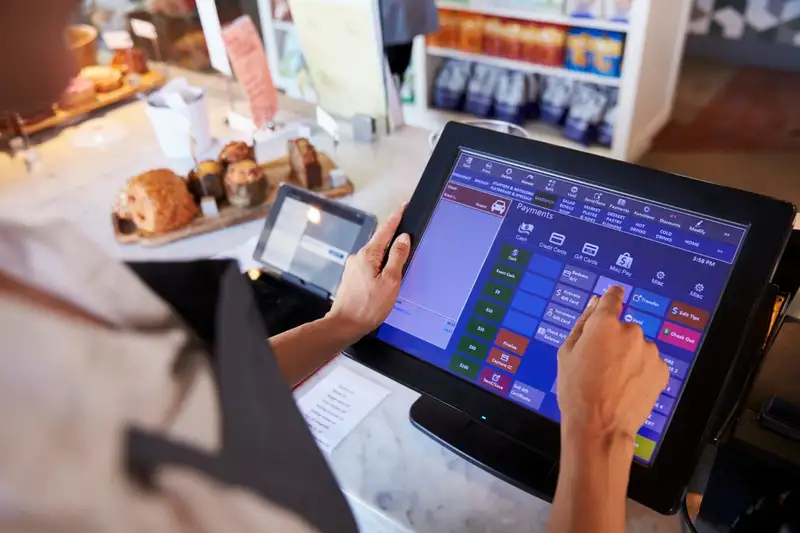
Step 1. Compatibility Check
Before proceeding with the integration, the first step is to ensure that the chosen online payment solution is fully compatible with your existing POS system. This involves verifying that the software versions, hardware requirements, and communication protocols align between the two systems. Compatibility is key to enabling seamless communication and data exchange, ensuring that transactions are processed smoothly and accurately.
Step 2. Engage with Vendor Support Teams
Leveraging the expertise of the vendor support teams for both your POS system and the online payment solution is invaluable. These teams can provide specific guidance, detailed documentation, and technical support throughout the integration process. Engaging with them early on can help anticipate potential challenges and tailor the integration approach to your specific system setup.
Step 3. Update Software and Firmware
Ensure that all software and firmware for your POS system and any associated hardware are up to date. This step is crucial for compatibility and security purposes and can significantly reduce the likelihood of integration issues.
Step 4. Test Hardware Compatibility
All hardware components, such as card readers and terminals, must be tested for compatibility with the online payment solution. This may involve updating drivers or firmware on these devices or possibly acquiring new hardware that is specifically designed to work with the payment platform.
Step 5. Conduct a Pilot Integration
Before rolling out the integration across your entire operation, conduct a pilot integration on a smaller scale. This controlled approach allows you to identify any unforeseen issues in a manageable context, making it easier to address them without affecting your entire system.
Step 6. Train Your Staff
Once the technical aspects of the integration are in place, training your staff on the new payment processing system is essential. This training should cover how to use the new features, troubleshoot common issues, and provide an excellent customer experience with the new payment options.
Best Practices for a Smooth Integration
1. Communication - Maintain open lines of communication with all vendor support teams and your staff throughout the integration process.
2. Documentation - Keep detailed records of all steps taken during the integration, including any changes to software settings or hardware configurations.
3. Security Measures - Ensure that all data security protocols are upheld during the integration, maintaining the integrity and security of customer payment information.
4. Ongoing Support - Arrange for ongoing technical support with your payment solution provider to address any issues that may arise post-integration.
By following these steps and best practices, integrating an online payment solution with your existing POS system can be a straightforward process that significantly enhances your restaurant's operational efficiency and customer payment experience. This integration not only streamlines transactions but also positions your restaurant to meet the evolving expectations of modern consumers.
Streamline Recording and Reconciliation
Take Charge of Your Financials with Altametrics
Syncing with Accounting and Other Operational Tools
Connecting with Accounting Software
The first step in syncing your online payment system with accounting software involves selecting a payment solution and accounting platform that are compatible or offer integration capabilities through APIs (Application Programming Interfaces). Many modern online payment solutions and accounting software are designed to work together seamlessly, offering plug-and-play integration options.
Once you've confirmed compatibility, the integration process typically involves setting up the online payment solution within your accounting software. This setup may require inputting API keys or running an installation wizard provided by the software vendors. The goal is to ensure that every transaction processed through your online payment system is automatically recorded in your accounting software, categorizing sales, taxes, and any fees associated with transactions correctly. This automation not only saves time but also reduces the potential for human error in manual data entry.
Best Practices for Financial Integration
1. Regular Reconciliation - Schedule regular checks to ensure that transactions recorded by your online payment system match those in your accounting software. This practice helps identify any discrepancies early on.
2. Security Protocols - Ensure that the integration adheres to strict security protocols to protect sensitive financial data during the transfer between systems.
3. Training - Provide training for your financial team on how to utilize the integrated system for reporting, analysis, and reconciliation processes.
Integrating with Other Operational Tools
Beyond accounting, integrating your online payment system with inventory management and reservation systems can further enhance operational efficiency. For instance, sales data can be used to automatically adjust inventory levels in real-time, helping manage stock more effectively and prevent overordering or stockouts. Similarly, integrating with reservation systems can allow for prepayments or deposits, improving cash flow and reducing no-shows.
Tips for a Unified Operation
1. Centralized Dashboard - Aim for solutions that offer a centralized dashboard or control panel where you can monitor and manage integrations across different systems.
2. Scalability - Choose tools and platforms that can grow with your business, ensuring that integrations remain effective as your operations expand.
3. Vendor Support - Utilize vendor support for troubleshooting integration issues and keep abreast of updates or new features that could benefit your operations.
By effectively syncing your online payment system with accounting and other operational tools, you can achieve a more streamlined, efficient, and data-driven operation. This holistic approach not only simplifies administrative tasks but also provides valuable insights that can drive strategic decisions and improve your restaurant's overall performance.
Training Your Staff
Creating Easy-to-Follow Guides
Developing comprehensive, easy-to-understand training guides is a crucial first step in the training process. These guides should cover every aspect of the new payment system, from basic operations like processing transactions and issuing refunds to handling less common scenarios such as disputed charges. Visual aids like screenshots, diagrams, and step-by-step instructions can greatly enhance understanding. Additionally, including a FAQ section in your guides can help address common questions and concerns, enabling staff to quickly find answers to issues they might encounter.
Conducting Hands-on Training Sessions
While guides are useful for reference, there's no substitute for hands-on experience. Conducting practical training sessions where your staff can use the new system in real or simulated scenarios is critical. These sessions allow employees to familiarize themselves with the system's interface and functions under the guidance of a trainer who can provide immediate feedback and assistance. It's beneficial to create a supportive environment where staff feel comfortable asking questions and making mistakes, as this is part of the learning process.
Importance of Ongoing Support and Training
The initial training sessions are just the beginning. As staff become more accustomed to the new system, they may encounter situations or features not covered in the initial training. Providing ongoing support is essential for addressing these challenges. This can include regular check-ins, offering refresher courses, and having a dedicated point of contact for system-related queries.
Furthermore, as your restaurant hires new employees, integrating them into your existing operational framework becomes necessary. Developing an onboarding process that includes comprehensive training on the online payment system ensures that new staff members are up to speed and can perform their duties effectively from day one.
Training your staff on a new online payment system is a critical component of a successful implementation. By creating detailed guides, conducting hands-on training sessions, and providing ongoing support, you can ensure that your team is competent and confident in using the new system. This not only improves the efficiency of your operations but also enhances the dining experience for your customers, contributing to the overall success of your restaurant.
Monitoring and Optimizing
Monitoring Performance Metrics
Key performance indicators (KPIs) for your online payment system include transaction speeds, error rates, and the incidence of failed transactions. These metrics are essential for assessing the system's efficiency and reliability. High transaction speeds contribute to a better customer experience by reducing wait times and improving table turnover rates. Conversely, a high error rate or a significant number of failed transactions can indicate issues with the payment system that need to be addressed. Monitoring these metrics regularly can help you identify trends, pinpoint problems, and implement timely solutions.
Gathering Customer Feedback
Customer feedback is an invaluable resource for evaluating the effectiveness of your payment solutions. Direct comments on the ease of use, convenience, and any difficulties encountered during the payment process can provide insights that performance metrics alone cannot. Regularly soliciting feedback through surveys, comment cards, or online reviews can highlight areas for improvement and inform your optimization efforts.
Working with Your Payment Solution Provider
Maintaining a close relationship with your payment solution provider is essential for the ongoing success of your system. Regularly reviewing system performance and discussing any issues or potential upgrades with your provider can ensure that your payment solutions stay aligned with your restaurant's needs and the latest technological advancements. Providers can offer support for troubleshooting issues, implementing updates, and adding new features that can enhance the functionality and security of your payment system.
Optimization Tips
1. Regularly Update Software - Ensure your payment system's software is always up-to-date to benefit from the latest security patches and features.
2. Train Staff on Updates - Whenever the system is updated or new features are added, provide training sessions for staff to ensure they are proficient in using the latest functionalities.
3. Adjust Settings as Needed - Based on performance monitoring and customer feedback, adjust settings within your payment system to streamline operations, such as customizing the checkout process or updating security protocols.
By actively monitoring and optimizing your integrated online payment system, you can ensure it continues to meet the evolving needs of your restaurant and your customers. This proactive approach not only enhances the efficiency and security of your payment processing but also contributes to a positive dining experience, fosters customer loyalty and driving business growth.
Simplify Recording Sales, Deposits, Payment Processing Fees
Track Your Store's Performance with Altametrics
Frequently
Asked Questions
Why integrate online payment solutions in my restaurant?
How do I monitor and optimize the performance of my integrated payment system?
How can I ensure the new payment system integrates well with my POS system?
Can online payment solutions handle tips and split bills?
Must-Read Content

10 Employee Retention Strategies for Restaurant Owners
Restaurant owners can cut turnover by paying fairly, onboarding well, scheduling flexibly, promoting growth, recognizing effort, offering meaningful benefits, listening to feedback, and hiring carefully for fit.
How to Reduce Supply Costs in Your Restaurant
Cut restaurant supply costs by understanding spending, auditing expenses, engineering menus, negotiating with suppliers, controlling inventory, reducing waste, and using technology to monitor everything continuously.

The Ultimate Guide to Managing Food Allergens in Restaurants
Food allergens require accurate labeling, employee training, cross-contact prevention, safe food handling, and consistent procedures to protect customers and improve restaurant safety.

