


How can restaurants streamline order management?
Restaurants can streamline order management by centralizing orders into one system, standardizing kitchen routing, creating clear ticket priority rules, using order verification steps, and tracking performance metrics such as ticket times and order accuracy.
How to Streamline Restaurant Order Management

Unifying Order Management
Restaurant order management has become more complex because orders now come from multiple places at once. A restaurant may receive dine-in orders from servers, takeout orders by phone, online orders through its website, and delivery orders from third-party platforms during the same rush. Without one clear process, these orders can compete for attention, slow down the kitchen, and create confusion between front-of-house staff, kitchen teams, and delivery handoff areas.
For restaurant owners, this directly affects revenue, labor efficiency, and customer satisfaction. When orders are managed through disconnected systems, employees may need to re-enter tickets, watch multiple tablets, or rely on verbal updates. Each extra step increases the risk of missed orders, duplicate entries, wrong modifiers, delayed prep, or food sitting too long before pickup.
A unified process gives the restaurant one consistent way to receive, organize, prepare, verify, and complete every order. Dine-in, takeout, and delivery may have different customer expectations, but staff should still know where orders appear, who owns each step, how tickets are prioritized, and when an order is complete.
Map Every Order Channel
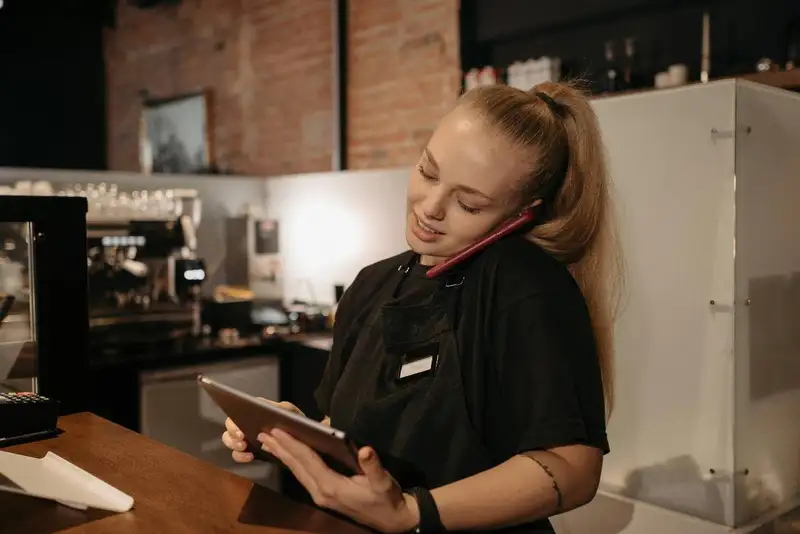
Before restaurant owners can improve order management, they need to understand how orders currently move through the business. Many order problems are not caused by one employee or one busy shift. They usually come from unclear handoffs, disconnected systems, or steps that were never formally defined. Mapping each order channel helps owners see exactly where delays, mistakes, and bottlenecks begin.
Start by reviewing every way an order enters the restaurant. This may include dine-in orders from servers, phone orders, website orders, mobile app orders, third-party delivery orders, catering requests, and walk-in takeout orders. Each channel should be followed from the moment the customer places the order to the moment the food is completed, checked, and handed off.
For example, a dine-in order may move from server to POS, then to the kitchen, then to expo, then back to the table. A delivery order may move from an online platform to a tablet or integrated POS, then to the kitchen, then to packaging, then to a pickup shelf or driver handoff area. If these steps are not clearly assigned, staff may assume someone else confirmed the order, checked the bag, or contacted the customer about an issue.
The goal is to identify the weak points in the process. Owners should look for questions such as -
1. Where do orders get delayed?
2. Which channels require manual re-entry?
3. Who verifies modifiers and special instructions?
4. Where do incorrect orders usually happen?
5. Which handoff points create confusion?
6. Are takeout and delivery orders competing with dine-in tickets?
7. Is the kitchen receiving too many orders at once without clear priority?
This mapping process gives restaurant owners a data-driven starting point. Instead of guessing why service slows down, they can connect problems to specific steps in the order flow. If delivery orders are delayed during dinner rush, the issue may be prep timing, packaging labor, driver staging, or ticket routing. If takeout errors are high, the problem may be missing verification steps before handoff.
Once each channel is mapped, owners can begin standardizing the process. The objective is not to make every order identical, but to make every order traceable. Staff should know where orders come from, where they go next, who is responsible, and how completion is confirmed. This creates better accountability, smoother communication, and fewer costly mistakes across dine-in, takeout, and delivery.
Efficient Ordering at Your Fingertips
Experience Flawless Inventory Management with Altametrics
Centralize Orders Into One System
Once restaurant owners understand how each order channel works, the next step is to centralize order flow as much as possible. Dine-in, takeout, delivery, phone, website, and third-party orders should not live in completely separate places. When staff have to watch multiple tablets, re-enter online orders into the POS, or manually tell the kitchen what came in, the process becomes slower and more error-prone.
A centralized order system gives staff one reliable place to view and manage orders. This is especially important during peak hours, when every extra step creates risk. If one employee is responsible for monitoring delivery tablets while another manages phone orders and another enters dine-in tickets, the restaurant can quickly lose control of timing, priority, and accuracy. One missed notification can turn into a late order, a refund request, or a frustrated customer.
Centralization also improves kitchen visibility. When orders flow directly into the POS or kitchen display system, cooks can see what needs to be prepared without waiting for verbal updates or handwritten notes. This helps reduce duplicate tickets, missing modifiers, and delays caused by manual entry. It also gives managers a clearer view of order volume across all channels, which is critical for staffing, prep planning, and performance tracking.
For restaurant owners, the goal is not only convenience. It is control. A disconnected order process hides important data. If delivery orders are handled on separate tablets, online orders are tracked in another system, and dine-in sales live only in the POS, owners may struggle to see the full picture. They may not know which channels are growing, where delays are happening, or which order types are creating the most errors.
A stronger order management setup should connect as many order sources as possible into one workflow. Owners should evaluate whether their systems can support -
1. POS integration for online and delivery orders
2. Automatic order routing to the kitchen
3. Real-time ticket visibility
4. Clear order status updates
5. Reporting by order channel
6. Reduced manual entry
7. Consistent menu and pricing updates across platforms
Centralizing orders also helps protect the guest experience. Customers do not care whether an order came from a delivery app, website, phone call, or dining room table. They expect the order to be accurate, ready on time, and handled professionally. When the restaurant uses one organized process behind the scenes, staff can meet those expectations more consistently.
For multi-location operators, centralization becomes even more important. A single-store restaurant may be able to work around disconnected systems for a while, but growth makes those gaps harder to manage. Standardized order flow allows owners to compare performance across locations, train teams consistently, and identify operational issues before they turn into larger profit problems.
Kitchen Routing and Ticket Prioritization
After orders are centralized, the next step is making sure each ticket moves to the right place at the right time. A restaurant can have the best order entry system in place, but if tickets are not routed clearly through the kitchen, service will still slow down. Kitchen routing determines which station receives each item, how orders are organized, and how staff know what to prepare first.
This matters because dine-in, takeout, and delivery orders often create different pressure points. A dine-in guest expects food to arrive hot and timed with the table. A takeout customer expects the order to be ready at the promised pickup time. A delivery order needs to be packaged accurately and handed off before the driver waits too long. If all orders are treated the same without clear priority rules, one channel can easily disrupt the others.
Restaurant owners should create routing rules based on menu structure, station capacity, and preparation time. Grill items should go to the grill station, fryer items to the fry station, cold items to the prep or pantry station, and drinks or desserts to the correct service area. When routing is unclear, tickets pile up in the wrong place, employees interrupt each other for updates, and orders take longer to complete.
Ticket prioritization is just as important. During peak periods, the kitchen needs clear rules for how to balance multiple channels. For example, dine-in orders may need tighter timing around table service, while delivery orders may need attention based on promised pickup windows. Takeout orders may need to be prepared close enough to pickup time to stay fresh, but not so late that customers are waiting at the counter.
A strong prioritization process should answer a few basic questions -
1. Which orders need to be started first?
2. Which tickets have promised pickup or delivery times?
3. Which items require longer prep times?
4. Which orders should be held briefly to protect food quality?
5. Who has authority to adjust priority during a rush?
Kitchen display systems can help by showing order type, ticket age, prep status, and timing expectations. However, technology only works when the restaurant has clear operating rules behind it. Staff should know how to read tickets, when to start them, when to escalate delays, and how to communicate if one station falls behind.
Standardized routing and prioritization reduce stress because the team is not guessing during busy periods. Instead of reacting to whoever asks the loudest or whichever tablet beeps first, the kitchen follows a consistent flow. This improves ticket times, protects food quality, reduces handoff confusion, and helps each order channel receive the right level of attention.
Clear Order Verification Steps
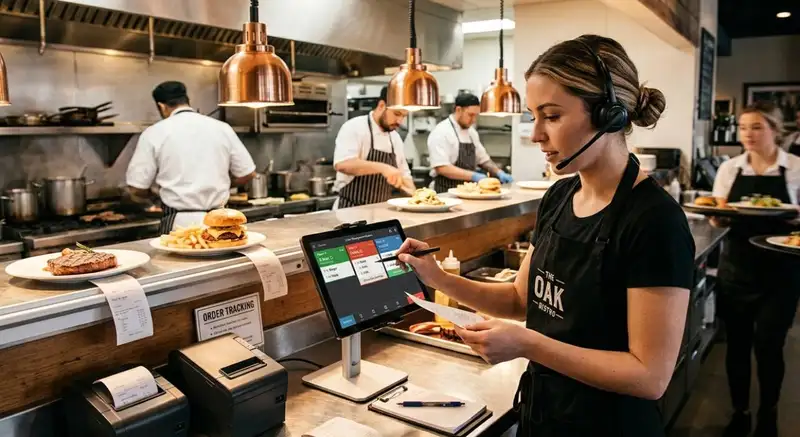
Speed is important in restaurant order management, but accuracy is what protects the guest experience and the restaurant's profitability. A fast order that is missing an item, packed incorrectly, or sent with the wrong modifier still creates a problem. It can lead to refunds, remakes, negative reviews, delivery platform complaints, and extra labor spent correcting mistakes that could have been prevented.
This is why every restaurant needs clear order verification steps before food leaves the kitchen, reaches the pickup shelf, goes to a delivery driver, or arrives at the table. Verification should not depend on memory or informal habits. It should be built into the order process so staff know exactly what to check, when to check it, and who is responsible.
For dine-in orders, accuracy starts with confirming modifiers, allergies, substitutions, seat numbers, and timing between courses. If a guest asks for no onions, sauce on the side, or a specific temperature on a protein, that information must be entered correctly and visible to the kitchen. The server, kitchen team, and expo station all need a shared understanding of what was ordered.
For takeout and delivery, verification becomes even more critical because the customer may not notice an error until after they leave the restaurant. Staff should check each bag against the ticket before handoff. This includes entrees, sides, sauces, utensils, napkins, drinks, desserts, and any special instructions. A simple missed drink or sauce can create frustration, even when the main food item is prepared correctly.
Restaurant owners can improve accuracy by creating a final-check process that includes -
1. Ticket review - Confirm the order type, customer name, items, modifiers, and promised time.
2. Food check - Match each prepared item to the ticket before packaging or serving.
3. Packaging check - Confirm containers, labels, seals, sauces, utensils, and temperature-sensitive items.
4. Handoff check - Verify the right order goes to the right guest, driver, or table.
5. Issue tracking - Record repeat mistakes by item, employee, shift, or order channel.
The data behind these checks matters. If delivery errors are higher than dine-in errors, the issue may be packaging or handoff. If modifiers are often missed, the problem may be POS entry, kitchen ticket layout, or staff training. If remakes spike during dinner rush, the restaurant may need more expo support or clearer station communication.
A strong verification process does not slow the restaurant down when it is designed correctly. It reduces the time wasted fixing preventable errors. For restaurant owners, the goal is simple- catch mistakes before the customer does. That one discipline can improve order accuracy, reduce refunds, protect margins, and create a more consistent experience across dine-in, takeout, and delivery.
Streamline Your Inventory. Order Smartly.
Start Simplifying Your Orders with Altametrics
Align Staffing and Prep With Order Demand
Streamlined restaurant order management does not depend on systems alone. It also depends on having the right people, ingredients, and prep levels ready before demand hits. Even a well-organized order process can break down if the kitchen is understaffed, prep is incomplete, or managers are surprised by order volume during peak periods.
Restaurant owners should use order data to plan labor and prep more accurately. Instead of scheduling based only on general sales expectations, owners should review how orders actually arrive by hour, day-part, and channel. A restaurant may look steady on total daily sales, but the real pressure may come from a short dinner window where dine-in, takeout, and delivery all spike at the same time.
The first step is identifying demand patterns. Owners should review -
1. Order volume by hour - Shows when the kitchen needs the most support.
2. Sales by channel - Separates dine-in, takeout, delivery, online, and phone order demand.
3. Average ticket size - Helps estimate workload, not just revenue.
4. Menu mix - Shows which items require more prep, cooking time, or packaging.
5. Peak ticket times - Reveals when service speed starts to slow down.
6. Labor cost as a percentage of sales - Helps balance service needs with profitability.
This data helps owners move from reactive management to proactive planning. If delivery orders consistently surge between 6-00 p.m. and 8-00 p.m., the restaurant may need more packaging support, an extra expo person, or adjusted prep levels before dinner begins. If takeout spikes on weekends, owners may need a dedicated pickup station or a staff member assigned to bag checks and guest handoff.
Prep planning should also match real order behavior. High-volume items should be prepared based on forecasted demand, not guesswork. Under-prepping creates delays, while over-prepping increases waste and food cost. The best approach is to use historical order data, recent trends, weather patterns, promotions, and local events to estimate what the restaurant will need by day-part.
Staffing should follow the same logic. Owners should not only ask, "How many people do we need today?" They should ask, "Where will order pressure happen, and which roles will reduce bottlenecks?" During busy periods, one additional person at the right station can improve throughput more than adding labor where it is not needed.
When staffing and prep align with demand, orders move more predictably. Kitchens are less likely to fall behind, employees are less stressed, and customers receive food faster and more accurately. For restaurant owners, this creates a measurable advantage- better ticket times, lower waste, stronger labor control, and a smoother order management process across dine-in, takeout, and delivery.
Restaurant Order Management Metrics
Restaurant order management should not be judged only by how busy the restaurant feels. A busy shift can still be profitable and well controlled, while a slower shift can still expose serious process problems. To improve order flow across dine-in, takeout, and delivery, restaurant owners need to track the right metrics consistently.
Without data, owners may rely on assumptions. For example, a manager may think delivery orders are the main issue, when the real problem is long ticket times from one kitchen station. Another owner may believe staffing is the problem, when the data shows that poor order routing or missed prep is causing the delay.
Important restaurant order management metrics include -
1. Average ticket time - Measures how long it takes from order entry to completion. This helps owners see whether kitchen speed is improving or declining.
2. Order accuracy rate - Tracks how often orders are completed correctly. This is especially important for takeout and delivery, where customers may not discover mistakes until after leaving.
3. Refund and remake rate - Shows how much revenue is being lost because of incorrect, delayed, or unsatisfactory orders.
4. Delivery handoff time - Measures how long completed delivery orders wait before driver pickup. Long handoff times can hurt food quality and customer satisfaction.
5. Order cancellation rate - Helps identify problems with long waits, unavailable menu items, poor timing estimates, or platform issues.
6. Peak-hour throughput - Shows how many orders the restaurant can successfully complete during its busiest periods.
7. Sales by order channel - Breaks down revenue from dine-in, takeout, online ordering, phone orders, and third-party delivery.
8. Labor cost as a percentage of sales - Helps owners understand whether staffing levels match actual order demand.
These numbers should be reviewed daily for quick operational issues and weekly for larger trends. A single late order may not mean the process is broken, but repeated delays during the same daypart usually point to a system problem. If order accuracy drops every Friday night, the restaurant may need stronger expo support, better ticket layouts, or more prep before the rush.
The most valuable metrics are the ones tied to action. Owners should not track data just to fill a report. Each number should help answer a practical question- Are orders moving faster? Are mistakes decreasing? Are labor hours being used effectively? Are delivery orders disrupting dine-in service? Are certain menu items slowing down the kitchen?
When restaurant owners track order management metrics consistently, they gain better control over the business. Instead of reacting to complaints after they happen, they can spot problems earlier, adjust staffing, improve training, refine prep levels, and build a stronger process across every order channel.
Build a Repeatable Process
A strong restaurant order management process should not depend on one great manager, one experienced cook, or one employee who "just knows how things work." If the process only works when certain people are on shift, it is not scalable. Restaurant owners need a repeatable system that every team member can follow across dine-in, takeout, and delivery.
The first step is documenting the order workflow for each channel. Staff should know exactly what happens when a dine-in order is entered, when a takeout order comes in, when a delivery driver arrives, or when an online order needs to be adjusted. This documentation does not need to be complicated. It should be clear, practical, and easy to train from.
A scalable order management process should define -
1. Where orders enter the system - Staff should know whether orders come through the POS, website, phone, delivery platform, or in-person counter.
2. Who owns each step - Assign responsibility for order entry, kitchen routing, preparation, expo, packaging, verification, and handoff.
3. How orders are prioritized - Define how dine-in, takeout, and delivery orders are balanced during normal periods and rush periods.
4. What must be verified before completion - Include modifiers, sides, sauces, drinks, utensils, packaging, guest names, driver pickup details, and table numbers.
5. Which metrics managers review - Track ticket times, accuracy, refunds, cancellations, handoff delays, and channel performance.
Training is what turns the process into daily execution. New employees should not have to learn order management only by watching others during a rush. Owners and managers should train staff on the full order journey, explain why each step matters, and review common mistakes before they happen. This creates consistency across shifts and reduces the risk of service breaking down when volume increases.
A repeatable process also needs regular review. Customer behavior changes, delivery volume shifts, menu items change, and labor availability can fluctuate. Restaurant owners should review order data weekly and update workflows when needed. If online orders are growing, the restaurant may need a better pickup station. If delivery errors are increasing, the final-check process may need to be tightened. If ticket times are rising, kitchen routing or prep planning may need adjustment.
For multi-location restaurants, repeatability becomes even more important. Owners cannot personally manage every ticket, every shift, or every handoff. A standardized process makes it easier to train teams, compare performance, and identify which locations need support.
When the process is documented, trained, measured, and improved over time, restaurants can serve more customers with fewer mistakes, better speed, and stronger operational control.
Must-Read Content
Restaurant supply chain management
A Practical Guide to Restaurant Supply Chain Management

Supply chain planning
How to Build a Restaurant Supply Chain Planning Process

Hotel supply chain
A Complete Guide to Hotel Supply Chain Management

Supply chain best practices
Supply Chain Best Practices Every Restaurant Should Follow
Order fulfillment process
How to Improve the Order Fulfillment Process in Your Restaurant
Frequently Asked Questions
How can restaurants reduce order mistakes?
Restaurants can reduce order mistakes by confirming modifiers, checking food against the ticket, verifying packaging, labeling takeout and delivery orders clearly, assigning final-check responsibilities, and tracking repeat errors by shift or order channel.
Why should restaurants centralize orders?
Centralizing orders helps staff manage dine-in, takeout, delivery, and online orders in one workflow. This reduces missed tickets, duplicate entries, manual re-entry, and confusion between front-of-house and back-of-house teams.
What causes order delays in restaurants?
Order delays are often caused by poor kitchen routing, unclear ticket priority, understaffing, incomplete prep, manual order entry, missing ingredients, or too many disconnected ordering channels operating at the same time.
How can restaurants improve takeout order accuracy?
Restaurants can improve takeout accuracy by checking every item against the ticket, labeling bags clearly, confirming customer names, verifying sauces and sides, and creating a dedicated pickup area for completed orders.

