


What You Will Learn
In this article, you will learn what an AI ordering system is, how it works, and where it fits inside restaurant operations. You will also learn how AI ordering can help restaurants reduce missed orders, improve order accuracy, increase average order value, support staff during busy periods, and give owners better data for managing sales, labor, menus, and customer demand.
What Is an AI Ordering System for Restaurants?

What AI Ordering Means
An AI ordering system is technology that helps restaurants take, process, and manage customer orders with less manual work. Instead of relying only on employees to answer phones, enter online orders, confirm modifiers, suggest add-ons, and send tickets to the kitchen, the system uses automation and artificial intelligence to support the ordering process from start to finish.
For restaurant owners, this matters because ordering is one of the highest-volume parts of daily operations. A restaurant may receive orders from phone calls, websites, mobile apps, kiosks, QR codes, drive-thru lanes, third-party delivery platforms, and in-store guests at the same time. When these channels are not connected, employees can spend too much time switching between systems, repeating information, correcting mistakes, and trying to keep up during peak hours.
An AI ordering system helps organize that demand. It can guide guests through the menu, recognize item preferences, apply required modifiers, suggest sides or drinks, confirm order details, process payments, and send the order to the POS or kitchen display system. This gives owners more control over speed, accuracy, and order flow.
How AI Ordering Systems Work
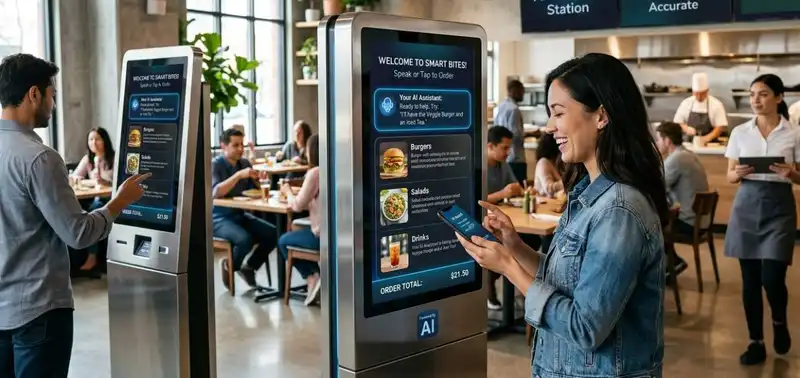
An AI ordering system works by turning customer order requests into structured data that the restaurant can process quickly and accurately. The system can receive orders through different channels, including phone calls, websites, mobile apps, kiosks, QR codes, drive-thru lanes, and chat-based ordering tools. Instead of every order depending on a staff member to manually listen, type, confirm, and route the request, AI helps automate the steps between the guest and the kitchen.
The process usually starts when a customer selects or says what they want to order. The AI reads the request, matches it to the restaurant's menu, checks available options, and applies the correct item rules. For example, if a guest orders a burger, the system may ask for the temperature, cheese choice, side item, sauce, and drink size if those modifiers are required. This helps reduce incomplete orders before they reach the kitchen.
AI ordering systems also use menu data and customer behavior to improve the transaction. If a guest orders a pizza, the system may suggest extra toppings, wings, drinks, or dessert. If a customer repeats a previous order, the system may make reordering faster by recognizing past preferences. These small prompts can help increase average order value without depending on employees to remember every upsell opportunity during a busy shift.
Once the order is confirmed, the system can send it to the POS, kitchen display system, printer, or payment processor. This creates a cleaner order flow and reduces the risk of lost tickets, duplicate entries, pricing errors, and delays. For restaurant owners, the main value is consistency. Every order follows the same process, every required modifier is captured, and every transaction creates data that can be reviewed later for sales, staffing, menu performance, and peak-hour planning.
Accept, Process, and Profit with Ease!
Streamline Your Online Orders with Altametrics
Where AI Ordering Fits
An AI ordering system fits into the part of restaurant operations where customer demand becomes a confirmed order. This is an important point because ordering is not just a front-of-house task. Every order affects the POS, kitchen, labor, inventory, payment flow, delivery timing, and guest experience.
In a traditional restaurant setup, orders often come from several different places at the same time. A guest may call the restaurant, another may order from the website, another may use a kiosk, another may place a delivery order, and another may order at the counter. If these orders are handled manually or across disconnected systems, employees have to manage multiple screens, repeat customer information, enter modifiers, confirm payments, and communicate changes to the kitchen.
This creates pressure during peak hours. For example, if a restaurant receives 25 orders in one hour and each order takes 3 minutes to enter, that equals 75 minutes of order-taking work. During a lunch rush or dinner rush, that time competes with greeting guests, packaging orders, answering questions, running food, and solving service issues.
An AI ordering system helps reduce this pressure by connecting the ordering process to the rest of the operation. It can support key areas such as -
1. Phone ordering - answering calls, taking orders, confirming details, and reducing missed calls
2. Online ordering - guiding guests through the menu and reducing abandoned orders
3. Kiosk ordering - helping customers place orders without waiting in line
4. Drive-thru ordering - supporting faster order capture during high-volume periods
5. POS integration - sending confirmed orders directly into the restaurant's sales system
6. Kitchen routing - moving tickets to the right prep stations or kitchen display screens
7. Payment processing - collecting payment before the order reaches production
8. Reporting - creating order data that owners can use to review sales, demand, and peak hours
This matters because ordering mistakes do not stay in one part of the business. A missed modifier can slow down the kitchen. A wrong price can reduce margin. A missed call can mean lost revenue. A delayed order can hurt customer satisfaction. A disconnected delivery order can create packaging or timing problems.
AI ordering helps owners create a more controlled order flow. Instead of relying on staff to manually manage every step, the system helps capture the order, organize the details, route it correctly, and create usable data. For restaurant owners, this means AI ordering does not operate as a separate tool. It becomes part of the daily system that connects guests, employees, kitchens, and revenue.
Why Owners Use AI Ordering
Restaurant owners are adopting AI ordering systems because the ordering process has become more complex, more digital, and more difficult to manage with labor alone. In the past, many restaurants depended mainly on dine-in orders and phone orders. Today, orders can come from websites, mobile apps, kiosks, QR codes, delivery platforms, drive-thru lanes, and repeat customers who expect speed and accuracy every time.
This creates a capacity problem. A restaurant may have enough food demand, but not enough staff time to capture every order efficiently. If employees are busy seating guests, packing takeout, answering questions, running food, or handling payments, phone calls may go unanswered and online orders may be delayed. Even a small number of missed orders can affect revenue. For example, if a restaurant misses 4 orders per day at an average ticket of $35, that equals $140 in lost daily sales. Over 30 days, that becomes $4,200 in potential lost revenue.
AI ordering systems help owners protect that revenue by handling routine order-taking tasks more consistently. The system can answer, guide, confirm, route, and record orders without requiring an employee to manage every step manually. This helps restaurants stay responsive during peak periods, after-hours demand, and staffing gaps.
Restaurant owners are also adopting AI ordering because it supports several financial and operational goals, including -
1. Labor efficiency - reducing the amount of staff time spent on repetitive order entry
2. Revenue capture - lowering the risk of missed calls, abandoned orders, and delayed responses
3. Order accuracy - collecting required modifiers, sizes, sides, and special instructions before production
4. Higher average order value - suggesting add-ons, upgrades, drinks, desserts, and combos
5. Faster service - moving orders from guest to POS or kitchen with fewer manual steps
6. Better customer experience - giving guests a more convenient way to order
7. Cleaner data - tracking order volume, peak times, customer behavior, and menu performance
8. Multi-channel control - keeping phone, online, kiosk, drive-thru, and delivery orders more organized
This matters because restaurant margins are often affected by small operational leaks. A missed call, wrong modifier, delayed ticket, or forgotten upsell may seem minor in the moment, but these issues can add up across hundreds or thousands of orders each month.
AI ordering gives owners a way to manage demand with more consistency. Instead of adding labor every time order volume increases, restaurants can use automation to support the team, capture more sales, and keep the ordering process moving. For owners, the main reason to adopt an AI ordering system is not just technology. It is better control over revenue, labor pressure, order accuracy, and guest convenience.
How AI Ordering Improves Order Accuracy
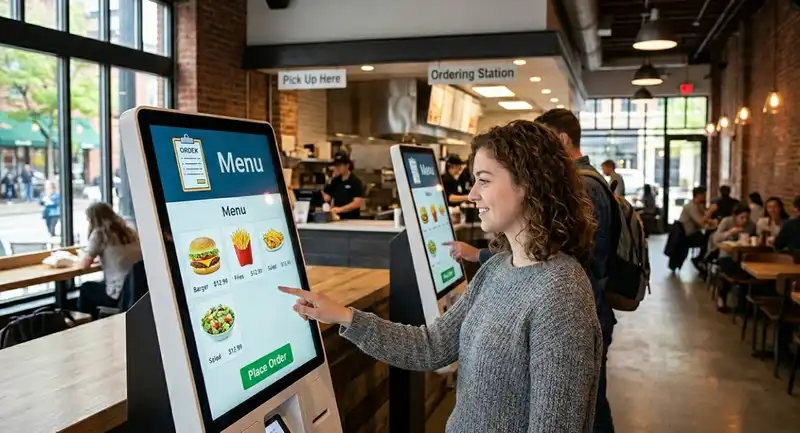
Order accuracy is one of the biggest pressure points in restaurant operations because one small mistake can create several costs at once. A missing modifier can lead to a remake. A wrong size can delay the kitchen. A missed allergy note can create a serious guest safety issue. A pricing error can reduce margin. When these mistakes happen repeatedly, they affect food cost, labor time, customer satisfaction, and online reviews.
Many ordering errors happen before the kitchen ever starts cooking. The guest may forget to choose a side, the employee may miss a topping request, the menu may not clearly require a modifier, or a handwritten note may be misunderstood. During peak hours, the risk increases because staff are moving faster and handling more orders at the same time.
An AI ordering system improves accuracy by building rules into the ordering process. Instead of depending only on memory, the system can require certain choices before the order is submitted. For example, a sandwich order may require bread type, protein, cheese, toppings, sauce, and side selection. A pizza order may require size, crust, toppings, and delivery instructions. A catering order may require pickup time, quantity, payment status, and customer contact details.
Accuracy improves when the system helps control details such as -
1. Required modifiers - making sure sizes, sides, toppings, and sauces are selected
2. Item availability - preventing customers from ordering sold-out items
3. Pricing rules - applying the correct charge for add-ons, substitutions, and upgrades
4. Allergy notes - capturing important food safety instructions clearly
5. Combo logic - confirming drinks, sides, and meal options before checkout
6. Special instructions - keeping customer notes attached to the correct item
7. Payment confirmation - reducing unpaid or incomplete orders
8. Kitchen routing - sending the right ticket details to the right prep station
The financial impact can be significant. If a restaurant has 300 orders per day and even 2% contain an error, that equals 6 problem orders daily. If each problem order costs $12 in remakes, refunds, wasted food, or labor time, that can become $72 per day, or more than $2,000 per month.
AI ordering does not eliminate every mistake, but it reduces the number of errors caused by rushed order-taking, unclear modifiers, and disconnected systems. For restaurant owners, better accuracy means fewer remakes, fewer refunds, less waste, smoother kitchen flow, and a more reliable guest experience.
Efficient Ordering at Your Fingertips
Experience Flawless Inventory Management with Altametrics
How AI Ordering Supports Revenue Growth
An AI ordering system can support revenue growth by making every order easier to complete and easier to increase in value. In many restaurants, revenue is not lost only because demand is low. It is also lost when customers abandon online orders, phone calls go unanswered, employees forget to suggest add-ons, or guests do not see the full range of menu options before checkout.
A strong ordering process should do more than record what the customer already planned to buy. It should guide the guest toward a complete order. For example, a customer ordering a burger may also want fries, a drink, an extra sauce, or a dessert. A customer ordering pizza may be open to wings, breadsticks, soda, or a larger size. In a manual ordering process, these prompts depend on the employee's timing, training, and ability to upsell during a busy shift.
AI ordering makes this process more consistent. The system can suggest relevant add-ons based on the item being ordered, the customer's previous behavior, the time of day, or current menu rules. Instead of using random upsell prompts, AI can recommend items that fit the order and make sense for the guest.
This can improve revenue in several ways -
1. Higher average order value - adding drinks, sides, desserts, toppings, and upgrades
2. Better menu visibility - showing guests items they may not notice on a printed or static menu
3. Faster repeat orders - making it easier for returning customers to reorder previous meals
4. Fewer abandoned orders - simplifying checkout and reducing friction before payment
5. More direct orders - encouraging customers to order through the restaurant's own channels
6. Smarter promotions - applying offers based on timing, order size, or menu category
7. Better catering capture - helping guests place larger orders with clearer quantities and pickup details
8. More consistent upselling - giving every customer the same opportunity to add to their order
The numbers can add up quickly. If a restaurant completes 200 digital or phone orders per day and AI prompts increase the average ticket by just $2, that equals $400 in additional daily sales. Over 30 days, that creates $12,000 in added revenue before considering repeat orders, larger group orders, or reduced abandonment.
For restaurant owners, the value is not only the upsell itself. The bigger advantage is consistency. AI ordering gives the restaurant a repeatable process for capturing demand, presenting add-ons, reducing checkout friction, and helping guests build a fuller order. Over time, those small improvements can have a measurable impact on sales performance.
What Data Restaurant Owners Can Track
One of the biggest advantages of an AI ordering system is that it turns everyday orders into measurable business data. Without clear reporting, restaurant owners may know sales are up or down, but they may not know why. They may see a busy lunch rush but not know how many calls were missed, which menu items drove the most add-ons, or when customers abandoned the ordering process.
AI ordering gives owners more visibility into the full path of an order. It can show where demand is coming from, how customers behave before checkout, which items are frequently modified, and which channels create the highest-value orders. This helps owners move from guessing to measuring.
Key ordering metrics to track include -
1. Order volume - how many orders come through phone, website, app, kiosk, drive-thru, or QR code
2. Missed calls - how many potential phone orders are not answered during busy periods
3. Completed orders - how many customers finish the order and payment process
4. Abandoned orders - how many customers start an order but leave before checkout
5. Average order value - the average dollar amount per transaction
6. Upsell rate - how often customers accept add-ons, upgrades, sides, drinks, or desserts
7. Modifier patterns - which toppings, substitutions, sauces, sizes, and add-ons customers choose most often
8. Peak ordering times - the busiest hours by day-part, weekday, weekend, or season
9. Refund and remake rate - how often errors lead to lost revenue or wasted product
10. Channel performance - which ordering channels produce the most sales or the highest tickets
This data matters because ordering patterns affect more than revenue. If phone orders spike between 11.30 a.m. and 1.00 p.m., owners may need better labor coverage, prep planning, or automated call handling. If online orders are abandoned before payment, the menu may be too confusing or checkout may have too many steps. If certain modifiers are selected often, those ingredients may need tighter inventory forecasting.
For example, if a restaurant sees 40 abandoned orders per week with an average ticket of $28, that represents $1,120 in potential weekly sales that never converted. If the owner can reduce abandonment by improving menu layout, checkout speed, or payment flow, the ordering system becomes more than a sales tool. It becomes a performance dashboard.
AI ordering helps owners connect ordering data to smarter decisions across staffing, menu design, inventory, promotions, and kitchen planning.
Choosing an AI Ordering System
Choosing an AI ordering system should be treated as an operational decision, not just a software purchase. The system will affect how customers place orders, how employees manage workflow, how tickets reach the kitchen, how payments are processed, and how owners measure performance. If the system does not fit the restaurant's daily operation, it can create more confusion instead of solving problems.
The first factor to review is integration. An AI ordering system should connect with the restaurant's POS, menu database, payment processor, kitchen display system, online ordering platform, and reporting tools when possible. If employees still have to re-enter orders manually, the restaurant may lose many of the labor and accuracy benefits. Manual re-entry increases the risk of wrong items, missed modifiers, duplicate tickets, and delayed production.
Menu setup is another major requirement. AI ordering depends on clean menu data. Item names, prices, modifiers, combo rules, add-ons, taxes, availability, and prep instructions need to be accurate. For example, if a restaurant has 80 menu items and each item has 5 modifier options, that creates 400 possible decision points that must be structured correctly. A weak menu setup can lead to order errors even if the AI system is advanced.
Restaurant owners should evaluate the system across several areas -
1. POS connection - does the system send orders directly into the sales system?
2. Menu control - can owners update pricing, modifiers, photos, and availability quickly?
3. Payment processing - can customers pay before the order reaches production?
4. Order accuracy - does the system require missing choices before checkout?
5. Customer experience - is the ordering process simple, fast, and easy to understand?
6. Reporting - can owners track sales, missed calls, abandoned orders, and average order value?
7. Staff workflow - does the system reduce manual work or create extra steps?
8. Support and training - will the provider help with setup, testing, and employee adoption?
Cost should also be measured against operational value. Owners should review monthly fees, setup fees, transaction fees, hardware needs, support costs, and contract terms. However, the lowest-cost option is not always the best choice. A cheaper system that misses orders, creates POS issues, or lacks reporting may cost more over time through lost sales and staff frustration.
Before making a decision, restaurant owners should ask one practical question - will this system make ordering faster, more accurate, and easier to manage? If the answer is yes, an AI ordering system can become a valuable part of the restaurant's revenue and operations strategy.
Must-Read Content
Ai improves restaurant operations
How AI Improves Restaurant Operations and Reduces Costs

Ai inventory management
How AI Inventory Management Improves Restaurant Forecasting

Ai menu optimization
AI Menu Optimization vs Traditional Menu Engineering

Ai scheduling
How AI Scheduling Helps Restaurants Lower Labor Costs

Lower food cost
How AI Helps Restaurants Lower Food Costs
Frequently Asked Questions
How can AI ordering improve order accuracy?
AI ordering improves accuracy by requiring customers to complete important order details before checkout. This can include sizes, sides, toppings, sauces, allergy notes, combo options, pickup times, and payment information. Better order details can reduce remakes, refunds, waste, and kitchen delays.
What should restaurant owners look for in an AI ordering system?
Restaurant owners should look for POS integration, easy menu management, payment processing, order accuracy controls, reporting, customer-friendly ordering, staff training, and reliable support. The system should make ordering faster, cleaner, and easier to manage without creating extra manual work.
Can AI ordering help with delivery and takeout?
Yes. AI ordering can help restaurants manage takeout and delivery by capturing order details, confirming pickup or delivery timing, collecting payment, and routing tickets correctly. It can also reduce confusion around packaging notes, delivery instructions, modifiers, and customer contact information.
How does AI ordering affect customer experience?
AI ordering can improve customer experience by making ordering faster, more consistent, and more convenient. Guests can place orders through the channel they prefer, review details before payment, and receive fewer incorrect orders.

