


What is AI scheduling for restaurants?
AI scheduling for restaurants uses labor data, sales trends, employee availability, historical traffic, and demand forecasts to help managers build more accurate schedules. Instead of relying only on manual planning, AI scheduling helps restaurant owners decide how many employees are needed, which roles should be scheduled, and when labor hours should be used.
How AI Scheduling Helps Restaurants Lower Labor Costs

How AI Scheduling Works
AI scheduling means using restaurant data to build more accurate labor schedules instead of relying only on manual planning. For restaurant owners, this does not mean removing the manager from the process. It means giving managers better information before they decide how many employees to schedule, which roles are needed, and where labor hours should be placed.
A traditional schedule is often based on past experience, employee availability, manager judgment, and last week's staffing pattern. While these inputs are useful, they can miss important changes in demand. A restaurant may have different labor needs based on sales trends, guest counts, day-parts, weather, local events, holidays, promotions, delivery volume, catering orders, and seasonal traffic. AI scheduling can review these patterns faster and more consistently than a manual process.
For example, if Friday dinner sales are usually 30% higher than Wednesday dinner sales, the schedule should reflect that difference. If lunch traffic drops during certain weeks or labor costs rise because of repeated overtime, AI scheduling can help identify the pattern before it becomes a larger expense.
The main value of AI scheduling is accuracy. It helps restaurant owners compare expected demand with planned labor hours. Instead of asking, "Who is available?" managers can also ask, "How many labor hours does this shift actually need?" That shift in thinking helps restaurants reduce wasted hours, control overtime, and staff each day-part with better precision.
Forecasting Demand Before Scheduling
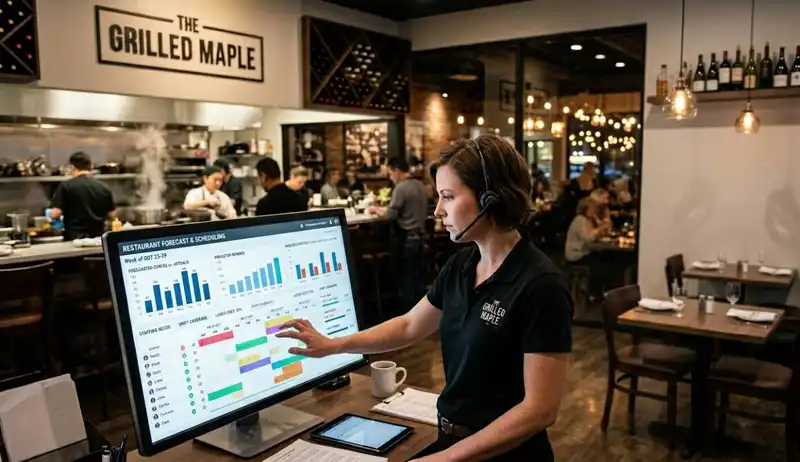
Demand forecasting is one of the most important ways AI scheduling helps restaurants lower labor costs. Before a schedule is created, owners need to understand when customers are likely to visit, how many orders may come in, and which parts of the restaurant will need the most coverage. Without that forecast, scheduling becomes a guessing game.
AI scheduling uses historical and real-time data to estimate demand by day, shift, and sometimes even by hour. This can include past sales, guest counts, average check size, online orders, reservations, delivery activity, holidays, weather, promotions, local events, and seasonal patterns. These inputs help the system identify when labor demand is likely to rise or fall.
For example, a restaurant may need more kitchen labor before a busy dinner rush, more cashiers during a lunch spike, or fewer employees during a slow weekday afternoon. AI scheduling can help show these patterns before the schedule is published, giving managers a clearer labor target for each shift.
This is important because labor costs are tied directly to timing. A restaurant may have the right number of total labor hours for the week but still lose money if those hours are placed in the wrong day-parts. Too many hours during slow periods increase payroll waste. Too few hours during peak demand can slow service and reduce sales.
By forecasting demand first, AI scheduling helps owners build schedules around expected revenue, not just employee availability. That makes labor planning more accurate, measurable, and easier to control.

Reducing Overstaffing
Overstaffing is one of the fastest ways labor costs increase without improving revenue. When too many employees are scheduled during slow periods, the restaurant pays for hours that are not matched by enough sales, orders, or guest traffic. This lowers labor productivity and can push labor cost percentage above target even when total sales look healthy.
AI scheduling helps restaurant owners identify where overstaffing is most likely to happen. Instead of looking only at daily sales totals, AI can review demand by hour, role, and day-part. This is important because a restaurant may be busy during dinner but slow between 2 p.m. and 4 p.m. If the schedule does not adjust for that gap, the business may carry unnecessary labor during low-revenue hours.
For example, AI scheduling can help show when fewer servers, cashiers, prep cooks, hosts, or support staff are needed based on expected traffic. It can also help managers compare scheduled labor hours against forecasted sales. If projected sales are lower for a specific shift, the system can recommend fewer hours before the schedule is published.
This creates a more controlled labor plan. Instead of cutting staff randomly, owners can reduce labor where demand data supports the decision. The point is not to run the restaurant with the fewest employees possible. The point is to schedule the right number of employees at the right time, so payroll dollars are not wasted during slow periods.
Preventing Understaffing
Understaffing can be just as expensive as overstaffing, even if the payroll number looks lower at first. When a restaurant does not have enough employees scheduled during peak demand, the business may lose revenue through slower service, longer wait times, missed orders, lower table turns, and poor guest experiences. In this case, labor costs may look controlled, but sales performance can suffer.
AI scheduling helps restaurant owners avoid this problem by matching labor hours to expected demand. Instead of only reducing hours to lower payroll, AI looks at when the restaurant is likely to need more coverage. This can include dinner rushes, weekend traffic, delivery spikes, catering orders, holidays, promotions, or weather-driven demand changes.
For example, if sales usually increase during Friday dinner, the restaurant may need more cooks, servers, hosts, bussers, or cashiers during that window. If online orders are expected to rise during lunch, the kitchen may need extra support to avoid delays. AI scheduling helps managers see these needs before the shift begins.
This matters because labor efficiency is not only about spending less. It is about placing labor where it protects revenue. A restaurant that cuts too many hours may save on payroll but lose more through slower service and fewer completed transactions.
By helping managers forecast busy periods more accurately, AI scheduling reduces the risk of understaffing. The result is a labor plan that supports sales, protects service quality, and keeps labor dollars focused on the hours that matter most.
Overtime and Last-Minute Labor Costs

Overtime can quietly increase restaurant labor costs because it often builds throughout the week before owners see the full impact on payroll. An employee may stay 30 minutes late after a busy dinner, pick up an extra shift, cover a callout, or work across multiple roles. Each decision may seem small in the moment, but repeated across several employees and shifts, overtime can quickly push labor costs above target.
Last-minute labor changes can create the same problem. When a restaurant does not have enough coverage, managers may need to call in employees, extend shifts, approve schedule changes, or rely on higher-cost coverage to keep service moving. These adjustments may protect the shift, but they can also make labor spending less predictable.
AI scheduling helps restaurant owners control these costs before they happen. Instead of reviewing overtime after payroll is processed, managers can see potential problems while the schedule is still being built. This makes it easier to adjust shifts, balance hours, and protect labor budgets before overtime becomes unavoidable.
Owners should track a few key scheduling numbers -
1. Projected overtime hours - Measure how many overtime hours are likely before the schedule is published. This helps managers adjust shifts before payroll costs increase.
2. Employees nearing overtime - Track which employees are close to weekly overtime limits. AI scheduling can help managers avoid assigning extra hours to employees who are already near the threshold.
3. Last-minute shift changes - Monitor how often schedules are changed after being published. A high number of changes may show that demand forecasting, availability tracking, or staffing plans need improvement.
4. Callout coverage cost - Track the cost of replacing employees who call out. This includes extra hours, overtime, manager time, and possible service delays.
5. Labor budget variance - Compare scheduled labor costs with the target labor budget. This shows whether the schedule is aligned with expected sales before the week begins.
6. Shift extension frequency - Measure how often employees stay later than scheduled. Frequent extensions may signal understaffing during certain day-parts or poor demand planning.
AI scheduling gives managers a clearer view of labor risk before it becomes a payroll problem.

Improving Labor Productivity
Labor productivity shows how much value the restaurant gets from every scheduled hour. For restaurant owners, this is more useful than only looking at total payroll. A restaurant may stay within its labor budget but still lose efficiency if too many hours are placed in the wrong roles, wrong shifts, or wrong day-parts.
AI scheduling helps owners look at labor more precisely. Instead of treating all labor hours the same, it can help compare staffing needs by role, such as cooks, servers, hosts, cashiers, bartenders, bussers, prep staff, and dishwashers. This matters because each role affects revenue and service in a different way. A dinner shift may need more kitchen coverage, while a lunch rush may need faster cashier support or more front-of-house coverage.
Day-part analysis is also important. Breakfast, lunch, dinner, late night, and mid-afternoon periods often have different sales patterns, order volumes, ticket sizes, and service needs. AI scheduling can help managers identify which day-parts generate enough sales to support more labor and which periods need tighter staffing control.
Owners should track a few key labor productivity numbers -
1. Sales per labor hour - Measure how much revenue is generated for every labor hour scheduled. A low number may show that too many hours are being used for the sales volume.
2. Labor cost percentage by day-part - Compare labor cost to sales during breakfast, lunch, dinner, and slower periods. This helps owners see when labor is above target.
3. Covers or orders per labor hour - Track how many guests, tickets, or orders employees handle during each shift. This helps measure whether staffing matches actual workload.
4. Role-based labor usage - Review how many hours are assigned to each position. This helps managers avoid overstaffing one role while understaffing another.
5. Peak-hour productivity - Measure whether the restaurant has enough labor during high-sales windows. Strong productivity should support both revenue and service speed.
6. Slow-period labor efficiency - Track whether low-volume hours are using more labor than needed. This helps reduce payroll waste without cutting into busy shifts.
AI scheduling helps restaurant owners move from basic scheduling to performance-based labor planning. Instead of asking only how many people are available, managers can ask which roles are needed, when they are needed, and how each scheduled hour supports sales. This gives owners more control over labor spending while helping each shift operate with better balance.
How Restaurants Can Start Using AI Scheduling
Restaurant owners do not need to change their entire labor process at once to benefit from AI scheduling. The best starting point is to review the labor data the restaurant already has. POS sales, time clock records, employee availability, overtime reports, payroll data, reservations, online orders, and delivery volume can all show where scheduling decisions are helping or hurting profitability.
AI scheduling works best when owners use it to improve specific labor problems. For example, one restaurant may need to reduce overtime. Another may need better lunch coverage. A multi-location operator may need more consistent labor targets across stores. By starting with a clear goal, owners can use AI scheduling as a practical operating tool instead of just another piece of software.
Owners should focus on a few key steps -
1. Review current labor performance - Look at labor cost percentage, overtime hours, sales per labor hour, schedule changes, and payroll variance. These numbers show where the biggest labor problems are happening.
2. Connect scheduling to sales data - Use POS data to compare labor hours with actual sales by day-part. This helps managers see whether schedules are built around real demand.
3. Track employee availability accurately - Keep employee availability, time-off requests, role assignments, and shift preferences updated. Better employee data leads to more accurate schedules.
4. Set labor targets before building schedules - Define target labor hours or labor cost percentages for each day or shift. This gives managers a clear benchmark before publishing the schedule.
5. Use alerts for overtime and compliance risks - AI scheduling can help flag employees approaching overtime, shift conflicts, missed breaks, or scheduling rules that may create risk.
6. Measure schedule accuracy every week - Compare forecasted labor needs with actual sales, labor hours, and shift performance. This helps owners improve the schedule over time.
7. Train managers to use the data - AI can recommend smarter schedules, but managers still need to understand the numbers. Training helps them make better decisions instead of relying only on habit.
AI scheduling helps restaurants lower labor costs by making staffing more accurate, measurable, and easier to control. When owners connect sales forecasts, labor targets, employee availability, and real-time reporting, they can reduce wasted hours, protect service quality, and make better labor decisions before payroll costs increase.
Must-Read Content
Ai improves restaurant operations
How AI Improves Restaurant Operations and Reduces Costs

Ai inventory management
How AI Inventory Management Improves Restaurant Forecasting

Ai menu optimization
AI Menu Optimization vs Traditional Menu Engineering

Ai ordering system
What Is an AI Ordering System for Restaurants?
Lower food cost
How AI Helps Restaurants Lower Food Costs
Frequently Asked Questions
How does AI scheduling help lower labor costs?
AI scheduling helps lower labor costs by reducing overstaffing, controlling overtime, improving shift coverage, and matching labor hours to expected demand. When schedules are based on sales forecasts and real-time labor data, restaurants can avoid paying for unnecessary hours during slow periods while still protecting service during busy shifts.
What restaurant data does AI scheduling use?
AI scheduling can use POS sales, guest counts, online orders, delivery volume, reservations, weather, holidays, local events, employee availability, payroll data, time clock records, and past labor performance. The more accurate the data, the more useful the schedule recommendations become.
How does AI scheduling improve labor forecasting?
AI scheduling improves labor forecasting by comparing expected sales with the number of labor hours needed to support those sales. It can review past performance, peak periods, slow periods, employee roles, and demand patterns to help managers build schedules that better match real business needs.
What types of restaurants can use AI scheduling?
AI scheduling can be useful for quick-service restaurants, full-service restaurants, fast casual concepts, cafes, bars, coffee shops, franchises, and multi-location operators. Any restaurant with changing traffic patterns, hourly employees, and labor cost pressure can benefit from more accurate scheduling.

