


What is system integration?
System integration is the process of connecting different software systems so data flows automatically between them. It eliminates manual data entry, improves accuracy, and ensures that sales, labor, inventory, and financial information stay consistent, enabling faster and more reliable operational decisions.
Restaurant System Integration Checklist for Owners

The Cost of Disconnected Systems
Most restaurants do not struggle because they lack data. They struggle because their data is fragmented across multiple systems that do not communicate effectively. POS, online ordering, inventory, scheduling, payroll, and accounting often operate in silos. Each system may work well on its own, but when they are not connected, the operation becomes harder to manage.
This creates three consistent problems-
1. Duplicate Work - Managers and staff spend time re-entering the same data across systems. Sales data gets manually transferred to accounting. Labor hours are exported and adjusted before payroll. Inventory counts are updated separately from purchasing. This is not just inefficientit increases labor costs without adding value.
2. Delayed Visibility - When systems are not integrated, data does not move in real time. Reports are delayed, and decisions are made based on outdated information. For example, if sales and labor data are not aligned daily, it becomes difficult to adjust staffing or control labor percentage during the week. By the time issues are visible, the opportunity to correct them has already passed.
3. Inconsistent and Unreliable Data - Disconnected systems often produce conflicting numbers. Sales totals may not match between POS and accounting. Labor hours may differ between scheduling and payroll. Inventory usage may not reflect actual depletion. When numbers do not align, managers lose confidence in reporting - and start relying on assumptions instead of data.
This is where restaurant system integration becomes critical. When systems are properly integrated, data flows automatically between platforms. Sales feed directly into reporting and accounting. Labor hours move cleanly into payroll. Inventory updates reflect real usage tied to menu items. Instead of managing multiple versions of the same data, operators work from a single, consistent source of truth.
The operational impact is immediate -
- Less time spent on manual data entry
- Faster access to accurate reports
- Fewer errors in payroll, inventory, and financials
- Better day-to-day decision-making
Without integration, small gaps in data handling compound into larger operational problems - higher labor costs, inaccurate forecasting, missed cost issues, and slower execution. With integration, those gaps are reduced, and the operation becomes more predictable and easier to manage.
Map Your Current Systems
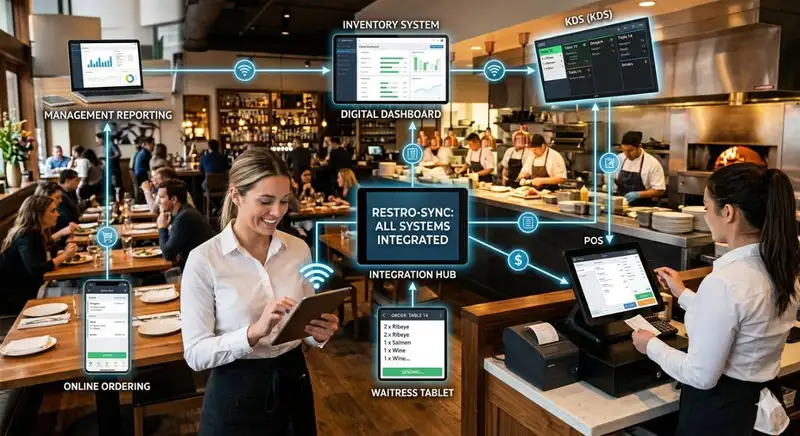
Most restaurant owners underestimate how many systems are involved in daily operations. Over time, tools are added to solve specific problems - online ordering, delivery platforms, scheduling apps, payroll providers, inventory systems, loyalty programs. Each one serves a purpose, but without a structured view, they create complexity instead of control.
This is why the first step in any restaurant system integration checklist is simple - map every system currently in use.
Start by listing systems across four core operational areas -
1. Sales and Revenue Systems
- POS system
- Online ordering platform
- Third-party delivery apps
- Kiosk or mobile ordering tools
These systems generate your top-line data. If they are not aligned, your revenue reporting will always be inconsistent.
2. Labor and Workforce Systems
- Scheduling software
- Time and attendance tracking
- Payroll system
These control one of your largest costs. Any disconnect here leads to payroll errors, compliance risks, and poor labor visibility.
3. Inventory and Cost Control Systems
- Inventory management tools
- Purchasing and vendor systems
- Recipe or menu costing platforms
These systems determine how accurately you track food cost, waste, and usage.
4. Financial and Reporting Systems
- Accounting software
- Reporting or analytics platforms
- Data dashboards
These are where decisions are made. If upstream systems are not connected, reporting becomes unreliable.
Once all systems are listed, the next step is to define what each system actually owns.
For example -
- Which system is the source of truth for sales?
- Where are labor hours finalized before payroll?
- Which platform tracks inventory depletion?
- Where are financial reports generated?
Without clear ownership, data conflicts are inevitable. Two systems may report different sales totals. Labor hours may not match payroll. Inventory numbers may not align with actual usage. These issues are not random - they come from unclear system roles.
Finally, document how data currently moves between systems -
- Is the data transferred automatically or manually?
- How often is it updated (real-time, daily, weekly)?
- Who is responsible for managing the transfer?
This mapping exercise will quickly expose gaps -
- Systems that do not connect at all
- Data that is manually re-entered
- Delays between when data is generated and when it is used
Once this map is complete, you can move to the next step- identifying exactly where manual work is happening and where integration will have the biggest impact.
Identify Manual Entry Points
If managers or staff are copying information from one system into another, your operation is already paying the price. The cost is not limited to extra time. Manual entry slows reporting, increases the chance of mistakes, and creates inconsistencies that affect payroll, inventory, and financial visibility.
This is why the next step in the checklist is to identify every place where data is being moved by hand.
Start by reviewing the most common transfer points -
1. Sales to Accounting - Many restaurants still export sales reports from the POS and manually enter or adjust them in accounting software. This creates delays in financial reporting and increases the chance of missed categories, duplicate entries, or incorrect totals.
2. Time and Attendance to Payroll - Hours may be tracked in one system, reviewed in another, and then entered into payroll manually. Every extra step increases the risk of incorrect pay, missed edits, and compliance issues related to wages and overtime.
3. Inventory Counts to Purchasing or Cost Reports - If inventory numbers are counted in one tool but updated elsewhere by hand, cost tracking becomes less reliable. Usage, waste, and ordering decisions can quickly become disconnected from actual stock levels.
4. Online Orders to POS or Reporting - When online ordering or delivery platform data does not flow directly into the POS or reporting system, sales visibility becomes fragmented. This makes it harder to see true revenue by channel and harder to reconcile totals.
5. Scheduling to Labor Reporting - If scheduled hours, actual clocked hours, and payroll hours do not connect automatically, labor reporting loses accuracy. Owners may think they are reviewing labor performance when they are actually comparing incomplete numbers.
As you review these workflows, ask three practical questions -
- What data is being entered more than once?
- Who is responsible for moving it?
- How often does this happen each day or week?
These questions help quantify the true cost of manual work.
A five-minute task done multiple times per day across several managers adds up quickly. More importantly, each manual touchpoint introduces a new opportunity for error. A mistyped number, missing export, or delayed update can distort reports and lead to poor decisions.
This is where many owners misjudge the problem. They see manual work as an inconvenience, when it is actually a control issue.
Manual re-entry means -
- More manager time spent on administration instead of operations
- Slower access to usable reports
- Greater risk of payroll, inventory, and financial errors
- Less confidence in the numbers used to make decisions
Once you identify where manual re-entry is happening, you can start prioritizing the integrations that will save the most time and remove the most risk.
Confirm Automatic Data Flow
After identifying manual work, the next step is to verify whether your systems are actually sharing data - and how well they are doing it.
Many restaurants assume their systems are "integrated" because a connection exists. In reality, not all integrations are equal. Some only transfer partial data. Others update infrequently. Some require manual triggers. This creates a false sense of visibility.
Start by reviewing your most critical system connections -
1. POS to Reporting and Accounting - Sales data should flow automatically from your POS into both reporting dashboards and accounting systems. This includes not just total sales, but also categories, taxes, discounts, and payment types. If only summary data is transferred, financial reporting will lack detail.
2. Time Tracking to Payroll - Employee hours should move directly from time and attendance into payroll without re-entry. This includes regular hours, overtime, and any adjustments. If managers are exporting and editing files before payroll, the integration is incomplete.
3. POS to Inventory and Menu Costing - Inventory systems should receive item-level sales data from the POS to calculate usage. Without this connection, inventory depletion becomes theoretical instead of actual, making food cost tracking less reliable.
4. Online Ordering and Delivery to POS - All external sales channels should sync directly into the POS. Orders should not need to be re-entered or reconciled manually. If they are, your sales data is fragmented and harder to analyze.
5. Scheduling to Labor Reporting - Scheduling systems should align with actual clock-in data and feed into labor reporting. Without this connection, it becomes difficult to compare planned vs actual labor performance.
Once these connections are identified, verify three key factors -
1. Data Completeness - Is all relevant data transferring, or just totals? For example, are you getting item-level detail or only daily sales summaries?
2. Data Timing - How often is the data updated? Real-time, hourly, daily? Delayed data limits your ability to make timely decisions during active shifts.
3. Data Direction - Is the data flowing one way or both ways? Some integrations only push data in one direction, which can create gaps if updates are made in multiple systems.
This is where many integration gaps become visible.
A system may technically be connected, but if -
- Data is delayed
- Key details are missing
- Updates require manual steps
Then the integration is not supporting operations effectively.
For restaurant owners, the standard should be simple - Data should move automatically, completely, and consistently - without manual intervention.
These gaps directly impact how quickly you can react to issues like labor overages, sales drops, or inventory shortages. If your systems are not sharing accurate data in a timely way, your ability to manage the business in real time is limited.
Check Reporting Accuracy
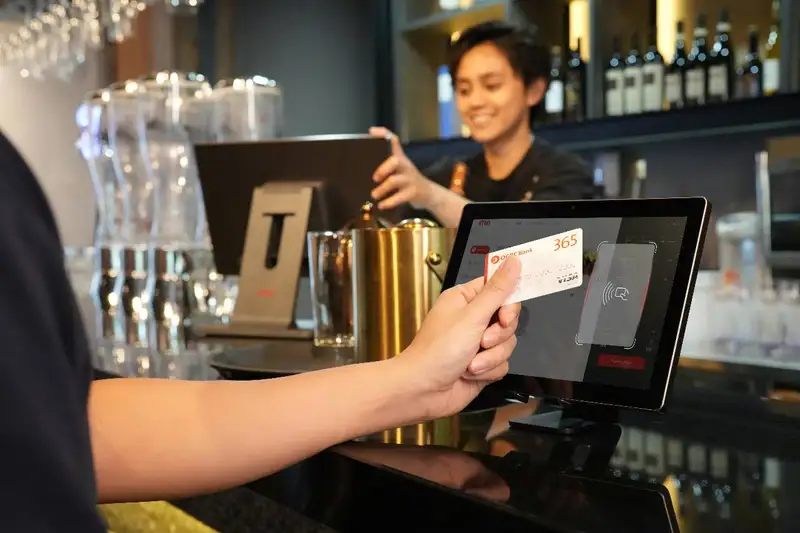
At this stage, your focus should shift from connections to results. Even if systems appear to be integrated, the real question is whether the numbers they produce actually match. If they do not, the integration is not delivering value - it is creating confusion.
Restaurant owners rely on reports to make daily and weekly decisions. Labor targets, food cost percentages, sales trends, and profitability all depend on accurate data. When systems produce conflicting numbers, those decisions become less precise and more reactive.
Start by comparing key metrics across your core systems -
1. Sales Totals - Check whether sales figures match between your POS, reporting platform, and accounting system. Differences often come from missing integrations, timing delays, or incomplete data transfers (such as discounts, refunds, or third-party orders not syncing properly).
2. Labor Hours and Costs - Compare hours from scheduling, time tracking, and payroll. These numbers should align. If they do not, it often means adjustments are happening outside the system or integrations are not capturing edits correctly.
3. Inventory Usage and Cost of Goods Sold (COGS) - Review whether inventory depletion reflects actual sales activity. If usage does not align with menu sales, your inventory system is not receiving accurate or complete data.
4. Payment and Cash Reconciliation - Ensure that payment types (cash, card, online) match across POS and accounting. Mismatches here can signal missing transactions or incorrect mapping between systems.
As you review these areas, look for patterns - not just one-time discrepancies.
Ask -
- Do mismatches happen daily or only at certain times?
- Are specific data points consistently incorrect?
- Do corrections require manual adjustments each period?
Consistent misalignment is a signal of a structural integration issue, not a one-off error. This is where reporting confidence becomes a critical factor.
When numbers do not align -
- Managers spend time investigating instead of acting
- Reports are delayed while data is corrected
- Decisions are made with uncertainty or hesitation
Over time, this leads to a common but risky behavior- ignoring system reports and relying on instinct. By identifying where reporting breaks down, you can pinpoint which integrations need to be fixed or strengthened. In the next section, we will connect these data issues to real operational impact and show how integration gaps affect daily execution on the floor.
Find Operational Integration Gaps
Integration problems do not stay in the back office. They show up in daily execution. This is an important shift in how restaurant owners should think about system integration. When data does not move correctly between systems, the issue is not just administrative. It affects staffing decisions, prep planning, ordering, payroll accuracy, and the speed at which managers can respond to problems.
Start by reviewing where disconnected systems are interfering with day-to-day performance -
1. Labor Decisions Are Delayed or Inaccurate - If sales, scheduling, time tracking, and payroll data are not aligned, labor management becomes reactive. Managers may not see labor percentage rising until after the shift or even after the week closes. That makes it harder to adjust staffing in time to control cost.
2. Prep and Inventory Planning Become Less Reliable - If POS sales data is not flowing into inventory or menu costing tools, usage patterns become less accurate. This leads to over-ordering, under-ordering, missed prep estimates, and avoidable waste. The kitchen ends up working from assumptions instead of real demand signals.
3. Payroll Errors Take More Time to Catch - When hours, edits, and wage data do not transfer cleanly into payroll, issues are often found late. That creates more back-and-forth, more corrections, and more risk around employee trust and wage compliance.
4. Revenue Visibility Is Incomplete - If online ordering, delivery platforms, kiosks, or POS channels are not fully connected, owners do not get a complete view of sales performance. This makes it harder to understand true channel mix, peak periods, and promotional impact.
5. Managers Spend More Time Fixing Data Than Running the Operation - This may be the most expensive effect of all. When managers are forced to reconcile reports, transfer data, or investigate mismatches, they spend less time coaching employees, monitoring service, controlling food cost, and solving problems in real time.
These issues may look separate, but they come from the same root problem - systems are not supporting operational flow.
To evaluate the impact clearly, ask -
- Where are managers losing time each day because systems do not align?
- Which decisions are delayed because reports are incomplete or late?
- Where do errors repeat because data is transferred manually?
- Which part of the operation becomes harder to control when numbers are inconsistent?
This helps move the conversation beyond software features and toward business performance.
A weak integration setup usually creates the same pattern -
- slower decisions
- more manual correction
- less confidence in data
- higher operating friction
A stronger integration setup creates the opposite -
- faster visibility
- cleaner workflows
- better control over labor and cost
- more time spent managing the business instead of fixing information
That is the real standard owners should use. The question is not whether a system has an integration. The question is whether that integration improves execution at the store level and reduces friction across the operation.
Integration Order Checklist
Most restaurants should not try to integrate everything at once. That approach usually creates delays, adds complexity, and makes it harder to measure progress. A better approach is to prioritize integrations based on operational value. The goal is to fix the connections that remove the most manual work, reduce the most risk, and improve the most important decisions first.
Start with a simple rule - prioritize systems tied to revenue, labor, cost control, and financial reporting.
These are usually the highest-impact areas -
1. POS - Your POS is the center of restaurant data. It captures sales, transactions, item mix, discounts, payment types, and order timing. If this system is not connected properly to reporting, accounting, inventory, and labor tools, every downstream decision becomes weaker.
2. Scheduling, Time Tracking, and Payroll - Labor is one of the largest controllable costs in a restaurant. If these systems are disconnected, managers spend more time fixing hours, payroll becomes less accurate, and labor reporting becomes harder to trust.
3. Inventory and Menu Costing - These systems affect food cost, waste control, and purchasing decisions. If sales data is not feeding into inventory usage, the operation loses visibility into true consumption and product performance.
4. Accounting and Reporting - These systems turn operational activity into business insight. If they receive delayed or incomplete data, owners lose speed and confidence in financial decision-making.
To prioritize clearly, evaluate each potential integration using four questions -
How often is this system used?
A system touched daily should usually rank higher than one reviewed occasionally.
How much manual work does this integration eliminate?
The more repeated data entry it removes, the greater the immediate value.
What is the risk if the data is wrong or delayed?
Payroll, labor, and financial errors usually carry higher risk than less critical reporting gaps.
Does this integration improve decision-making speed?
If the connection helps managers act faster on labor, sales, or inventory issues, it should move up the list.
You can also think about priorities in three tiers -
Tier 1 - Critical Integrations
These support daily control of sales, labor, payroll, and financial reporting.
Tier 2 - Cost and Efficiency Integrations
These improve inventory visibility, purchasing accuracy, and menu performance tracking.
Tier 3 - Optimization Integrations
These include loyalty, marketing, customer data, and other tools that add value but are not the first priority if core systems are still disconnected.
This structure helps owners avoid a common mistake- spending time integrating lower-impact tools while core operational systems still require manual work.
The purpose of this checklist is not to build the biggest technology stack. It is to build the most useful one.
A strong priority list should answer -
- Which integration saves the most manager time?
- Which one reduces the most operational risk?
- Which one improves the quality of our most important reports?
- Which one gives us faster control over sales, labor, and costs?
Once these priorities are clear, integration becomes easier to manage because the work is tied directly to business value.
How Strong Integration Works
A strong restaurant system integration process is not defined by how many systems you use. It is defined by how consistently those systems work together without manual intervention.
There are four clear indicators that integration is working effectively -
1. Data Moves Automatically Without Intervention - Sales, labor hours, inventory usage, and financial data flow between systems without exports, re-entry, or manual adjustments. Managers are not responsible for "moving data." Their role shifts to reviewing and acting on it.
2. Reports Align Across Systems - Key metrics match wherever they appear. Sales totals, labor hours, and cost figures are consistent between POS, payroll, inventory, and accounting. When reports align, confidence increases and time spent reconciling decreases.
3. Information Is Available When It Is Needed - Data is updated frequently enough to support real decisions during the day or week - not after the fact. Owners and managers can see labor trends, sales performance, and cost signals early enough to take action.
4. Operational Workflows Become Simpler - Managers spend less time correcting errors, transferring information, or validating numbers. Instead, they focus on execution - staffing adjustments, prep planning, service quality, and cost control.
To maintain this level of performance, integration should be treated as an ongoing operational process, not a one-time setup.
This means -
- Regularly reviewing integrations to ensure data is still flowing correctly
- Validating reports to confirm numbers continue to align
- Updating connections when systems, menus, or workflows change
- Training managers so they understand how data moves and where to look for issues
Without ongoing attention, even well-integrated systems can drift. Small changes - new menu items, updated payroll rules, added sales channels - can create new gaps if integrations are not monitored.
The long-term objective is simple -
- Create a single, consistent flow of operational data that supports faster, more accurate decision-making.
When this is in place -
- Managers spend less time on administrative tasks
- Reports become a trusted source of truth
- Decisions happen earlier, not after problems escalate
- The operation becomes more predictable and easier to control
This is what restaurant system integration should deliver. It is not about adding more technology. It is about making your existing systems work together in a way that reduces friction, improves accuracy, and strengthens how your restaurant runs every day.
All in One Workforce Management Solution
Streamline Your Restaurant Success with Altametrics
Must-Read Content

Online ordering pos integration
Online Ordering POS Integration for Restaurants

Inventory integration
5 Signs Your Restaurant Needs Better Inventory Integration

Payment system integration
How to Evaluate Payment System Integration for Your Restaurant
Integration tools
Restaurant Integration Tools That Improve Accuracy and Efficiency

Loyalty program integration
What to Know About Restaurant Loyalty Program Integration
Frequently Asked Questions
What type of data should always sync between systems?
At a minimum - sales transactions, item-level data, labor hours, payroll adjustments, inventory usage, and financial summaries. Missing any of these creates blind spots in reporting and decision-making.
How does integration impact food cost control?
Integration connects POS sales to inventory usage, allowing accurate tracking of depletion. Without it, food cost is based on estimates instead of actual consumption, leading to waste and margin loss.
What is the difference between integration and automation?
Integration connects systems so they can share data. Automation uses that connected data to trigger actions or workflows. Integration is the foundation; automation builds on it.
How does system integration reduce labor costs?
Integration eliminates manual administrative tasks, reduces payroll errors, and provides real-time labor data. This allows managers to adjust staffing faster and spend more time managing operations instead of handling data.

