


What is online ordering POS integration?
Online ordering POS integration connects your online ordering system directly to your POS so orders, menu data, pricing, and reporting flow automatically without manual entry or duplicate work.
Online Ordering POS Integration for Restaurants

Understanding POS Integration
Online ordering POS integration is the process of connecting your online ordering system directly to your POS so that data moves automatically between both systems - without manual intervention.
At a basic level, this means that when a customer places an order online, that order is instantly pushed into your POS. From there, it follows the same workflow as any in-store order - routing to the kitchen, applying pricing and taxes, and being captured in your reporting.
A complete setup should ensure that all critical data points stay aligned across systems in real time, including -
- Menu items and categories
- Pricing and taxes
- Modifiers and customization options
- Item availability (in stock / out of stock)
- Order types (pickup, delivery, scheduled orders)
- Sales and reporting data
This is where many restaurants misunderstand integration. Not all integrations are equal.
Partial Integration (Common but Problematic)
Some systems only push orders into the POS but do not sync menus, modifiers, or pricing. This creates gaps -
- Menus must be updated in multiple places
- Prices can drift across channels
- Modifier mismatches lead to incorrect orders
- Staff still need to monitor and correct issues manually
Full Integration (Operationally Effective)
A strong integration creates a two-way data flow -
- Menu updates in the POS automatically reflect online
- Orders flow directly into the POS without re-entry
- Modifiers map correctly every time
- Reporting combines all sales into one system
- Availability updates prevent overselling
When integration is done correctly, your team does not need to think about where an order came from. Online and in-store orders follow the same process, the same rules, and the same standards.
Where Restaurants Lose Time
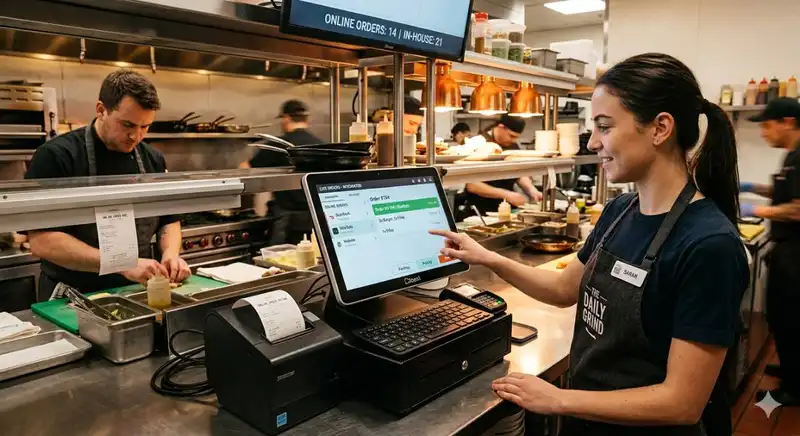
When online ordering and the POS are not fully connected, restaurants do not just lose efficiency. They lose time in small, repeated ways that compound across every shift.
At first, these issues may look minor - a staff member re-enters an order, a manager corrects a menu price, the kitchen calls to confirm a modifier. But when these steps happen dozens of times per day, they create real operational drag.
Here are the most common places where time is lost -
1. Manual Order Entry - This is one of the biggest breakdowns. If online orders must be typed into the POS by staff, the restaurant adds an unnecessary labor step to every transaction. That increases the chance of entry errors and slows down front-of-house execution, especially during busy periods.
2. Delays in Ticket Flow - When orders do not move automatically from the online ordering platform into the POS and kitchen workflow, ticket timing becomes less predictable. Even a short delay creates bottlenecks in prep, pickup coordination, and delivery readiness.
3. Menu Updates in Multiple Systems - Without proper integration, menu changes must often be made manually in more than one place. That means managers spend extra time updating prices, item availability, modifiers, and descriptions across separate platforms. It also increases the chance that one system gets updated while another does not.
4. Modifier and Customization Errors - Online orders often include detailed guest choices such as add-ons, substitutions, cooking preferences, or combo selections. If those modifiers are not mapped correctly to the POS, staff must stop and verify orders manually. That interrupts workflow and slows service.
5. Reporting Reconciliation - Disconnected systems create separate sales records. As a result, managers often spend time pulling data from multiple dashboards just to understand daily sales, channel performance, refunds, or order volume. Instead of reviewing one clean report, they are forced to reconcile numbers by hand.
6. Peak-Hour Staff Interruptions - When the system does not work cleanly, team members become the backup process. Cashiers answer questions about online orders. Kitchen staff pause to confirm order details. Managers step in to resolve sync issues. These interruptions reduce focus and weaken execution at the exact time the operation needs control.
The real problem is not just that each task takes extra time. It is that these tasks happen repeatedly and often during high-pressure periods.
Over time, the impact becomes clear -
- More labor spent on low-value work
- Slower service during peak demand
- Higher risk of order errors
- Less time for managers to focus on operations
This is why disconnected systems are costly even when they appear manageable. The restaurant absorbs the cost through wasted labor, slower workflows, and daily friction.
Core Integration Areas
Not every online ordering POS integration delivers the same operational value. A restaurant may technically have an integration in place, but if key functions are weak or inconsistent, the system still creates errors, manual work, and reporting problems.
A strong setup must handle the following core areas correctly.
1. Order Injection Into the POS - Online orders should enter the POS automatically and immediately, without staff re-entering any information. This is the most basic requirement of integration. If the order does not appear correctly in the POS every time, the restaurant is still relying on manual work to close the gap.
2. Real-Time Menu Syncing - Your menu should not have to be maintained in multiple disconnected systems. Item names, prices, descriptions, availability, and category changes should update consistently across the POS and online ordering channels. Without this, restaurants create mismatched menus, outdated pricing, and guest frustration when unavailable items still appear online. Real-time syncing is especially important for limited items, 86 lists, seasonal offers, and price changes.
3. Modifier and Customization Accuracy - Modifiers are where many integrations fail. Extra toppings, combo selections, substitutions, size choices, cooking preferences, and special requests must map correctly from the online ordering platform into the POS and kitchen ticket. If they do not, the order may technically go through, but the execution still breaks down.
4. Pricing and Tax Consistency - The integration must apply the correct prices, discounts, fees, and taxes across every order channel. If the online menu price differs from the POS price, or if taxes are calculated incorrectly, reporting becomes unreliable and guests may lose trust.
5. Pickup and Delivery Channel Routing - Orders need to be routed properly based on fulfillment type. Pickup, curbside, in-house delivery, and third-party delivery may each require different timing, printing, prep logic, or service handoff steps. A weak integration can create confusion about where the order belongs, when it should be prepared, and how the team should stage it.
6. Unified Sales Reporting - A strong integration should allow restaurant owners to view online ordering performance inside a single reporting structure, not across scattered dashboards. Sales by channel, order counts, average check, discounts, refunds, and fulfillment type should all be visible in a way that supports fast decision-making.
If managers still need to combine reports manually, the integration is incomplete from an operational standpoint.
The key point is that these functions do not operate in isolation. A restaurant can have clean order injection but poor modifier mapping. It can have menu sync but weak reporting. It can process orders correctly but still struggle with pickup routing.
POS Integration and Daily Operations
Online ordering POS integration does not just improve one part of the business. It changes how daily operations function across the entire restaurant.
When systems are connected correctly, the biggest benefit is not simply automation. It is operational stability. Orders move faster, information stays consistent, and the team spends less time correcting avoidable problems.
This impact can be seen across three areas.
1. Front-of-House Execution Becomes More Efficient
Without integration, front-of-house staff often become the bridge between disconnected systems. They re-enter online orders, verify missing details, answer questions about pricing differences, or fix fulfillment errors. That adds unnecessary workload during busy periods.
With proper integration, those manual steps are removed. Orders arrive in the POS correctly, pricing is already aligned, and the team can stay focused on service, handoff accuracy, and guest communication instead of system cleanup.
2. Back-of-House Workflow Becomes More Predictable
Kitchen teams perform best when tickets are clear, complete, and timely. If online orders arrive late, print incorrectly, or miss modifiers, kitchen flow becomes less stable. Staff must stop to ask questions, remake items, or reprioritize orders on the fly.
Integration improves this by sending complete orders into the kitchen workflow in a consistent format. That helps reduce confusion, improve prep sequencing, and support better timing for pickup and delivery orders.
3. Management Gains Better Control
Managers often absorb the hidden cost of disconnected systems. They handle order disputes, reconcile reports, update multiple menus, and step in when sync errors affect service. This is reactive work that takes time away from labor planning, coaching, and operational oversight.
When online ordering and POS systems are properly integrated, managers gain cleaner reporting, fewer exceptions, and stronger visibility into how the operation is performing. That allows them to spend more time managing the business and less time fixing data and process issues.
A strong integration helps restaurants -
- Process orders faster
- Reduce staff interruptions
- Improve kitchen communication
- Maintain menu accuracy
- Lower manual correction work
- Produce more reliable reporting
These improvements matter because restaurant operations are built on repetition. If the process is inefficient, the same friction repeats every hour of every shift. If the process is reliable, the restaurant gains consistency at scale.
How to Evaluate an Integration

Not all online ordering POS integrations are built to support real restaurant operations. Some appear functional during a demo but create gaps once the system is live. That is why restaurant owners should evaluate an integration based on how it performs in daily use, not how it is described in marketing language.
Start with these review areas -
1. Menu Syncing - Ask whether menu changes update automatically between systems. This includes item names, pricing, modifiers, availability, and categories. If your team must update menus in more than one place, the process is already creating extra labor and more room for error.
2. Modifier Mapping - Review how customizations are handled. Toppings, substitutions, combo choices, sizes, and special instructions should flow into the POS exactly as intended. If modifier logic is weak, the restaurant will still face order errors even if the order itself reaches the POS.
3. Multi-Channel Support - Many restaurants do not rely on one order source. They may manage direct online ordering, pickup, delivery, and additional channels at the same time. The integration should be able to handle multiple order paths without forcing staff to manage each one differently.
4. Reporting Accuracy - Check whether online sales data appears clearly inside your reporting workflow. You should be able to track sales by channel, order volume, average check, discounts, refunds, and fulfillment type without having to combine separate reports manually.
5. Exception Handling - No system is perfect all the time. Ask what happens if the internet drops, a sync fails, a menu item does not map correctly, or an order stalls between systems. A strong integration should include a clear process for identifying and managing exceptions quickly.
6. Remaining Manual Steps - This is one of the most important questions - what still requires human intervention? If staff must regularly re-enter items, adjust modifiers, correct taxes, or update multiple menus, the integration is not solving the real operational problem. It is only shifting the burden.
7. Speed and Reliability During Peak Hours - An integration should not only work during quiet periods. It should remain stable when order volume increases. Restaurants should review how quickly orders appear in the POS, how reliably tickets reach the kitchen, and whether the system performs consistently during lunch, dinner, and promotional spikes.
8. Operational Fit With Your Workflow - A good integration should support how your restaurant actually runs. That includes kitchen routing, prep timing, pickup staging, delivery coordination, and manager reporting. Even a technically capable system can create friction if it does not match the realities of your daily workflow.
A useful review question is - Will this reduce work for the team, or create new cleanup work behind the scenes?
That is the standard restaurant owners should use. A strong online ordering POS integration should simplify execution, not add hidden complexity.
Signs Your Setup Is Failing
A system can appear to work on the surface while creating daily inefficiencies behind the scenes. The clearest way to evaluate your setup is to look for repeated signs of manual correction, data inconsistency, and avoidable service disruption.
Here are the most common warning signs.
1. Staff Are Re-Entering Online Orders Manually - If team members must type online orders into the POS, the integration is not doing its core job. This creates extra labor on every order and increases the risk of mistakes, especially during peak hours.
2. Menu Prices Differ Across Channels - If the price shown online does not match the price in the POS, the restaurant has a syncing problem. This affects guest trust, reporting accuracy, and margin control. Even small pricing mismatches create confusion and extra refund or adjustment work.
3. Orders Arrive With Missing or Incorrect Modifiers - When customization details such as toppings, sizes, combo selections, or substitutions do not transfer correctly, the team is forced to stop and verify what the guest actually ordered. This slows kitchen execution and increases the chance of remakes.
4. Managers Spend Too Much Time Fixing Reports - If managers must pull numbers from separate systems and manually reconcile online sales, refunds, or order counts, the reporting structure is incomplete. A strong integration should reduce administrative cleanup, not create more of it.
5. Guests Order Items That Are Not Actually Available - If an item is sold out in the restaurant but still appears online, menu syncing is weak. This leads to order changes, cancellations, disappointed guests, and avoidable interruptions for staff.
6. Refunds, Voids, or Remakes Increase - A rise in order corrections often points to integration issues, not just staff mistakes. If the system is transferring incorrect order data, the restaurant ends up paying the cost through wasted food, slower service, and guest recovery efforts.
7. Peak Hours Create More System Problems - If the setup becomes unreliable when volume increases, that is a serious operational concern. Delayed tickets, missing orders, or slower sync performance during lunch and dinner rushes show that the system is not dependable when the restaurant needs it most.
8. The Team Has Built Workarounds - This is one of the strongest warning signs. If employees have their own steps to "make the system work" - double-checking tickets, confirming orders manually, keeping side notes, or updating menus in multiple places - the process is not truly integrated. It is being held together by staff effort.
Over time, weak integration creates measurable operational costs -
- More labor spent on correction work
- Higher order error rates
- Slower service and handoff times
- Less reliable reporting
- More pressure on managers and frontline staff
The key question is not whether orders are coming in. The key question is whether the system is accurate enough to support daily execution without constant intervention.
What Good POS Integration Looks Like
A strong online ordering POS integration process is not defined by the fact that two systems are connected. It is defined by whether the connection supports accurate, consistent, and low-friction restaurant operations every day.
A reliable process usually includes five core elements.
1. Accurate Menu Mapping - Every item, modifier, price, tax rule, and fulfillment option should be mapped correctly from the start. This is the foundation of the entire setup. If menu logic is inconsistent, problems will continue no matter how fast orders move through the system.
2. Automatic Data Flow - Orders should move directly from the online ordering channel into the POS without manual entry. Menu updates should flow across systems without requiring duplicate maintenance. Reporting data should be captured in a way that gives managers one clear view of performance.
This is what removes repeated labor and reduces execution risk.
3. Consistent Testing and Validation - Integration should not be treated as a one-time setup. Restaurants need a repeatable process to test menu changes, new modifiers, pricing updates, tax settings, and order routing. Even small changes can create issues if they are not validated before going live.
4. Clear Exception Handling - Strong systems still need backup procedures for failures. Restaurants should know what happens if an order does not sync, a menu item maps incorrectly, or a channel goes offline. The team should have a clear way to identify the issue, fix it quickly, and prevent guest disruption.
5. Routine Performance Review - Integration quality should be reviewed regularly, not assumed. Restaurant owners and managers should monitor order accuracy, refund patterns, remake frequency, menu mismatch issues, and reporting consistency. These are the operational signals that show whether the integration is truly supporting the business.
When these elements are in place, the process becomes much stronger.
A well-run integration process should make it possible to -
- Keep menus consistent across channels
- Process orders without re-entry
- Route tickets correctly to the kitchen
- Maintain pricing and modifier accuracy
- Reduce service disruptions
- Produce reliable reporting for decision-making
That is what restaurant owners should expect.
Online ordering POS integration should not create hidden cleanup work for staff or force managers to constantly patch system gaps. It should reduce complexity, improve visibility, and support smoother execution across the entire operation.
In the end, the value of integration is not technical. It is operational. A strong process gives restaurants what they need most - speed, accuracy, consistency, and control.
All in One Workforce Management Solution
Streamline Your Restaurants Success with Altametrics
Must-Read Content
Restaurant system integration
Restaurant System Integration Checklist for Owners

Inventory integration
5 Signs Your Restaurant Needs Better Inventory Integration

Payment system integration
How to Evaluate Payment System Integration for Your Restaurant
Integration tools
Restaurant Integration Tools That Improve Accuracy and Efficiency

Loyalty program integration
What to Know About Restaurant Loyalty Program Integration
Frequently Asked Questions
What is the difference between partial and full integration?
Partial integration only pushes orders into the POS. Full integration includes menu syncing, modifier accuracy, pricing consistency, and unified reporting across all systems.
Can online ordering POS integration help with menu management?
Yes. It ensures menu updates - such as pricing, availability, and modifiers - sync automatically across all channels, preventing mismatches and guest frustration.
What are common signs that an integration is not working properly?
Manual order entry, mismatched menu prices, missing modifiers, frequent refunds, reporting inconsistencies, and staff relying on workarounds are all warning signs.
How does integration impact kitchen operations?
It delivers clear, complete, and timely tickets to the kitchen, reducing confusion, improving prep flow, and helping teams execute orders consistently during busy shifts.

