


What features should I look for in time tracking software?
Kiosk + mobile options, break tracking, permissions, manager approvals, edit audit logs, overtime alerts, job codes/labor groups, and payroll/scheduling integrations.
Beginner's Guide to Time Tracking for Restaurant Owners

What Time Tracking Means in a Restaurant
In a restaurant, time tracking is simply the process of recording when employees start work, take breaks, switch roles (if needed), and end work - then turning that information into accurate payroll hours. That sounds basic, but the details matter because restaurants run on fast-changing shifts, multiple job roles, and constant adjustments. A server may start as a host, move to the floor, then help with side work. A line cook might come in early for prep, stay late for a rush, or cover a different station mid-shift. Time tracking is how all of that becomes clear, consistent, and defensible on a timecard.
It also helps to separate three things that owners often mix together -
1. Schedule - what you planned to staff (expected start/end times, roles, break plans).
2. Punches - what actually happened (real clock-ins, clock-outs, breaks).
3. Payroll hours - what you pay on (approved, corrected, and documented hours after review).
When time tracking is sloppy, you usually feel it in three places. First, labor costs creep up - a few minutes early here, a late clock-out there, and suddenly you're paying extra hours every week without noticing. Second, payroll gets messy - missed punches, manual edits, and last-minute questions from employees ("Why am I short an hour?"). Third, you increase compliance and dispute risk - especially around breaks, off-the-clock work, and unclear manager edits.
Good time tracking creates a simple system everyone can follow. Employees know what's expected. Managers know what to review. Owners get payroll they can trust and data they can use - without spending Sunday night trying to rebuild the week from texts, memory, and scribbled notes.
What You Should Track
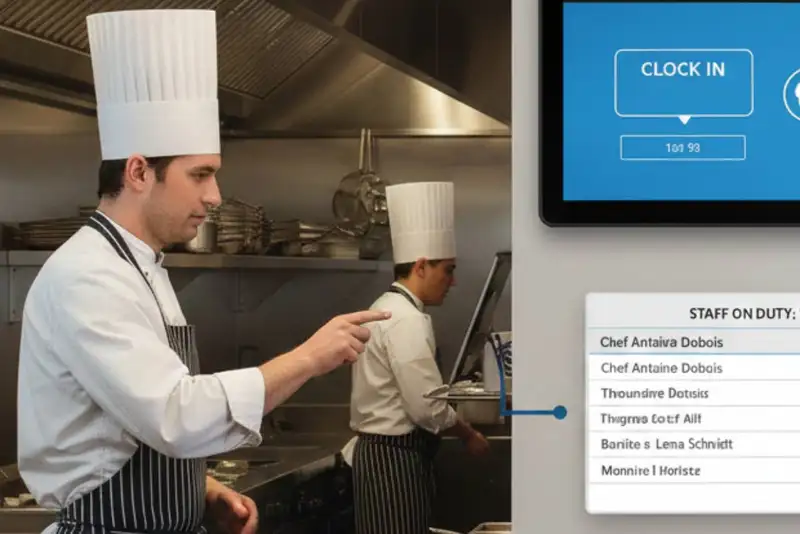
If you're new to time tracking, the goal isn't to track "everything." The goal is to track the right things consistently so payroll is accurate and your records are clean if questions come up later. Think of this as the minimum set of information that turns timecards into something you can trust.
1) Employee identity and role - Every time entry should clearly tie back to one employee (no shared logins) and reflect the job role they're working. In restaurants, role matters because pay rates, overtime patterns, and labor targets often differ between FOH and BOH. If someone works multiple roles, you'll want a way to identify that (more on job codes below).
2) Clock-in and clock-out times - This is the core. You need the actual start and end times for each shift. If you allow employees to clock in early or stay late, define the rules and make sure the punches match what happened. If you're manually entering times, you're increasing the chance of errors and disputes.
3) Breaks - Break tracking is a common weak spot. At minimum, you should record break start and break end, or a clear break duration tied to the shift - depending on your process and local requirements. The key is consistency- if breaks are expected, they should be visible on the timecard. If a break was missed, there should be a documented reason and approval.
4) Timecard edits + reason codes - Edits happen in every restaurant - missed punches, wrong job selection, someone forgot to clock out. The important part is not pretending edits won't happen; it's making them controlled and traceable. Track -
- What was changed
- Who changed it
- When it was changed
- Why it was changed (short reason note)
This "audit trail" protects you and keeps managers from turning payroll into a guessing game.
5) Manager review and approval - Time tracking isn't complete until a manager reviews exceptions (missed punches, unusual overtime, long shifts, break issues) and approves the timecard. Approval is what turns punches into payroll hours. Without that step, you're basically paying from raw data - and raw data is messy.
Even as a beginner, you'll benefit from simple categories like FOH, BOH, Prep, Line, Dishwasher, Delivery, Catering. This lets you spot where hours are going and prevents "one bucket" labor reporting that hides problems.

Paper, Spreadsheet, POS, or Time Clock App
As a restaurant owner, you usually have four realistic ways to track time. The "best" option isn't the fanciest - it's the one that matches your operation, reduces mistakes, and doesn't create extra work every week.
1) Paper timesheets - Paper is simple, employees write start/end times and managers total hours. The downside is consistency and accuracy. Paper makes it easy to round in your head, forget breaks, or lose records. It also creates extra work at payroll time because someone has to calculate everything manually. If you use paper, it should be a short-term solution - and you'll need strict manager review to avoid payroll disputes.
2) Spreadsheets - Spreadsheets are a step up from paper because they're easier to store and calculate - if set up correctly. But the main issue remains - you're still relying on manual entry. That means missed punches become "best guesses," and time edits are hard to document cleanly. Spreadsheets can work for very small operations, but they often break down when you have multiple roles, frequent shift swaps, or more than one manager touching payroll.
3) POS time clock - Some restaurants track time inside the POS. The advantage is convenience - employees are already using it, and managers may already have access. The trade-off is that POS time functions can vary widely. Some systems do a decent job with punches, but may be limited on break tracking, permissions, approvals, or reporting. If your POS time tracking can't provide a clear audit trail or help you manage overtime and exceptions, you'll feel the gaps quickly.
4) Dedicated time clock / time tracking app - A dedicated system (tablet kiosk, mobile app, or both) is usually the most reliable long-term option. You can set rules (like early clock-in limits), require break tracking, control who can edit timecards, and run reports without rebuilding the week manually. This is especially helpful if you have multiple locations or you're trying to tighten labor cost.
How to choose quickly (owner-friendly rule of thumb)
1 location + small team + stable shifts - spreadsheet can work temporarily
Fast-paced shifts, frequent changes, multiple roles - dedicated time tracking wins
Multiple locations or high payroll complexity - dedicated system is almost always worth it
The biggest sign you've outgrown manual tracking is simple- if payroll week ends with stress, corrections, and arguments, your system is costing you more than it saves.
Build a Simple Time Tracking Policy
Time tracking gets messy when the rules live in people's heads. A simple written policy (even one page) prevents confusion, protects payroll accuracy, and keeps managers consistent. The key is to make it clear, fair, and easy to follow - not overly strict or full of legal language.
Clock-in and clock-out rules
Start by defining what's allowed -
- How early can someone clock in? (Example - no more than 5 minutes before shift unless a manager approves.)
- What happens if someone is late? (Clock in immediately, notify manager, no "adjusting" time to match the schedule.)
- Clock-out expectations. Employees clock out when they stop working - after side work, after closing tasks, not when the dining room "feels slow."
These rules stop slow "labor creep," where extra minutes become extra hours every week.
Break rules (make it trackable)
Break tracking is where restaurants often get exposed. Your policy should state -
- When breaks are expected (by shift length, role, or schedule)
- How employees record breaks (start/end punches or break button)
- What to do if a break is missed (tell the manager, document why)
Even if your restaurant runs hectic shifts, the rule should still be- breaks are recorded accurately, and exceptions are documented - no guessing.
Missed punches and corrections (no drama, just process)
People will forget to punch. Your policy should define -
- Who employees notify (shift lead, manager, or GM)
- The deadline to report a missed punch (same day or within 24 hours)
- What information is required (approximate time + reason)
- How it gets corrected (manager edits with a note)
This reduces "end-of-week surprises" that turn into disputes.
Timecard edits (control + audit trail)
Edits should be allowed, but never casual. Define -
- Who is authorized to edit time
- When edits are allowed (preferably daily, not only at payroll close)
- Required reason notes for every edit
- No editing to "match the schedule" - timecards should reflect real work performed
Off-the-clock work (draw a bright line)
Be direct - employees should never work before clock-in, after clock-out, or during unpaid breaks. If work is needed, they clock in. This protects the employee and protects you.
Make it stick with two simple habits
1. Review timecards daily for exceptions (late punches, missed breaks, odd edits).
2. Have employees confirm their timecards before payroll close, so issues are caught early.
A clear policy doesn't create tension - it removes it. Everyone knows the rules, and payroll becomes routine instead of a weekly argument.
The Weekly Workflow

Time tracking only becomes a "problem" when it's handled once a week, all at once, under pressure. The easiest way to make it painless is to treat it like a simple workflow - daily checks + weekly approval + clean payroll handoff. Here's a beginner-friendly routine that works in most restaurants.
Daily (5-10 minutes). Catch issues while they're small
Have a manager do a quick scan at the end of each shift or day. You're looking for exceptions, not perfection -
- Missed punches (no clock-out, duplicate clock-ins, weird gaps)
- Break issues (missing break punches, unusually long breaks, no break recorded)
- Early/late punches that don't match what was expected
- Role/job code mistakes (someone worked BOH but stayed in FOH role)
Fixing these the same day is easier because people remember what happened. It also prevents a pile-up at payroll close.
Mid-week (10-15 minutes). Watch overtime before it happens
Overtime surprises are expensive and avoidable. Mid-week, check -
- Who is trending toward overtime
- Which shifts are running long
- Where coverage gaps are forcing extended hours
This gives you time to adjust - swap shifts, cut a little earlier on slow periods, or bring in coverage before one person accumulates too many hours.
End of week (30-60 minutes). Timecard review + approvals
Before payroll is processed, managers should do a structured review -
- Confirm all employees have complete punches
- Verify breaks are recorded (or exceptions are documented)
- Review any timecard edits and notes
- Validate job codes/labor groups if you use them
- Check overtime and long shifts one last time
- Approve timecards by a set deadline
Pro tip. Set a consistent cutoff like "Timecards must be submitted by Monday 10 a.m." (or whatever fits your payroll schedule). The important part is consistency.
Payroll handoff - Export, reconcile, and document
Once timecards are approved, export/send hours to payroll. Then do a quick reconciliation -
- Total hours vs. expected staffing levels
- Overtime hours vs. what you planned
- Any unusual spikes (holiday, call-outs, late closes)
Keep a record of approvals and edits. If someone disputes a paycheck later, you'll have a clean trail showing what was submitted and why.
If your process requires managers to "remember" who left early or who forgot a punch, it will fail. A good workflow uses the time tracking system (or a simple checklist) to catch issues daily - so payroll week is boring, not stressful.

Time Theft, Buddy Punching, and Overtime Creep
Most restaurants don't lose money from one huge timekeeping issue - they lose it from small problems that happen every week. The good news - you can prevent most of them with clear rules, light controls, and consistent manager follow-through. You don't need to treat your team like suspects. You just need a system that's hard to misuse and easy to verify.
Time theft (what it usually looks like)
In restaurants, "time theft" is rarely dramatic. It's usually -
- Clocking in early and not starting work right away
- Clocking out late while chatting or doing low-priority tasks
- Stretching breaks beyond what's allowed
- Staying on the clock while waiting for a ride or winding down
Prevention is mostly about guardrails- limit early clock-ins, require manager approval for overtime, and review exceptions daily so patterns don't build.
Buddy punching (one person clocks in for another)
This is common when time tracking is based on shared PINs, shared logins, or a register everyone can access. It's also one of the easiest issues to prevent without being heavy-handed -
- Use unique employee logins (no shared accounts)
- Require a simple verification step (PIN + photo, kiosk check, or manager confirmation)
- Place the time clock in a visible area, not tucked away
- Make it clear in policy. Clocking in for someone else is not allowed
If your team uses mobile punches, geo-fencing and location rules can help make sure punches happen where work happens.
Overtime creep (the silent budget killer)
Overtime often shows up when -
- Shifts run long due to late prep, late closes, or call-outs
- Managers approve just this once extra hours without checking weekly totals
- Schedules don't match real demand, so teams stay late to catch up
The fix is simple - don't wait until the end of the week. Check overtime mid-week and set a rule like- Overtime must be approved before the extra hours are worked. This doesn't mean cutting labor blindlyit means planning coverage so you're not paying time-and-a-half by accident.
Coaching first, discipline second
When you see time issues, start with clarity -
- "Here's the rule."
- "Here's what happened on the timecard."
- "Here's what we need going forward."
Many problems are training issues, not bad intent - especially with new hires. But if the same behavior repeats after coaching, your system should support escalation (written warning, tighter punch controls, or schedule changes).
A strong time tracking process prevents problems without drama - fewer surprises, fewer disputes, and a labor budget you can actually control.
The 5 Reports Owners Should Check
Time tracking isn't just for payroll. Once your punches are accurate and consistently approved, they become one of your best sources of operational insight. The trick is to focus on a small set of reports that actually help you control labor - not a dashboard with 40 charts you'll never open. Here are five reports (or views) that deliver the most value for restaurant owners.
1) Hours vs. schedule (variance report)
This shows the difference between what you planned and what you paid. It helps answer -
- Are we consistently running over on certain shifts?
- Which dayparts are most likely to drift late?
- Are managers sending people home when it's slowor keeping extra coverage?
Even a small variance every day adds up fast across a week.
2) Overtime report (who, when, and why)
Overtime isn't always "bad," but it should never be a surprise. This report helps you catch -
- Employees trending toward overtime mid-week
- Specific days that drive overtime (late closes, weekend rushes)
- Roles that are under-covered (forcing the same people to stay late)
Use it to adjust schedules before overtime hits, not after.
3) Labor by role / labor group (FOH vs. BOH, prep vs. line)
This is where time tracking becomes a management tool. If you tag hours by role or labor group, you can see -
- Where your hours are going
- Which roles are consistently overstaffed
- Whether prep hours match sales volume and menu complexity
Owners often think "labor is high," but this report tells you which part of labor is high.
4) Exceptions report (missed punches, missing breaks, edits)
If you want tighter time tracking without micromanaging, watch exceptions. A clean timekeeping operation has fewer -
- Missed punches
- Unapproved edits
- Break issues
- Oddly long shifts or gaps
Exceptions are the early warning system that something is off - training, process, or manager follow-through.
5) Late/early punch patterns (habit report)
This highlights repeat behaviors like -
- Frequent early clock-ins
- Regular late clock-outs
- Chronic late arrivals
- Long breaks
Patterns matter more than one-off days. If you see the same behavior every week, it's a policy and coaching opportunity - not a payroll surprise.
How often should you check these?
Daily - exceptions + schedule variance (quick scan)
Mid-week - overtime trends
Weekly - labor by role + punch patterns
You don't need to be a data person to use these. The goal is simple - use time tracking to spot leaks early, make small adjustments, and keep labor and payroll under control.
Choosing Time Tracking Software
If you're moving beyond paper, spreadsheets, or basic POS punches, the right time tracking software should do two things well- prevent common mistakes before they hit payroll and give you clean visibility into labor without adding extra admin work. Here's a practical checklist to help you choose a system that fits restaurant reality.
Must-have features (non-negotiable for most restaurants)
1. Easy clock-ins (kiosk + mobile options) - Many restaurants need a shared kiosk (tablet) for reliable clock-ins, while others benefit from mobile for managers or certain roles. The best setup often supports both so you're not forcing one method on every job.
2. Break tracking + clear exception handling - Breaks shouldn't be a guessing game. Look for a system that makes it simple to record breaks and flags missing breaks or unusual patterns so managers can resolve them quickly.
3. Manager approvals - permissions
You want clear control over who can-
- approve timecards
- edit punches
- override rules
- view reports
Strong permissions protect payroll integrity and reduce too many hands changing timecards.
4. Timecard edit audit trail (who changed what, when, and why) - This is huge for disputes. If edits happen (and they will), you want a clear log that shows the original entry, the change, the editor, and a reason note.
5. Overtime controls and alerts - The best systems help you spot overtime mid-week and prevent accidental overtime through alerts, rules, or approvals - so you're not discovering it after the fact.
High-value features (especially helpful as you grow)
1. Job codes / labor groups - Tracking hours by role (FOH/BOH, prep/line, delivery/catering) helps you actually manage labor, not just pay it.
2. Multi-location standardization - If you have more than one store, you'll want centralized settings with location-level flexibility - so your process is consistent, but not rigid.
3. Integrations that reduce double entry - Time tracking should connect cleanly with scheduling and payroll so managers aren't retyping hours or manually reconciling totals every week.
Even the best tool fails if managers don't use it daily. Choose a system that's simple on the floor, quick for managers to approve, and strong on reporting - because that's what keeps payroll clean long-term.
Make Time Tracking and Scheduling Work Together with Altametrics
If you want time tracking to actually help you control labor - not just calculate payroll - pair it with smart scheduling. Altametrics Workforce Scheduling helps restaurant operators build schedules faster, align labor to demand, and reduce overtime surprises with more consistent planning and visibility.
When scheduling and time tracking work together, you can -
- spot schedule vs. actual variances earlier
- prevent overtime before it happens
- reduce last-minute staffing chaos
- keep managers consistent across shifts and locations
Explore Altametrics Workforce Scheduling by clicking "Schedule a Demo" below.

Must-Read Content

Guide to workforce management
Guide to Workforce Management for Restaurants

Employee hours
How to Forecast Employee Hours for a Hotel

Restaurant employee time
Restaurant Employee Time Tracking Made Simple

Employee attendance tracking
7 Must-Have Policies for Employee Attendance Tracking in Restaurants
Employee management tools
Employee Management Tools for Restaurants
Frequently Asked Questions
What is time tracking in a restaurant?
Time tracking is recording when employees clock in, take breaks, switch roles (if needed), and clock out - then approving those hours for payroll.
How do I prevent buddy punching?
Use unique logins/PINs (no shared accounts), a visible time clock location, and verification options like a kiosk, photo prompts, or location rules for mobile punches.
How can time tracking help reduce overtime?
Mid-week overtime trend checks + alerts + requiring approval before overtime is worked. The earlier you see it, the easier it is to prevent.
How long should I keep time tracking records?
Keep records long enough to handle payroll questions and potential disputes. Many owners keep them for several years, but requirements vary by location.

