


What is restaurant employee time tracking?
Restaurant employee time tracking is the process of recording when employees start and end work, take breaks, and (often) what role they worked - so payroll is accurate and labor reporting reflects what actually happened.
Restaurant Employee Time Tracking Made Simple

Overview
In a restaurant, "time tracking" isn't just clocking in and clocking out. It's the system you use to document who worked, when they worked, what role they worked, and whether the shift followed your rules (like breaks and approvals). That sounds straightforward until you layer in how restaurants actually operate - employees switch stations mid-shift, cover for each other, come in early to prep, stay late for side work, and trade shifts with little notice. Without a clear approach, time data quickly becomes messy - and messy time data creates messy payroll.
It also helps to separate three things owners often lump together -
- Scheduling is the plan (who you expected to work and when).
- Time tracking is what actually happened (what was worked and what was recorded).
- Payroll is the outcome (how those recorded hours translate into wages, overtime, and deductions).
The gap between the schedule and the timecard is where most problems live. If your time tracking is loose, you'll see it in a few predictable ways - unexpected overtime, inflated labor percentage, frequent manager edits, and recurring "I forgot to clock out" conversations. Even worse, inconsistent time records can create risk when there's a dispute about pay, breaks, or off-the-clock work.
The reason restaurant time tracking is harder than it looks is simple - the work is dynamic, but payroll requires precision. Your job as an owner isn't to micromanage every punch - it's to create a process that captures reality accurately with minimal friction. When you do that, time tracking becomes less of a daily annoyance and more of a reliable operational tool you can actually manage from week to week.
What You Must Track Every Shift
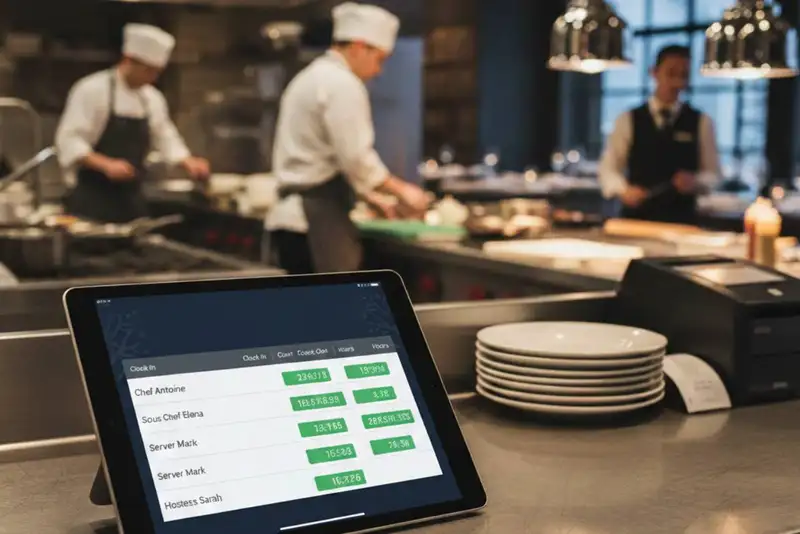
If you want restaurant time tracking to stay simple, focus on the essentials. The goal isn't to collect "more data." It's to capture the few details that make your timecards accurate, your payroll clean, and your labor reporting trustworthy. When these non-negotiables are tracked consistently, most timekeeping headaches shrink fast.
1) Clock-in and clock-out times - Every shift needs a clear start and end time, tied to the correct store or location. This sounds obvious, but it's where errors pile up - especially when employees bounce between locations or clock in from a phone without guardrails. If you run multiple units, make sure time entries clearly show where the work happened.
2) Role or job code for the shift - Restaurants aren't one-job workplaces. Someone might start as a cashier, then run expo, then finish doing prep or dish. If you don't capture role (or allow a role change mid-shift), you lose visibility into where labor is going - and your labor reports become misleading. Even a simple approach (primary role per shift, or role changes when they happen) is better than nothing.
3) Breaks and meal periods - Break tracking is not optional, even if it feels like an extra step. You need to record when breaks are taken (and sometimes whether they were taken at all) to support compliance and reduce disputes. A good rule of thumb- if you're relying on memory to confirm breaks at the end of the week, you're already too late.
4) Manager edits with an audit trail - Edits happen - missed punches, incorrect job codes, accidental early clock-ins. The issue is not that corrections exist; it's that corrections aren't documented. Every change should show who made it, when, and why. This protects you and prevents "quiet" adjustments that create mistrust.
5) Approval before payroll closes - A timecard isn't final until it's reviewed and approved. That approval step is how you catch overtime creep, weird punch patterns, and missing breaks before payroll locks in the problem.
If you build your process around these five items, you'll spend less time chasing exceptions - and more time using labor data to run the business.

Common Time Tracking Problems
Most restaurant time tracking issues fall into a handful of patterns. The good news- you don't need a complicated overhaul to fix them - you need clear rules, simple guardrails, and a consistent manager routine.
1) Missed punches - Employees forget to clock in, forget to clock out, or miss a break punch - especially during rushes. The fast fix is an "end-of-shift check" - require staff to confirm their punch before they leave (or have a manager quickly scan exceptions before closing). Pair that with a simple rule - missed punches must be reported the same day and corrected with a short note (who/what/when).
2) Buddy punching and shared PINs - If one employee can clock in for another, you'll eventually pay for time that wasn't worked. Reduce the opportunity- use unique credentials, discourage shared devices without oversight, and limit remote punching unless there's a real need. If you allow mobile punching, add guardrails like location restrictions and manager approval for off-site punches.
3) Early clock-ins and late clock-outs that inflate labor - A few minutes doesn't feel like much - until it happens across multiple employees, multiple days, all year. Fix it with defined clock-in windows (for example. no earlier than X minutes before shift start) and a manager habit- review early/late exceptions daily. Most teams adapt quickly when expectations are clear.
4) Off-the-clock work and just help for a second. - This often comes from good intentions - helping with a delivery, finishing side work, cleaning a station. But it creates legal risk and wage disputes. The fix is cultural and procedural - no work without being clocked in and managers must model it. If someone's still working, they should still be on the clock.
5) Manual timecards and spreadsheet chaos - Manual systems fail when things get busy. If you're constantly re-keying hours or guessing times, you're increasing error and burnout. Even a basic digital time clock can reduce edits and speed up payroll close.
Start by fixing the patterns that happen weekly. When the same exceptions stop repeating, time tracking becomes predictable - and that's the real win.
Your Restaurant Timekeeping Policy
A timekeeping policy doesn't need to read like a legal document. It needs to be short, clear, and repeatable - something your managers can enforce the same way every shift, even on a Friday night when everything is chaotic. When policies are vague, you'll end up with inconsistent edits, frustrated employees, and timecards you can't fully trust.
Here are the core rules every restaurant timekeeping policy should cover -
1) Where and how employees can clock in/out - Define approved methods (POS terminal, time clock kiosk, mobile app) and where it must happen. If you allow mobile punching, be explicit about limits (for example. Only on-site, only within a defined area, or only with manager approval). The goal is to remove ambiguity.
2) When employees can clock in/out - Set a clock-in window (example - no more than 5-10 minutes before the scheduled start unless a manager approves it). Also define what "end of shift" means - some restaurants want staff to clock out only after side work is completed and checked, others want a manager sign-off first. Choose one approach and stick to it.
3) Break expectations and documentation - Spell out who gets breaks, when they should be taken, and how they're recorded. Also clarify what employees should do if they miss a break (report it immediately, document it, manager follows up). This protects both the employee and the business.
4) Timecard edits and approvals - Edits should be allowed - but controlled. Require that timecard corrections include a reason and that a manager approves them. Most importantly - employees shouldn't be editing their own timecards without oversight, and managers shouldn't "clean up" timecards without leaving a trail.
5) Consequences that are consistent - Your policy should include a simple escalation - (1) verbal reminder (2) written warning (3) further action if it continues. The point is consistency. If one person is disciplined for missed punches but another isn't, you'll lose buy-in fast.
A clean timekeeping policy is about fairness and predictability. When everyone knows the rules, you spend less time arguing about what should have happened and more time running the restaurant.
Choosing the Right Time Tracking Method

The "best" time tracking method is the one your team will actually use correctly every day - without creating extra work for managers. Restaurant owners often get stuck comparing features instead of starting with the real question- What problems are we trying to solve? If you're battling missed punches and timecard edits, you need simplicity and guardrails. If you run multiple locations, integrations and controls matter more.
Here are the most common options and what to watch for -
1) POS-based time clock (built into your POS) - This can be convenient because staff already touch the POS, and it may connect to sales reporting. The downside is that it's not always built for detailed labor controls, break tracking, or approvals. It works best when you want basic punching and minimal setup.
2) Standalone time clock (kiosk or terminal) - A dedicated clock-in station can reduce confusion and keep punching consistent. Look for clear permissions (who can edit, who can approve) and an audit trail. This setup is often best for restaurants that want fewer "I forgot" excuses.
3) Mobile app time tracking - Mobile punching is great for off-site roles, catering, or managers moving between units - but it's also where abuse can creep in. If you go mobile, you'll want guardrails like location verification, manager approvals for exceptions, and clear restrictions for hourly staff.
4) Biometric or facial recognition options - These can reduce buddy punching, but they're not always necessary for every restaurant. If you're considering biometrics, focus on whether the benefit outweighs the complexity and employee concerns. The best systems still need strong policies - technology doesn't replace management.
No matter which method you choose, prioritize these essentials -
Ease of use - simple punches, clear prompts, minimal steps
Permissions - role-based access (employee vs. manager vs. admin)
Audit trail - every edit is tracked (who, when, why)
Break tracking - built-in prompts or required acknowledgements
Integrations - payroll export, scheduling connection, multi-location support
Reporting - overtime alerts, exceptions, schedule vs. actual
A good rule - pick the system that makes the "right behavior" the easiest behavior. When clocking in correctly is effortless, compliance and accuracy follow.

Manager Workflow
Time tracking becomes painful when managers only look at timecards on payroll day. By then, you're stuck chasing employees for missed punches, trying to remember what happened three days ago, and making rushed edits that can create disputes later. The fix is a simple rhythm - a few minutes daily + one focused weekly review. Done consistently, this keeps timecards clean and makes payroll close fast.
Daily (5 minutes, ideally before shift change or close)
1) Check exceptions, not every punch - Open your timekeeping dashboard and look for the usual red flags- missed punches, long shifts, no break recorded, unusually early clock-ins, or repeated edits.
2) Resolve issues while they're fresh - If someone forgot to clock out, fix it the same day while you can confirm the actual end time. Require a quick note (employee confirms, manager approves). This is also the best time to correct job codes if someone worked a different station.
3) Catch overtime creep early - Don't wait until Friday to notice someone is already at 38-39 hours. If your system supports alerts, use them. If not, a quick glance at weekly hours in progress is enough to prevent surprises.
Weekly (10-20 minutes, before payroll close)
1) Review timecards in batches - Start with the biggest risks, employees near overtime, employees with multiple edits, and anyone with missing breaks or unusually long shifts.
2) Compare schedule vs. actual - Look for patterns- are people consistently clocking in early? Are closers staying 30-45 minutes late every night? Those patterns usually point to scheduling gaps, side work issues, or unclear rules - not "lazy employees."
3) Approve timecards and lock edits - Set a clear deadline - "Timecards must be finalized by ___." Once approved, changes should require a higher-level approval to prevent last-minute chaos.
Payroll close checklist (keep it simple)
- Missed punches resolved and documented
- Break exceptions reviewed
- Overtime confirmed and explained
- Job codes cleaned up (at least for key roles)
- Manager approvals complete
This workflow isn't about extra admin work - it's about preventing rework. A disciplined 15-30 minutes per week will save hours of cleanup and reduce payroll surprises dramatically.
Using Time Data to Lower Labor Cost
Once your time tracking is clean, the real value shows up- you can use punch data to control labor without guessing - and without hurting the guest experience. The key is to stop treating timecards like a payroll requirement and start treating them like an operations signal.
1) Compare schedule vs. actual - Looking at the full day can hide problems. Break it into dayparts (open, lunch, dinner, late night) and ask - Where are we consistently over or under hours? lunch is always over hours but dinner is always short-staffed, you don't have a labor problem - you have a staffing distribution problem.
2) Watch overtime as a trend, not a surprise - Overtime usually comes from predictable patterns- one strong employee covering callouts, closing taking too long, or a prep list that's too big for the scheduled hours. Use weekly hour-to-date views to catch it early. If someone is at 30+ hours by midweek, you can adjust before overtime becomes inevitable.
3) Use job codes to see what labor is really paying for - If every hour is labeled "Team Member," you can't tell where time is going. Even basic job coding (cashier, line, prep, dish, manager) can reveal the real drivers of labor. For example- prep may be eating hours because par levels are off, or dish may run long because closing tasks are poorly sequenced.
4) Track a few simple metrics that actually move the needle - You don't need a wall of KPIs. Start with -
- Schedule vs. actual hours (%)
- Overtime hours (weekly)
- Labor % by daypart
- Timecard edits per employee
- Late clock-outs for closers (average minutes)
5) Fix the process, not the people (most of the time) - When you see repeated late clock-outs, the answer usually isn't "work faster." It's often - too few closers, unrealistic side work, poor station resets, or managers not cutting early when it's slow.
When time data is consistent, labor control becomes calmer. You can make targeted changes - tighten one daypart, adjust one role, fix one closing routine - and see results within a week or two.
Altametrics Workforce Scheduling
If you're ready to make time tracking and labor planning easier - especially across busy dayparts or multiple locations - Altametrics can help. With Altametrics Workforce Scheduling, you can build smarter schedules, reduce last-minute chaos, and align labor to demand so your team is staffed correctly without overspending.
Explore Altametrics Workforce Scheduling by clicking "Request a Demo" below.

Must-Read Content
Time tracking for restaurant
Beginner's Guide to Time Tracking for Restaurant Owners

Guide to workforce management
Guide to Workforce Management for Restaurants

Employee hours
How to Forecast Employee Hours for a Hotel

Employee attendance tracking
7 Must-Have Policies for Employee Attendance Tracking in Restaurants
Employee management tools
Employee Management Tools for Restaurants
Frequently Asked Questions
What's a good weekly timecard review process for managers?
Do a quick daily exception check (5 minutes) and one weekly review before payroll close (10-20 minutes) - overtime risks, missed breaks, multiple edits, and schedule vs. actual.
How does scheduling software help time tracking?
Scheduling software helps align planned labor to demand, reduces last-minute changes, and makes it easier to compare schedule vs. actual so managers can correct staffing issues before labor cost spikes.
What's the best time tracking setup for multiple locations?
Look for location-based controls, role permissions, centralized reporting, and clean exports to payroll. The big win is being able to compare schedules vs. actual across all stores consistently.
What should I track on every employee shift?
At minimum - clock-in time, clock-out time, location, job code/role, break/meal periods, timecard edits (with an audit trail), and a manager approval before payroll closes.

