How can multi-location restaurants control purchasing?
Restaurants can control purchasing by using approved vendor lists, standardized order guides, purchase approval rules, invoice matching, delivery checks, and vendor price tracking. These steps help reduce unauthorized buying and improve cost consistency.
A Complete Guide to Multi-Location Restaurant Inventory

Inventory Challenges Across Locations
Inventory becomes more difficult when a restaurant expands because every location adds another layer of activity, cost, and risk. A single restaurant may have one storage room, one manager placing orders, one delivery schedule, and one team counting inventory. In a multi-location restaurant business, each store may have different sales volume, customer demand, staff habits, storage space, vendor delivery times, and waste patterns. That makes inventory harder to control without a clear system.
One of the biggest challenges is inconsistency. If each location handles inventory differently, owners cannot trust the numbers. One manager may count inventory every week, while another waits until the end of the month. One store may record waste daily, while another only tracks major losses. One location may follow approved order guides, while another places last-minute orders based on guesswork. These differences make it difficult to compare stores fairly.
Multi-location inventory also becomes more complicated because demand is not always the same at every restaurant. A downtown location may sell more lunch items, while a suburban location may have stronger dinner traffic. A high-volume store may need higher par levels, while a smaller store may need tighter purchasing controls to avoid spoilage. Even with the same menu, each location may use ingredients at a different pace.
Another major issue is delayed visibility. If owners only review inventory after the accounting period ends, they may discover problems too late. Over-ordering, theft, waste, spoilage, incorrect portions, missing transfers, and vendor price increases can quietly reduce margins before anyone catches them. By the time the profit and loss statement shows a high food cost percentage, the product has already been purchased, used, wasted, or lost.
Multi-location restaurant inventory requires more structure because small mistakes multiply quickly. A few cases of over-ordered product at one store may seem minor. But if the same habit happens across five or ten locations, the financial impact grows fast. This is why owners need standardized processes, accurate reporting, and regular review routines. The more locations a restaurant has, the more important inventory control becomes for protecting profit, reducing waste, and keeping operations consistent.
Inventory Items, Units, and Count Procedures

For multi-location restaurant inventory to work, every location needs to speak the same inventory language. This means each store should use the same item names, units of measure, pack sizes, storage categories, count schedules, and reporting process. Without standardization, owners may think they are comparing location performance, but they may actually be comparing inconsistent data.
For example, one location may list an item as "chicken breast," another may enter it as "raw chicken," and another may track it by the vendor product name. Even if all three stores are using the same ingredient, the system may treat them as different items. This creates confusion in reports, ordering, recipe costing, and food cost analysis.
Units of measure are just as important. A restaurant cannot accurately compare inventory if one store counts tomatoes by the case, another counts them by the pound, and another counts them by each piece. The same issue can happen with bottles, bags, boxes, ounces, gallons, and portions. When units are not consistent, usage reports and cost calculations become unreliable.
Restaurant owners should standardize inventory in a few key areas -
1. Item names - Use one approved name for every ingredient, beverage, paper product, and supply item.
2. Units of measure - Define how each item should be counted, purchased, stored, and used in recipes.
3. Pack sizes - Make sure vendor pack sizes match the inventory system so costs are calculated correctly.
4. Count schedules - Decide when each location should count inventory, such as weekly, monthly, or by category.
5. Storage categories - Organize items by areas such as walk-in cooler, freezer, dry storage, bar, prep area, or paper goods.
6. Count procedures - Train managers to count the same way each time, in the same order, using the same forms or system.
Standardization helps restaurant owners create cleaner data across all locations. It also makes training easier because managers are not building their own process from scratch. When every store follows the same structure, owners can review reports with more confidence, compare locations fairly, and identify real problems instead of chasing errors caused by inconsistent tracking.
Strong inventory control starts with consistency. Before owners can reduce waste, improve purchasing, or compare food costs, they need accurate inventory data from every location. Standardized items, units, and count procedures create the foundation for that accuracy.
Set Location-Specific Par Levels and Reorder Rules
Par levels help restaurant owners control how much inventory each location should keep on hand. A par level is the target amount of stock needed to operate without running out or over-ordering. In a multi-location restaurant, par levels are especially important because each store may have different sales volume, storage space, menu demand, and delivery schedules.
One mistake owners often make is using the same par levels for every location. That may seem easier, but it can create problems. A busy location may run out of key ingredients because its par levels are too low. A slower location may over-order and end up with spoilage, waste, or too much cash tied up in inventory. Even when restaurants share the same menu, each location may need different ordering rules.
Location-specific par levels should be based on real operating data. Owners should review sales history, product usage, menu mix, delivery frequency, shelf life, storage capacity, and seasonal demand. For example, a location near offices may need higher lunch inventory during weekdays, while a location near residential neighborhoods may need more product for dinner and weekends. A store with limited cooler space may also need smaller, more frequent deliveries.
Restaurant owners should define reorder rules clearly for each location. These rules should answer important questions, such as -
1. What is the minimum amount each store should keep on hand? This helps prevent stock-outs and last-minute emergency orders.
2. What is the maximum amount each store should carry? This helps reduce over-ordering, spoilage, and storage problems.
3. When should managers place orders? Ordering schedules should match vendor delivery days and expected demand.
4. Who approves large or unusual orders? Approval rules help prevent unnecessary purchases and control spending.
5. How often should par levels be reviewed? Par levels should change when sales patterns, menu items, seasonality, or vendor schedules change.
Strong par levels give each location enough inventory to serve guests while protecting cash flow and reducing waste. They also help managers make better ordering decisions instead of relying on memory or guesswork.
When par levels and reorder rules are built around real demand, inventory becomes easier to control, food costs become more predictable, and each location can run with fewer shortages and less waste.
Track Transfers, Waste, and Variance Between Locations
In multi-location restaurant inventory, product does not always stay in one place. Ingredients may be moved from one store to another, wasted during prep, spoiled before use, comped for guests, used for employee meals, or adjusted after a count error. If these movements are not tracked, owners lose visibility into where inventory is really going.
This is why transfers, waste, and variance need to be part of the inventory process at every location. Counting what is on the shelf is only one part of inventory control. Restaurant owners also need to understand what happened between the last count and the current count.
A transfer happens when one location sends product to another location. This can help prevent stock-outs, reduce emergency vendor orders, or use excess product before it spoils. However, transfers must be recorded correctly. If one store gives away product and another receives it without documentation, both locations' food cost reports become inaccurate. One location may look like it used too much product, while the other may look like it spent less than it actually did.
Waste tracking is just as important. Every location should record spoiled food, burned items, dropped product, expired ingredients, over-prepped food, incorrect orders, and damaged goods. Waste should be logged by item, quantity, reason, date, and manager approval. This helps owners identify patterns. For example, repeated produce waste may point to over-ordering, poor storage, or weak prep planning.
Variance shows the difference between what inventory should have been used and what was actually used. High variance may reveal problems such as over-portioning, inaccurate recipes, theft, unrecorded waste, missing transfers, or incorrect counts. For multi-location owners, variance is especially useful because it helps compare performance across stores.
Owners should review these areas regularly -
1. Transfers between locations - Make sure both the sending and receiving stores record the same product, quantity, and date.
2. Waste logs - Look for repeated waste by item, location, shift, or manager.
3. Inventory adjustments - Review manual changes to understand why counts were corrected.
4. Theoretical vs. actual usage - Compare expected ingredient usage against real inventory movement.
5. Location-level variance - Identify which stores are consistently outside target ranges.
When transfers, waste, and variance are tracked correctly, restaurant owners get a clearer picture of product movement. They can see which locations need better training, tighter controls, improved ordering, or stronger prep management. This turns inventory from a basic counting task into a useful tool for protecting profit across every location.
Use Inventory Reports to Compare Performance
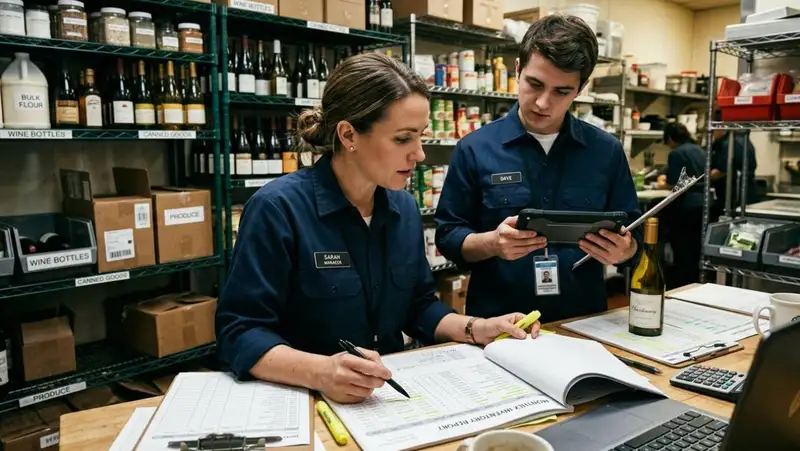
Inventory reports help restaurant owners see what is really happening across every location. Without reports, inventory decisions are often based on manager feedback, end-of-month food cost numbers, or rough assumptions. That can make it hard to know which stores are performing well, which ones are wasting product, and which ones need closer support.
For multi-location restaurants, reports are valuable because they turn inventory activity into measurable performance. Instead of only asking, "Did each store complete inventory?" owners can ask better questions - Which location is using more product than expected? Which store has the highest waste? Which vendor prices are increasing? Which location is carrying too much stock? Which store is running out of key ingredients too often?
Restaurant owners should review several key inventory reports -
1. Food cost percentage by location - This shows how much each store spends on food compared to sales. If one location has a higher food cost percentage than others, owners can investigate purchasing, portioning, waste, or pricing issues.
2. Theoretical vs. actual usage - This compares how much inventory should have been used based on sales against how much was actually used. A large gap may point to over-portioning, theft, incorrect recipes, waste, or count errors.
3. Waste reports - Waste reports show what products are being lost, how often, and at which locations. This helps owners identify training issues, over-prepping, storage problems, or poor forecasting.
4. Vendor spend reports - These reports show how much each location is purchasing from each vendor. Owners can use this data to spot unauthorized buying, price changes, or inconsistent ordering habits.
5. Inventory turnover reports - Turnover shows how quickly product is being used and replaced. Slow turnover may mean a location is over-ordering, while fast turnover may signal strong sales or risk of stock-outs.
6. Stock-on-hand reports - These reports show current inventory levels by location. They help owners understand where product is available, where shortages may happen, and where excess stock may need attention.
A single location with high waste one week may not be a major problem. But if the same location shows high waste, high food cost, and high variance for several weeks, the owner has a clear signal that something needs to be fixed.
Strong inventory reporting gives restaurant owners visibility across the full business. It helps them identify patterns, coach managers, adjust purchasing, reduce waste, and protect margins. When reports are reviewed regularly, owners can move from reacting to problems after profits drop to correcting issues before they become expensive.
Transform Your Restaurant Operations Now!
Effortless Inventory Tracking with Altametrics!
Improve Purchasing and Vendor Control
Purchasing becomes harder to manage as a restaurant grows into multiple locations. Each store may have different managers placing orders, different delivery schedules, different storage needs, and different sales patterns. Without clear purchasing rules, one location may follow approved vendors while another buys from outside suppliers. One store may order based on actual usage, while another orders based on habit. Over time, these small differences can create higher food costs, inconsistent product quality, and weaker inventory control.
For multi-location restaurant owners, vendor control starts with structure. Every location should know which vendors are approved, which items can be ordered, what prices are expected, and who has authority to place or approve purchases. This helps prevent unnecessary buying, duplicate orders, price surprises, and product substitutions that affect recipes or menu consistency.
A strong purchasing process should include -
1. Approved vendor lists - Each location should order from approved suppliers whenever possible. This keeps product quality, pricing, and delivery expectations more consistent.
2. Standardized order guides - Managers should use the same item list when placing orders. This reduces mistakes, prevents unauthorized products, and helps keep recipes consistent across locations.
3. Purchase approval rules - Owners should define which orders need approval, especially large orders, emergency purchases, high-cost items, or products outside the normal order guide.
4. Invoice matching - Each location should compare what was ordered, what was delivered, and what was billed. This helps catch price changes, missing items, incorrect quantities, and vendor billing errors.
5. Delivery checks - Managers should inspect deliveries before accepting them. They should verify quantity, quality, temperature, packaging, and expiration dates when needed.
6. Vendor price tracking - Owners should monitor price changes across locations. If one store is paying more for the same item, it may signal a contract issue, ordering error, or vendor inconsistency.
Centralized purchasing rules do not mean every location must order the exact same amount. Each store still needs flexibility based on demand, volume, and storage capacity. However, the process should be controlled enough that owners can see what is being purchased, from whom, at what price, and why.
Better vendor and purchasing control helps restaurant owners protect margins before inventory problems happen. When ordering is consistent, invoices are checked, and vendor pricing is monitored, owners can reduce waste, prevent unnecessary spending, and keep food costs more predictable across every location.
Use Inventory Technology
Managing inventory across multiple restaurant locations becomes much easier when owners have one system for visibility, tracking, and reporting. Manual spreadsheets, paper count sheets, and location-by-location updates may work for a single restaurant, but they can quickly become unreliable as the business grows. When each store manages inventory separately, owners may not see problems until food costs rise, products run out, or reports do not match.
Inventory technology helps bring every location into one connected process. Instead of waiting for managers to send updates manually, owners can view inventory activity across the business from a centralized dashboard. This gives them a clearer picture of what each location has on hand, what has been ordered, what has been wasted, what has been transferred, and where costs are moving.
A strong multi-location inventory system should help restaurant owners manage several key areas -
1. Real-time inventory visibility - Owners can see stock levels by location instead of relying on delayed reports or manager updates.
2. Standardized item tracking - Each store can use the same item names, units, categories, and count procedures, which helps improve reporting accuracy.
3. Recipe and ingredient tracking - Inventory can connect to recipes so owners can compare expected usage against actual usage.
4. Purchase and invoice management - Technology can help track orders, vendor pricing, deliveries, and invoice details in one place.
5. Waste and transfer logs - Managers can record waste, spoilage, comps, employee meals, and transfers so product movement is easier to review.
6. Multi-location reporting - Owners can compare food cost, variance, usage, waste, and purchasing trends across all locations.
7. Alerts and approvals - Systems can flag unusual spending, low stock, high waste, or purchases that need approval.
The biggest benefit of inventory technology is control. It helps restaurant owners move away from guesswork and toward consistent, data-driven decisions. Instead of asking each manager for separate updates, owners can review location performance from one place and act faster when something looks wrong.
Technology does not replace strong inventory habits. Restaurants still need trained managers, accurate counts, clean storage areas, approved purchasing rules, and regular review routines. However, the right system makes those habits easier to follow across every location.
For multi-location restaurant owners, inventory technology creates the structure needed to scale. It helps protect margins, reduce waste, improve purchasing accuracy, and keep every store aligned. When inventory is managed through one connected system, owners gain the visibility they need to run multiple locations with more confidence and less operational confusion.
Must-Read Content

Inventory management for restaurants
How to Improve Inventory Management for Restaurants

Theoretical vs actual
Theoretical vs Actual Food Cost Formula for Restaurants

Bar and liquor inventory
How to Manage Bar and Liquor Inventory
Stock control
Stock Control Best Practices for Restaurant Owners
Perishable food inventory
Perishable Food Inventory Management for Restaurant Owners
Frequently Asked Questions
How can inventory reports help compare locations?
Inventory reports allow owners to compare food cost, waste, usage, purchasing, and variance across stores. This helps identify patterns, such as one location over-ordering, another wasting product, or another using more ingredients than expected.
What is the biggest benefit of centralized inventory control?
The biggest benefit is visibility. Centralized inventory control helps owners see what is happening across every location, catch problems faster, improve purchasing decisions, reduce waste, and manage food costs with more confidence.
How can restaurant owners standardize inventory across locations?
Owners can standardize inventory by using the same item names, units of measure, pack sizes, count schedules, storage categories, and count procedures at every location. This helps create cleaner data and more accurate reports.
How can owners reduce food waste across multiple locations?
Owners can reduce waste by setting accurate par levels, tracking waste daily, reviewing prep quantities, training staff on portion control, checking storage practices, and comparing waste reports by location. When waste is reviewed regularly, owners can spot patterns before they become expensive.