
Consistency, Accountability, and Operational Flow
That's where a checklist can help. A good checklist makes sure nothing important is forgotten. It gives your staff a clear list of what to do, when to do it, and who's in charge of doing it. Whether it's for opening in the morning, cleaning throughout the day, or prepping before the dinner rush, a checklist keeps everyone on the same page.
When used the right way, checklists can help your team stay organized, work faster, and avoid mistakes - making your whole restaurant run more smoothly.
Identify Your Operational Categories
Here are the most common categories you'll want to focus on -
1. Opening Tasks - These are the things your team needs to do before the first customer walks in. This might include unlocking doors, turning on equipment, brewing coffee, refilling condiments, or setting up the front counter.
2. Prep Work - These tasks involve getting food ready before the rush starts. It includes chopping vegetables, portioning proteins, labeling ingredients, and restocking the line.
3. Cleaning Tasks - This covers things like wiping down surfaces, sanitizing tables, sweeping floors, and cleaning equipment. These can be broken into daily, shift-based, or weekly lists.
4. Closing Tasks - At the end of the day, there's usually a final round of cleaning, shutting down equipment, counting the drawer, and locking up the building.
5. Safety and Maintenance Checks - Some tasks make sure the restaurant stays safe and up to code, like checking fridge temperatures or testing the dishwasher.
Once you've grouped your tasks by category, it's easier to decide what needs to be done each day and who should do it. Keeping your checklists organized by type helps your team stay focused, especially during busy hours.
Create, Implement, and Execute Multiple Daily Checklists
Streamline Your Operations with Altametrics
Break Down Each Task Step-by-Step
Instead of writing Clean the kitchen, break it into smaller steps like -
-Wipe down prep tables with sanitizer
-Sweep and mop the kitchen floor
-Take out all trash and replace liners
-Sanitize all cutting boards
This makes each task easier to complete and check off. It also helps prevent the common I thought someone else was doing it problem that happens when instructions aren't clear.
You should also include details like -
-How often the task needs to be done (once per shift, daily, weekly)
-Who's responsible (line cook, dishwasher, manager)
-Time to complete (if important to workflow)
Another tip - keep your wording consistent. Use action words like sanitize, refill, turn off, label, and restock to make each task sound clear and actionable.
When each item on your checklist is specific and easy to understand, you'll notice fewer missed steps, better teamwork, and more confidence from your staff. The goal is to take the guesswork out of daily tasks so your team can focus on doing things right the first time.
Create Templates for Each Checklist Type
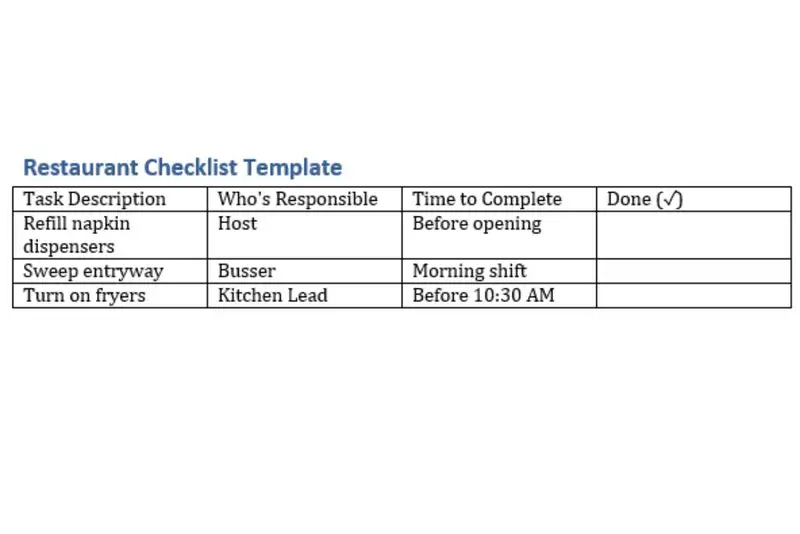
A good checklist template is simple, clear, and easy to update. The above table is a basic format to follow -
You can create these in a printed binder, a dry-erase board, or use a digital tool if you want it on mobile devices. The key is to keep the format clean and easy to use so staff can quickly check off items throughout the shift.
To save time, use the same structure across all templates. Once you create a few, you can copy and tweak them for other parts of your operation. For example, your closing checklist may look similar to your opening checklist, just in reverse order.
When your templates are done, you'll have a reliable system to hand off to new hires or team leads. The goal is to make the routine part of the job easier, so everyone knows what's expected and can stay focused during busy shifts.
Assign Roles and Ownership
Start by reviewing each checklist and noting who's best suited for each task. For example -
-A dishwasher can be responsible for cleaning the sinks and taking out the trash.
-A line cook may handle restocking the prep station and labeling ingredients.
-A shift lead might do temperature checks or ensure all opening tasks are completed.
Assigning tasks by role, rather than name, is especially helpful in restaurants with rotating staff. It also makes onboarding new team members easier, since the checklist already outlines what's expected for each position.
To make this work smoothly, include checklist reviews in your shift communications. Whether it's a quick huddle at the start or a check-in during a slower period, use that time to remind staff about their responsibilities and check off any completed tasks together.
Ownership matters. When employees know a task is theirs, they're more likely to take it seriously. You can even include a final supervisor review line at the bottom of each checklist for added accountability.
In the end, assigning clear roles ensures that tasks don't slip through the cracks - and your team knows exactly what's expected every shift.
Effortlessly Create, Implement, and Execute Multiple Daily Checklists
Optimize Your Daily Operations with Altametrics
Implement and Communicate with Your Team
Start by introducing the checklists during a team meeting or pre-shift huddle. Walk everyone through each section, explain why the checklist exists, and show how it helps the whole restaurant stay on track. Make sure your team understands how to check off tasks, who reviews them, and what happens if something is missed.
Use the same approach when bringing on new hires. During employee training, include a walkthrough of each checklist that applies to their role. This builds good habits from the beginning and helps new staff feel confident about what's expected.
Post checklists in visible areas - like the prep area, near the time clock, or behind the service station. If you're using a digital system, make sure staff know how to log in and access it from a phone or tablet.
Most importantly, make checklist use a regular part of your shift routine. Don't just mention it once and forget it. Use it during opening, mid-shift, and closing reviews to keep everyone aligned.
When your team knows what to do and where to find the list, it takes the guesswork out of the day. Everyone works better - and faster - when there's a clear plan in place.
Monitor, Audit, and Update Checklists
Start by observing how your team interacts with the checklists during shifts. Are tasks being completed on time? Are items being checked off properly? Are there any points where things consistently get skipped or misunderstood? This gives you insight into what's working and what needs improvement.
Schedule regular audits - weekly, bi-weekly, or monthly depending on how often things change in your restaurant. During these audits, review completed checklists and talk with team members about any challenges they've faced. Ask questions like -
-Are any tasks unclear or unnecessary?
-Are there new tasks that should be added?
-Do the right people have access to the checklist?
It's also important to update checklists whenever your operations shift. If you add a new menu item, change your opening hours, or reorganize the kitchen layout, your checklists should reflect that.
Keep your updates simple and don't be afraid to remove steps that no longer serve a purpose. The goal is to keep the checklist accurate, easy to follow, and practical for your current team setup.
By regularly reviewing and improving your checklists, you show your team that the system matters - and that helps everyone stay focused on doing things the right way, every day.
Make Checklists Part of Your Restaurant Culture

When checklists are used every day - not just during busy shifts or when a manager is watching - they create a sense of structure and accountability. Your team knows exactly what's expected, when it needs to be done, and who is responsible. That kind of clarity helps reduce stress, cut down on mistakes, and keep operations running even when things get hectic.
To make checklists part of your culture, stay consistent. Use them during every shift, talk about them in team meetings, and encourage your staff to give feedback on what's working and what could be better. If something on the list feels outdated or confusing, fix it. This shows your team that the checklist isn't just a chore - it's a tool that's meant to help them do their jobs more easily and effectively.
Over time, your staff will begin to rely on checklists not because they're told to, but because they make the day run smoother. That's when you know your system is working.
Take Control of Your Operations Team's Tasks
Discover Seamless Workflow Management with Altametrics
Frequently
Asked Questions
What types of checklists should I use in my restaurant?
Who should be responsible for completing the checklist?
Should checklists be used for every shift or just once a day?
How detailed should each checklist item be?
Must-Read Content
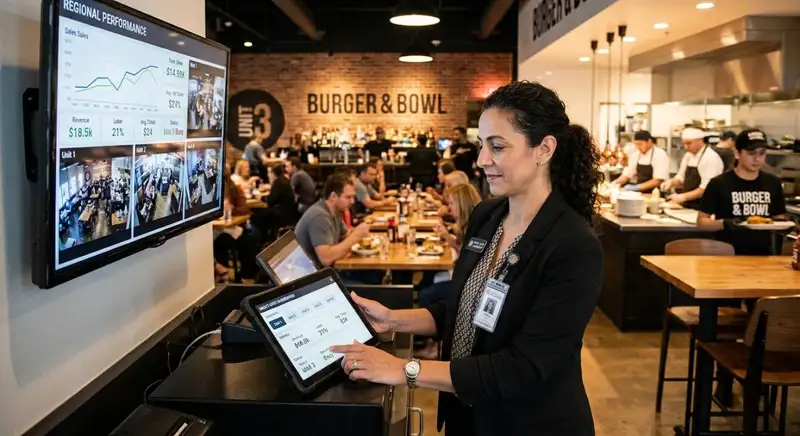
How AI Is Transforming Multi-Unit Restaurant Management
AI helps multi-unit restaurant operators forecast demand, optimize labor, detect anomalies, ensure consistency, refine menus and pricing, and adopt tools gradually, freeing managers to focus on hospitality.

Restaurant ERP Explained - What It Is, How It Works, and Its Benefits
Restaurant ERP connects essential operations, improves cost control, centralizes business information, streamlines workflows, and helps owners make informed management decisions.

10 Benefits of All-in-One Restaurant Management Software
All-in-one restaurant management software streamlines operations, improves communication, reduces administrative work, controls costs, strengthens workforce management, and supports informed business decisions.