Overview
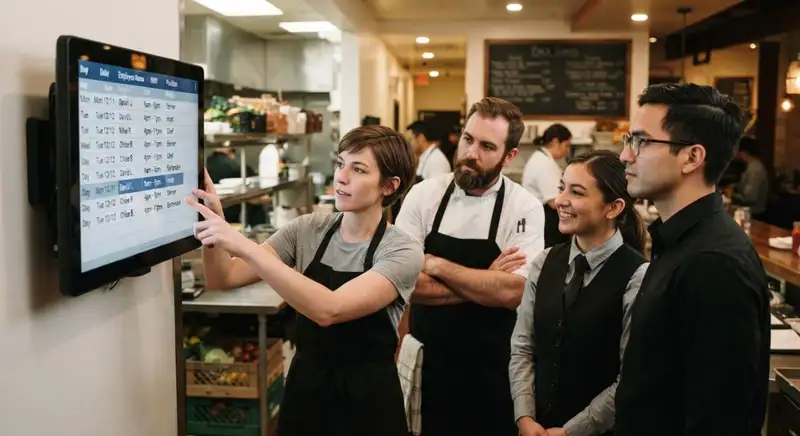
An effective restaurant schedule helps balance employee working hours with the restaurant's daily staffing requirements. Instead of assigning shifts based only on employee availability or manager preferences, restaurant owners should consider expected customer demand, historical sales patterns, employee availability, and projected labor costs. This approach makes it easier to determine how many employees are needed for each shift and how their hours should be distributed throughout the week.
Preventing overtime starts before employees clock in. When managers review projected weekly hours before publishing schedules, they can identify potential overtime risks and adjust shifts accordingly. For example, redistributing hours among available employees or using staggered shifts can help maintain adequate coverage without unnecessarily extending individual workdays.
The following restaurant scheduling tips explain how to forecast staffing needs, distribute employee hours, manage shift changes, and monitor actual working hours to reduce overtime and maintain better control over labor costs.
Employee Overtime Rules and Scheduling Requirements

Consider the following factors when planning employee schedules -
1. Understand daily and weekly overtime thresholds - Determine when employees become eligible for overtime under applicable federal, state, and local labor laws. In the United States, the Fair Labor Standards Act (FLSA) generally requires covered, nonexempt employees to receive overtime pay at one and a half times their regular rate for hours worked over 40 in a workweek. Some states have additional daily overtime requirements.
2. Identify employee classifications - Not every employee follows the same overtime rules. Restaurant owners should understand which employees are classified as exempt or nonexempt. Most hourly restaurant employees are nonexempt and generally qualify for overtime when applicable thresholds are exceeded.
3. Account for actual hours worked - Overtime calculations should be based on hours employees actually work, not simply the hours listed on the schedule. Early clock-ins, late clock-outs, extended shifts, and additional work assignments can push employees beyond applicable limits.
4. Understand required meal and rest periods - Some jurisdictions require employers to provide specific meal and rest periods. These requirements should be considered when assigning shifts and planning staffing coverage. Managers should also understand whether meal periods qualify as unpaid time under applicable laws.
5. Maintain accurate timekeeping records - Track employee start times, end times, meal periods, and total hours worked. Accurate records help managers identify employees approaching overtime thresholds and make informed scheduling adjustments.
Review overtime exposure before publishing schedules. Managers should calculate projected weekly hours for every employee and compare them against applicable overtime thresholds. If an employee is already scheduled close to the overtime limit, additional shifts should generally be assigned to another qualified employee when practical.
Understanding overtime requirements gives restaurant owners a foundation for building compliant schedules. It also helps prevent avoidable payroll expenses by identifying potential overtime risks before employees begin their shifts.
Take Charge of Your Schedule
Smarter Scheduling Made Easy with Altametrics
Forecast Restaurant Demand
Use sales data and customer traffic patterns to estimate staffing requirements. Restaurant owners should review historical sales records to understand when customer demand increases or decreases. Point of sale (POS) data can help identify busy days, peak ordering times, and differences in sales volume between lunch and dinner shifts.
Consider the following strategies when forecasting restaurant demand -
1. Analyze historical sales data - Review sales from previous weeks and months to identify recurring demand patterns. Compare sales by day of the week and time of day to determine when additional employees are needed.
2. Identify peak operating hours - Determine when the restaurant experiences the highest customer traffic. Schedule enough employees to handle these periods without assigning unnecessary hours during slower parts of the day.
3. Account for seasonal fluctuations - Consider holidays, local events, weather conditions, and seasonal changes that may influence customer demand. Adjust staffing levels to reflect expected changes in restaurant traffic.
4. Evaluate staffing needs by department - Determine how many employees are required in the kitchen, dining area, bar, and other departments. Different positions may experience different workloads depending on customer volume.
5. Compare forecasted demand with actual results - After each scheduling period, compare projected sales and staffing requirements with actual performance. Use these differences to improve future scheduling decisions.
Connect staffing levels to expected business activity rather than relying on fixed schedules. For example, a restaurant may need more kitchen employees during Friday dinner service but fewer employees during Monday afternoon hours. Scheduling the same number of employees for both periods can result in unnecessary labor expenses.
Accurate demand forecasting helps restaurant owners determine when additional coverage is necessary and when employee hours can be reduced. By aligning staffing levels with expected customer demand, managers can maintain service quality while minimizing unnecessary overtime and controlling labor costs.
Distribute Employee Hours
Review projected employee hours before assigning shifts. Managers should calculate how many hours each employee is expected to work during the scheduling period. This makes it easier to identify employees approaching overtime thresholds before additional shifts are assigned.
Consider these scheduling strategies to distribute employee hours more effectively -
1. Set weekly hour limits - Establish target working hours for each employee based on their employment status, availability, and applicable overtime requirements. Use these targets when building weekly schedules to avoid assigning more hours than necessary.
2. Balance full-time and part-time employees - Distribute shifts between full-time and part-time employees according to staffing requirements. Part-time employees can help cover additional hours without consistently extending the shifts of full-time employees, provided their schedules comply with applicable labor laws.
3. Monitor employees approaching overtime - Review projected weekly hours before assigning additional shifts. If an employee is close to an overtime threshold, consider assigning the shift to another qualified employee with available hours.
4. Distribute shifts according to employee availability - Collect employee availability before preparing schedules. This helps managers assign shifts more efficiently, reduce scheduling conflicts, and avoid relying on employees who may need to extend their working hours to cover gaps.
5. Rotate additional shifts fairly - Avoid repeatedly assigning extra hours to the same employees. Distributing available shifts among qualified team members helps maintain balanced workloads and reduces the risk of recurring overtime.
Pay attention to how hours accumulate throughout the workweek. An employee scheduled for several long shifts early in the week may have limited availability for additional coverage later. Managers should review the entire weekly schedule rather than evaluating each shift independently.
For example, if an employee is projected to work 38 hours by Friday, assigning another eight-hour shift could result in six hours of overtime under a standard 40-hour workweek. Assigning that shift to another qualified employee with available hours may help prevent additional overtime expenses.
Distributing employee hours strategically gives restaurant owners better control over weekly labor expenses. It also creates more predictable schedules, helps employees manage their availability, and ensures that staffing requirements are met without unnecessarily increasing working hours.
Use Overlapping Shifts Strategically
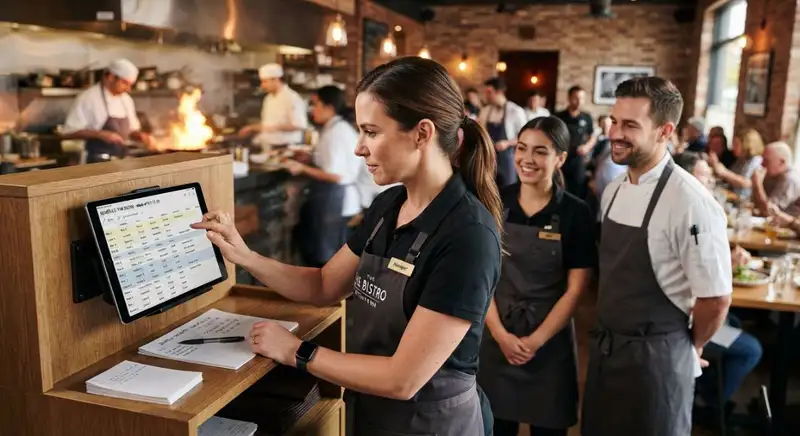
Plan overlapping shifts around peak customer demand. Restaurants often experience higher customer traffic during lunch and dinner services. Scheduling additional employees to start shortly before these periods can help managers prepare for increased workloads without keeping the entire team on the clock throughout the day.
Consider these strategies when planning overlapping shifts -
1. Stagger employee start times - Schedule employees to begin their shifts at different times based on expected customer traffic. For example, kitchen employees may start before the lunch rush, while additional front-of-house employees arrive closer to peak dining hours.
2. Align shift endings with demand - Avoid keeping employees scheduled beyond the period when their positions are needed. Adjust shift end times according to expected customer volume and operational requirements.
3. Schedule additional coverage during peak hours - Identify the busiest periods and assign overlapping shifts to departments experiencing higher workloads. This helps maintain service speed without increasing staffing levels throughout the entire day.
4. Coordinate front-of-house and back-of-house schedules - Ensure that servers, hosts, cooks, and dishwashers are scheduled according to their respective workloads. Having too many employees in one department while another remains understaffed can create operational inefficiencies.
5. Use shorter shifts when appropriate - Consider shorter shifts for employees who only need to cover specific busy periods. This can provide additional staffing during peak hours without unnecessarily increasing total weekly working hours.
Avoid creating overlapping shifts without considering total employee hours. Although staggered schedules can improve staffing efficiency, managers should calculate the combined hours assigned to each employee. Poorly planned overlaps can still contribute to overtime if employees are regularly asked to extend their shifts or cover additional periods.
For example, a restaurant expecting a busy lunch service may schedule some employees from 9 a.m. to 3 p.m. and others from 11 a.m. to 5 p.m. This creates additional coverage during midday hours while allowing staffing levels to decrease as customer traffic slows.
Strategic shift overlaps help restaurant owners match labor hours with operational demand. By adjusting employee start and end times, managers can maintain adequate coverage during busy periods, reduce unnecessary staffing during slower hours, and prevent avoidable increases in labor costs.
Effortlessly Schedule, Seamlessly Manage
Schedule Like a Pro with Altametrics
Manage Shift Changes and Unexpected Absences
Establish a backup staffing plan before scheduling problems occur. Restaurant owners should prepare for unexpected absences by identifying qualified employees who may be available to cover open shifts. Having alternative staffing options makes it easier to maintain adequate coverage without automatically assigning additional hours to employees who are already approaching overtime.
Consider these strategies for managing schedule changes -
1. Create a list of available backup employees - Identify employees who can cover additional shifts when someone calls out. Consider their availability, qualifications, current working hours, and overtime eligibility before assigning coverage.
2. Establish clear shift-swapping procedures - Allow employees to request shift swaps through an organized approval process. Managers should review proposed changes to ensure the replacement employee has the necessary skills and will not exceed applicable working-hour limits.
3. Monitor overtime before approving additional shifts - Check each employee's projected weekly hours before approving schedule changes. If an employee is approaching an overtime threshold, consider assigning the shift to another qualified team member.
4. Set guidelines for extended shifts - Establish procedures for employees who need to stay late because of unexpected customer demand or operational issues. Managers should monitor additional working hours and ensure all hours worked are accurately recorded and compensated.
5. Cross-train employees for scheduling flexibility - Train employees to perform multiple roles where appropriate. Cross-trained employees give managers more options when filling staffing gaps without depending on a limited number of employees to cover every unexpected absence.
6. Communicate schedule changes promptly - Notify employees about approved changes as early as possible. Clear communication helps prevent confusion, missed shifts, and additional scheduling problems.
Do not treat overtime as the default solution to staffing shortages. Before extending an employee's shift, managers should review available coverage, redistribute responsibilities when practical, and determine whether another qualified employee can take over the remaining work.
For example, when a kitchen employee calls out before a dinner rush, a manager can review the availability of cross-trained employees and identify someone who can cover the shift without exceeding their projected weekly hours. This helps maintain kitchen operations while limiting unnecessary overtime.
Managing unexpected schedule changes requires preparation, communication, and consistent oversight. By maintaining backup staffing options and reviewing employee hours before approving additional shifts, restaurant owners can respond to staffing disruptions without losing control of labor expenses.
Track Scheduled Hours and Actual Employee Working Hours
Compare scheduled hours with actual hours worked throughout the workweek. Managers should regularly review timekeeping records to identify discrepancies and determine whether employees are accumulating more hours than anticipated.
Consider these strategies for monitoring employee working hours -
1. Compare scheduled and actual working hours - Review employee schedules alongside clock-in and clock-out records. Identify differences between planned shifts and actual working hours to understand where additional labor hours are occurring.
2. Monitor early clock-ins and late clock-outs - Employees who regularly arrive before their scheduled shifts or stay after their shifts end can accumulate additional working hours. Establish clear timekeeping procedures and ensure all time worked is accurately recorded and compensated.
3. Set overtime alerts - Monitor employees approaching applicable overtime thresholds throughout the workweek. Automated alerts can help managers identify potential overtime risks early enough to adjust future staffing assignments where practical.
4. Review labor costs by department - Evaluate working hours and labor expenses across different restaurant departments. Comparing front-of-house and back-of-house labor costs can help managers identify areas where staffing levels may need adjustment.
5. Investigate recurring scheduling discrepancies - Look for patterns involving extended shifts, frequent shift changes, and employees consistently working beyond their scheduled hours. Determine whether these issues result from inaccurate demand forecasts, insufficient staffing, or inefficient shift planning.
6. Adjust future schedules using actual labor data - Use timekeeping records and labor reports to improve upcoming schedules. If certain shifts regularly require additional coverage, revise staffing allocations instead of repeatedly relying on overtime.
Pay attention to the difference between scheduled labor and actual labor. An employee may be scheduled for 35 hours but work 39 hours because of early arrivals, extended shifts, or additional assignments. Although the employee has not exceeded a standard 40-hour weekly overtime threshold, those additional hours still increase labor expenses.
Restaurant owners should also ensure managers follow applicable timekeeping and wage requirements. Employees must be paid for all compensable time worked, even when they work outside their scheduled hours or without prior approval.
Consistent time and attendance monitoring helps restaurant owners identify overtime risks before they become recurring payroll problems. By comparing scheduled hours with actual working hours, managers can make better staffing decisions, improve scheduling accuracy, and maintain greater control over restaurant labor costs.
Use Restaurant Scheduling Technology
Use scheduling software to improve workforce planning and prevent unnecessary overtime. Restaurant owners can use technology to automate scheduling tasks, monitor employee hours, and identify potential staffing problems before they affect payroll.
Consider these capabilities when evaluating restaurant scheduling software -
1. Automate employee scheduling - Use scheduling tools to create employee schedules based on staffing requirements, availability, and projected demand. Automated scheduling reduces manual work and helps managers distribute shifts more efficiently.
2. Monitor projected labor hours - Track employee working hours as schedules are created and updated. This helps managers identify employees approaching overtime thresholds before publishing schedules or approving additional shifts.
3. Use automated overtime alerts - Look for scheduling systems that notify managers when employees are approaching applicable overtime limits. Early warnings allow managers to review staffing options and make adjustments where appropriate.
4. Connect scheduling with time and attendance - Integrate employee schedules with timekeeping systems to compare planned shifts against actual clock-in and clock-out records. This makes it easier to identify extended shifts, early arrivals, and unexpected working hours.
5. Use demand forecasting to optimize staffing - Scheduling technology with forecasting capabilities can help managers estimate staffing requirements based on historical sales, customer demand, and operating patterns. This reduces the likelihood of overstaffing during slow periods or understaffing during peak hours.
6. Improve employee scheduling communication - Provide employees with access to their schedules, shift updates, time-off requests, and shift-swapping options. Centralized communication helps managers coordinate changes and maintain consistent staffing coverage.
Connect scheduling decisions with actual restaurant performance. Managers should regularly review labor reports, employee working hours, and staffing levels to determine whether schedules are meeting operational requirements. Using this information to improve future schedules helps restaurants maintain better control over labor expenses.
Control Restaurant Labor Costs with Altametrics
Creating effective employee schedules requires accurate demand forecasting, visibility into working hours, and the ability to identify overtime risks before they increase payroll expenses. Altametrics helps restaurant owners bring these workforce management activities together through an all-in-one workforce management tool.
With Altametrics, restaurant managers can use AI-powered scheduling to align employee availability, staffing requirements, labor budgets, and demand forecasts. The platform also helps identify potential overtime and compliance risks, monitor labor targets, and manage employee shift changes. Connected time and attendance capabilities provide additional visibility into actual working hours, helping managers compare scheduled labor with real workforce activity.
Rather than relying on manual scheduling processes, restaurant owners can use Altametrics to make more informed staffing decisions, reduce unnecessary overtime, and maintain adequate employee coverage across shifts.
Ready to improve your restaurant scheduling and control labor costs? Explore Altametrics Workforce Scheduling and schedule a personalized demo to see how AI-powered workforce management can help your restaurant build smarter schedules, monitor labor costs, and manage employee hours more effectively.
Say Goodbye to Scheduling Stress
Simplify Your Workflow with Altametrics
Frequently
Asked Questions
How does sales forecasting improve restaurant scheduling?
What causes unexpected overtime in restaurants?
How does poor restaurant scheduling increase labor costs?
What is the best way to create a restaurant employee schedule?
Must-Read Content

Why Do Restaurant Staff Quit? Common Reasons and How to Prevent Them
Restaurant staff quit because of low wages, poor management, burnout, and scheduling issues. Learn practical strategies to improve retention and reduce turnover.
How to Maintain Hiring Compliance Across Multiple Restaurant Locations
Restaurant groups can maintain hiring compliance by standardizing processes, centralizing records, assigning ownership, training managers, adapting to local laws, auditing regularly, and using technology for ongoing monitoring.

10 Employee Retention Strategies for Restaurant Owners
Restaurant owners can cut turnover by paying fairly, onboarding well, scheduling flexibly, promoting growth, recognizing effort, offering meaningful benefits, listening to feedback, and hiring carefully for fit.