
Overview
Running a restaurant requires managing multiple operations, including inventory, purchasing, food costs, employee schedules, sales, and financial records. As businesses grow, coordinating these activities through separate software platforms, spreadsheets, and manual processes can become increasingly difficult. Disconnected systems often create information gaps, reporting delays, and unnecessary administrative work.
Restaurant Enterprise Resource Planning (ERP) addresses these challenges by connecting essential business functions through an integrated software system. Instead of managing each department independently, restaurant owners can centralize operational information, coordinate workflows, and monitor business performance. Depending on the platform, ERP capabilities may include inventory management, accounting, purchasing, workforce management, and sales reporting.
Restaurant ERP can help improve operational efficiency, control expenses, and provide better visibility into business performance. By connecting information across departments, owners can identify inefficiencies, reduce repetitive tasks, and make more informed decisions. It can also simplify management for restaurant groups overseeing multiple locations.
However, ERP is not necessary for every restaurant. Smaller establishments with straightforward operations may already have sufficient management tools, while growing businesses may need more integrated systems. Understanding how Restaurant ERP works and which problems it solves helps owners determine whether it is a worthwhile investment.
Restaurant Enterprise Resource Planning (ERP) addresses these challenges by connecting essential business functions through an integrated software system. Instead of managing each department independently, restaurant owners can centralize operational information, coordinate workflows, and monitor business performance. Depending on the platform, ERP capabilities may include inventory management, accounting, purchasing, workforce management, and sales reporting.
Restaurant ERP can help improve operational efficiency, control expenses, and provide better visibility into business performance. By connecting information across departments, owners can identify inefficiencies, reduce repetitive tasks, and make more informed decisions. It can also simplify management for restaurant groups overseeing multiple locations.
However, ERP is not necessary for every restaurant. Smaller establishments with straightforward operations may already have sufficient management tools, while growing businesses may need more integrated systems. Understanding how Restaurant ERP works and which problems it solves helps owners determine whether it is a worthwhile investment.
What Is Restaurant ERP?
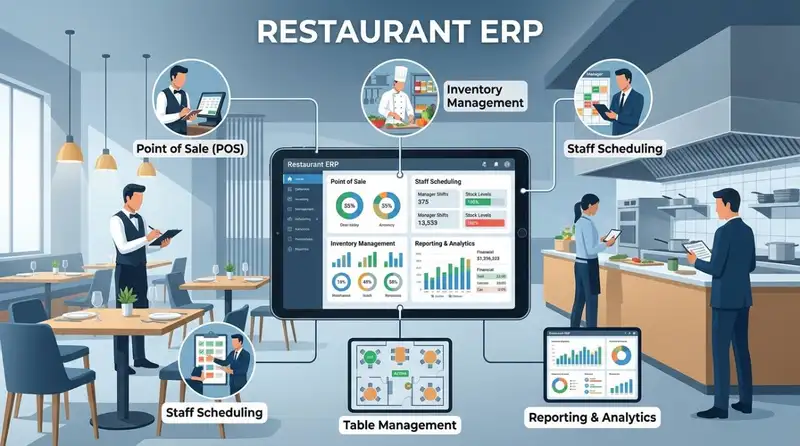
Restaurant Enterprise Resource Planning (ERP) is a type of business management software that connects different restaurant operations through a centralized system. It helps restaurant owners manage essential business functions, such as inventory, purchasing, accounting, workforce management, and financial reporting, without relying entirely on separate tools for each department.
The main purpose of Restaurant ERP is to bring operational information together so that different departments can work with consistent, accessible data. Rather than managing inventory in one application, employee schedules in another, and financial records in spreadsheets, an ERP system connects these activities within a broader management platform.
For example, when a restaurant records sales through its POS system, an integrated ERP platform can use that information to update inventory records, track ingredient consumption, and provide financial reporting data. This connection gives managers a clearer understanding of how daily sales affect food costs, stock levels, and overall profitability.
Restaurant ERP typically supports several important business functions -
1. Inventory Management - Tracks ingredient quantities, stock movements, usage, and food costs. It helps managers identify shortages, monitor waste, and maintain appropriate inventory levels.
2. Financial Management - Organizes financial information, including revenue, expenses, accounts payable, and budgets. This helps restaurant owners monitor financial performance and understand where money is being spent.
3. Purchasing Management - Coordinates supplier information, purchase orders, and procurement activities. Managers can monitor purchasing expenses and make decisions based on current inventory requirements.
4. Workforce Management - Helps organize employee schedules, attendance, timekeeping, and labor expenses. This gives managers better visibility into staffing requirements and labor costs.
5. Sales Management and POS Integration - Connects transaction information with other operational functions. Sales data can help inform inventory planning, financial reporting, and performance analysis.
6. Reporting and Analytics - Consolidates operational and financial information into reports and dashboards, allowing restaurant owners to monitor important business metrics.
Restaurant ERP is different from using individual restaurant software solutions independently. A standalone inventory application may track stock levels, while accounting software records expenses and revenue. An ERP system aims to connect these functions so that information can move between departments with less manual intervention.
However, not every ERP platform includes every restaurant management feature. Some systems provide comprehensive business management capabilities, while others rely on integrations with specialized POS, payroll, or workforce management applications.
Ultimately, Restaurant ERP provides a centralized approach to managing restaurant operations. Its purpose is to reduce information gaps between departments, improve coordination, and give restaurant owners better control over their business activities.
The main purpose of Restaurant ERP is to bring operational information together so that different departments can work with consistent, accessible data. Rather than managing inventory in one application, employee schedules in another, and financial records in spreadsheets, an ERP system connects these activities within a broader management platform.
For example, when a restaurant records sales through its POS system, an integrated ERP platform can use that information to update inventory records, track ingredient consumption, and provide financial reporting data. This connection gives managers a clearer understanding of how daily sales affect food costs, stock levels, and overall profitability.
Restaurant ERP typically supports several important business functions -
1. Inventory Management - Tracks ingredient quantities, stock movements, usage, and food costs. It helps managers identify shortages, monitor waste, and maintain appropriate inventory levels.
2. Financial Management - Organizes financial information, including revenue, expenses, accounts payable, and budgets. This helps restaurant owners monitor financial performance and understand where money is being spent.
3. Purchasing Management - Coordinates supplier information, purchase orders, and procurement activities. Managers can monitor purchasing expenses and make decisions based on current inventory requirements.
4. Workforce Management - Helps organize employee schedules, attendance, timekeeping, and labor expenses. This gives managers better visibility into staffing requirements and labor costs.
5. Sales Management and POS Integration - Connects transaction information with other operational functions. Sales data can help inform inventory planning, financial reporting, and performance analysis.
6. Reporting and Analytics - Consolidates operational and financial information into reports and dashboards, allowing restaurant owners to monitor important business metrics.
Restaurant ERP is different from using individual restaurant software solutions independently. A standalone inventory application may track stock levels, while accounting software records expenses and revenue. An ERP system aims to connect these functions so that information can move between departments with less manual intervention.
However, not every ERP platform includes every restaurant management feature. Some systems provide comprehensive business management capabilities, while others rely on integrations with specialized POS, payroll, or workforce management applications.
Ultimately, Restaurant ERP provides a centralized approach to managing restaurant operations. Its purpose is to reduce information gaps between departments, improve coordination, and give restaurant owners better control over their business activities.
Streamline Operations
Control Menus, Items, and Prices Seamlessly with Altametrics
How Does Restaurant ERP Work?
Restaurant ERP works by collecting, organizing, and connecting information from different restaurant operations within a centralized software environment. Instead of allowing departments to manage information independently, the system creates connections between business functions so that updates in one area can inform activities in another.
For example, when a restaurant records a customer transaction through its POS system, the sales information can be transferred to the ERP platform. Depending on the available integrations, this information can update inventory records, contribute to financial reports, and help managers evaluate product demand. This reduces the need to manually transfer information between separate applications.
Here is how Restaurant ERP typically works across different operational areas -
1. Data Collection Across Departments - The ERP system gathers information from different sources, including POS transactions, inventory records, purchasing activities, employee timekeeping, and accounting systems. This creates a centralized source of operational information.
2. Information Integration - The system connects related business functions so that information can be shared between departments. For example, inventory data can inform purchasing decisions, while sales information can contribute to financial reporting and demand analysis.
3. Workflow Automation - Restaurant ERP can automate repetitive administrative activities, such as updating inventory records, generating reports, processing purchase requests, and organizing financial information. Automation capabilities depend on the platform and its integrations.
4. Data Monitoring and Analysis - Managers can use dashboards and reports to monitor important performance indicators, including food costs, labor expenses, inventory levels, sales, and purchasing activity. These insights help identify unusual changes and operational inefficiencies.
5. Business Decision-Making - Restaurant owners can use consolidated information to make decisions about staffing, purchasing, inventory requirements, budgeting, and operational improvements.
Example - How Restaurant ERP Connects Daily Restaurant Operations
Consider a restaurant that sells several menu items throughout the day. Each transaction generates sales information through the POS system. If the POS is integrated with the ERP platform, the recorded sales can help update ingredient usage and inventory information.
When stock levels reach predefined thresholds, the system may alert managers or support purchasing recommendations. Managers can then review inventory requirements, compare supplier prices, and prepare purchase orders. Meanwhile, sales and purchasing information can contribute to financial reports, helping owners understand how revenue and expenses affect profitability.
This process connects several activities that would otherwise require separate tracking and manual coordination.
The role of centralized data is particularly important for multi-location restaurants. Owners can access information from different locations through a shared platform, compare operational performance, monitor purchasing activities, and identify differences in inventory usage or labor expenses.
However, the accuracy of ERP information depends on proper system configuration, reliable data entry, and effective integrations. Restaurant owners must ensure that POS systems, inventory records, employee information, and other connected applications are configured correctly.
Restaurant ERP works by connecting operational information and workflows, giving restaurant owners a more organized way to manage daily activities and monitor overall business performance.
For example, when a restaurant records a customer transaction through its POS system, the sales information can be transferred to the ERP platform. Depending on the available integrations, this information can update inventory records, contribute to financial reports, and help managers evaluate product demand. This reduces the need to manually transfer information between separate applications.
Here is how Restaurant ERP typically works across different operational areas -
1. Data Collection Across Departments - The ERP system gathers information from different sources, including POS transactions, inventory records, purchasing activities, employee timekeeping, and accounting systems. This creates a centralized source of operational information.
2. Information Integration - The system connects related business functions so that information can be shared between departments. For example, inventory data can inform purchasing decisions, while sales information can contribute to financial reporting and demand analysis.
3. Workflow Automation - Restaurant ERP can automate repetitive administrative activities, such as updating inventory records, generating reports, processing purchase requests, and organizing financial information. Automation capabilities depend on the platform and its integrations.
4. Data Monitoring and Analysis - Managers can use dashboards and reports to monitor important performance indicators, including food costs, labor expenses, inventory levels, sales, and purchasing activity. These insights help identify unusual changes and operational inefficiencies.
5. Business Decision-Making - Restaurant owners can use consolidated information to make decisions about staffing, purchasing, inventory requirements, budgeting, and operational improvements.
Example - How Restaurant ERP Connects Daily Restaurant Operations
Consider a restaurant that sells several menu items throughout the day. Each transaction generates sales information through the POS system. If the POS is integrated with the ERP platform, the recorded sales can help update ingredient usage and inventory information.
When stock levels reach predefined thresholds, the system may alert managers or support purchasing recommendations. Managers can then review inventory requirements, compare supplier prices, and prepare purchase orders. Meanwhile, sales and purchasing information can contribute to financial reports, helping owners understand how revenue and expenses affect profitability.
This process connects several activities that would otherwise require separate tracking and manual coordination.
The role of centralized data is particularly important for multi-location restaurants. Owners can access information from different locations through a shared platform, compare operational performance, monitor purchasing activities, and identify differences in inventory usage or labor expenses.
However, the accuracy of ERP information depends on proper system configuration, reliable data entry, and effective integrations. Restaurant owners must ensure that POS systems, inventory records, employee information, and other connected applications are configured correctly.
Restaurant ERP works by connecting operational information and workflows, giving restaurant owners a more organized way to manage daily activities and monitor overall business performance.
Essential Features of Restaurant ERP Software
Restaurant ERP software brings multiple business management capabilities together to help owners coordinate daily operations and maintain better control over costs. While available features vary between platforms, most ERP systems focus on connecting essential functions such as inventory, purchasing, accounting, workforce management, and reporting.
Understanding these features helps restaurant owners determine which capabilities are necessary for their operations and whether an ERP platform can address their existing management challenges.
1. Inventory Management
Inventory management helps restaurant owners monitor ingredient quantities, stock movements, usage, and purchasing requirements. An ERP system can centralize inventory information and provide visibility into what is available, what has been used, and what needs replenishment.
Important capabilities include -
Real-Time Inventory Tracking - Monitor stock levels as inventory is received, transferred, or used.
Ingredient Usage Monitoring - Track ingredient consumption based on recorded sales and recipe information.
Waste Management - Identify spoilage, overportioning, and other sources of inventory loss.
Stock Alerts - Receive notifications when ingredients reach predefined reorder levels.
Food Cost Monitoring - Compare ingredient costs and usage to understand their impact on profitability.
These capabilities help managers make informed purchasing decisions and reduce unnecessary inventory expenses.
2. Financial Management
Financial management provides restaurant owners with a centralized view of their business finances. Instead of reviewing information across multiple disconnected records, managers can use integrated financial tools to monitor revenue, expenses, budgets, and financial performance.
Common capabilities include -
- Revenue and expense tracking.
- Accounts payable and receivable management.
- Budget planning and monitoring.
- Financial reporting and reconciliation.
- Profitability analysis.
By connecting financial information with purchasing, sales, and inventory data, ERP software can help owners understand how operational activities affect their financial results.
3. Purchasing and Supplier Management
Purchasing management helps restaurants organize procurement activities and maintain relationships with suppliers. Since ingredient prices and availability can change, having accurate purchasing information is important for controlling food costs and maintaining consistent stock levels.
Useful features include -
Purchase Order Management - Create, review, and track orders placed with suppliers.
Supplier Records - Maintain information about vendors, pricing, and purchasing terms.
Purchasing History - Review previous orders and monitor changes in ingredient prices.
Reorder Management - Use inventory information to identify purchasing requirements.
Receiving Management - Record incoming deliveries and compare received quantities against purchase orders.
These tools help restaurants coordinate purchasing activities and avoid unnecessary orders or stock shortages.
4. Workforce Management
Labor is one of the major operating expenses for restaurants. Workforce management capabilities help owners coordinate employee schedules, monitor attendance, and maintain visibility into labor expenses.
Depending on the ERP platform, these capabilities may include -
- Employee scheduling and shift management.
- Time and attendance tracking.
- Employee records and role management.
- Labor cost monitoring.
- Payroll data integration.
- Overtime tracking and reporting.
Connecting workforce information with sales data can also help managers evaluate staffing levels against business demand. This makes it easier to identify scheduling inefficiencies and manage labor expenses.
5. Sales and POS Integration
A POS system records customer transactions, menu item sales, discounts, and payment information. When connected to an ERP platform, this data can support other restaurant management functions.
For example, sales information can help update inventory records, inform purchasing requirements, and contribute to financial reporting. Managers can also review sales trends to understand which menu items generate the most revenue and how demand changes over time.
POS integration reduces the need for manual data transfers and helps keep operational records more consistent.
6. Reporting and Analytics
Reporting and analytics tools transform restaurant data into information that managers can use to evaluate business performance.
Common reporting capabilities include -
- Sales and revenue reports.
- Food cost and inventory reports.
- Labor cost and productivity reports.
- Purchasing and supplier expense reports.
- Financial performance dashboards.
- Multi-location performance comparisons.
These reports help restaurant owners identify cost increases, monitor operational trends, and make decisions based on actual business information rather than assumptions.
7. Multi-Location Management
Restaurant ERP can help businesses manage multiple locations through centralized information and standardized workflows. Instead of collecting reports individually from every restaurant, owners can access operational information through a shared platform.
Important capabilities include centralized reporting, location-level inventory tracking, purchasing oversight, employee management, and consolidated financial visibility.
For growing restaurant groups, these features can make it easier to compare locations, identify performance differences, and maintain consistent operating procedures.
The right Restaurant ERP system should provide the features that address a restaurant's actual operational requirements. Owners should prioritize capabilities that improve coordination between departments, reduce manual work, and provide better visibility into costs and business performance rather than choosing a platform simply because it offers the largest number of features.
Understanding these features helps restaurant owners determine which capabilities are necessary for their operations and whether an ERP platform can address their existing management challenges.
1. Inventory Management
Inventory management helps restaurant owners monitor ingredient quantities, stock movements, usage, and purchasing requirements. An ERP system can centralize inventory information and provide visibility into what is available, what has been used, and what needs replenishment.
Important capabilities include -
Real-Time Inventory Tracking - Monitor stock levels as inventory is received, transferred, or used.
Ingredient Usage Monitoring - Track ingredient consumption based on recorded sales and recipe information.
Waste Management - Identify spoilage, overportioning, and other sources of inventory loss.
Stock Alerts - Receive notifications when ingredients reach predefined reorder levels.
Food Cost Monitoring - Compare ingredient costs and usage to understand their impact on profitability.
These capabilities help managers make informed purchasing decisions and reduce unnecessary inventory expenses.
2. Financial Management
Financial management provides restaurant owners with a centralized view of their business finances. Instead of reviewing information across multiple disconnected records, managers can use integrated financial tools to monitor revenue, expenses, budgets, and financial performance.
Common capabilities include -
- Revenue and expense tracking.
- Accounts payable and receivable management.
- Budget planning and monitoring.
- Financial reporting and reconciliation.
- Profitability analysis.
By connecting financial information with purchasing, sales, and inventory data, ERP software can help owners understand how operational activities affect their financial results.
3. Purchasing and Supplier Management
Purchasing management helps restaurants organize procurement activities and maintain relationships with suppliers. Since ingredient prices and availability can change, having accurate purchasing information is important for controlling food costs and maintaining consistent stock levels.
Useful features include -
Purchase Order Management - Create, review, and track orders placed with suppliers.
Supplier Records - Maintain information about vendors, pricing, and purchasing terms.
Purchasing History - Review previous orders and monitor changes in ingredient prices.
Reorder Management - Use inventory information to identify purchasing requirements.
Receiving Management - Record incoming deliveries and compare received quantities against purchase orders.
These tools help restaurants coordinate purchasing activities and avoid unnecessary orders or stock shortages.
4. Workforce Management
Labor is one of the major operating expenses for restaurants. Workforce management capabilities help owners coordinate employee schedules, monitor attendance, and maintain visibility into labor expenses.
Depending on the ERP platform, these capabilities may include -
- Employee scheduling and shift management.
- Time and attendance tracking.
- Employee records and role management.
- Labor cost monitoring.
- Payroll data integration.
- Overtime tracking and reporting.
Connecting workforce information with sales data can also help managers evaluate staffing levels against business demand. This makes it easier to identify scheduling inefficiencies and manage labor expenses.
5. Sales and POS Integration
A POS system records customer transactions, menu item sales, discounts, and payment information. When connected to an ERP platform, this data can support other restaurant management functions.
For example, sales information can help update inventory records, inform purchasing requirements, and contribute to financial reporting. Managers can also review sales trends to understand which menu items generate the most revenue and how demand changes over time.
POS integration reduces the need for manual data transfers and helps keep operational records more consistent.
6. Reporting and Analytics
Reporting and analytics tools transform restaurant data into information that managers can use to evaluate business performance.
Common reporting capabilities include -
- Sales and revenue reports.
- Food cost and inventory reports.
- Labor cost and productivity reports.
- Purchasing and supplier expense reports.
- Financial performance dashboards.
- Multi-location performance comparisons.
These reports help restaurant owners identify cost increases, monitor operational trends, and make decisions based on actual business information rather than assumptions.
7. Multi-Location Management
Restaurant ERP can help businesses manage multiple locations through centralized information and standardized workflows. Instead of collecting reports individually from every restaurant, owners can access operational information through a shared platform.
Important capabilities include centralized reporting, location-level inventory tracking, purchasing oversight, employee management, and consolidated financial visibility.
For growing restaurant groups, these features can make it easier to compare locations, identify performance differences, and maintain consistent operating procedures.
The right Restaurant ERP system should provide the features that address a restaurant's actual operational requirements. Owners should prioritize capabilities that improve coordination between departments, reduce manual work, and provide better visibility into costs and business performance rather than choosing a platform simply because it offers the largest number of features.
Benefits of Using Restaurant ERP Software
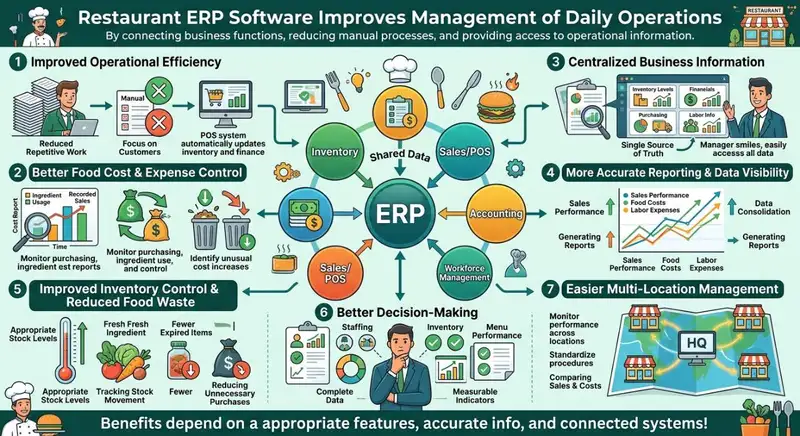
Restaurant ERP software can improve how restaurant owners manage daily operations by connecting business functions, reducing manual processes, and providing better access to operational information. When departments work with shared data, managers can spend less time coordinating disconnected systems and more time addressing issues that affect restaurant performance.
The benefits extend beyond administrative convenience. An integrated ERP system can help restaurants improve cost control, monitor operational efficiency, and make more informed decisions about business resources.
Here are some of the main benefits of using Restaurant ERP software.
1. Improved Operational Efficiency
Managing restaurant operations through separate applications often requires employees to enter the same information multiple times, transfer records between systems, and manually prepare reports. These activities consume valuable time and increase the possibility of errors.
Restaurant ERP helps streamline these processes by connecting different departments within one platform. For example, sales information from an integrated POS system can automatically contribute to inventory updates and financial reporting.
Reducing repetitive administrative work allows managers to focus more on daily operations, employee performance, and customer service.
2. Better Food Cost and Expense Control
Food costs, labor expenses, and operating overhead directly influence restaurant profitability. Without accurate and accessible information, identifying where expenses are increasing can become difficult.
Restaurant ERP provides tools to monitor purchasing activities, ingredient usage, inventory levels, and financial records. Owners can use this information to identify unusual cost increases, review supplier expenses, and evaluate whether actual inventory consumption aligns with expectations.
For example, comparing ingredient usage with recorded sales can help managers investigate potential overportioning, food waste, or inventory discrepancies.
This visibility makes it easier to identify cost-control opportunities before small problems become larger financial concerns.
3. Centralized Business Information
Restaurant owners often need information from multiple departments to understand overall business performance. When inventory, sales, accounting, and workforce records are stored separately, collecting this information can take considerable time.
An ERP system connects these business functions and provides centralized access to relevant operational information.
Managers can review inventory records, financial reports, purchasing activities, and labor information without constantly switching between disconnected applications.
Centralized information improves coordination between departments and gives owners a more complete picture of their restaurant operations.
4. More Accurate Reporting and Data Visibility
Making business decisions based on outdated or incomplete information can lead to unnecessary expenses and operational inefficiencies.
Restaurant ERP helps consolidate information from connected systems, making it easier to generate reports and monitor important performance indicators.
For example, restaurant owners can review sales performance alongside food costs, labor expenses, and purchasing activity. This makes it easier to understand how different operational factors influence financial results.
Accurate reporting also helps managers identify changes in business performance, investigate discrepancies, and evaluate whether operational adjustments are producing the intended results.
5. Improved Inventory Control and Reduced Food Waste
Poor inventory management can lead to overordering, stock shortages, expired ingredients, and unnecessary food waste.
Restaurant ERP can improve inventory visibility by tracking stock movements, ingredient usage, purchase orders, and receiving activities. When connected to POS and recipe management systems, it can also help managers compare expected ingredient consumption with actual inventory changes.
These insights help restaurants -
- Identify ingredients that are frequently wasted.
- Monitor stock levels and purchasing requirements.
- Reduce unnecessary inventory purchases.
- Recognize discrepancies between recorded and actual stock.
- Maintain more appropriate inventory levels.
Better inventory control helps restaurants protect food quality while reducing avoidable operating expenses.
6. Better Decision-Making
Restaurant owners make decisions every day about staffing, purchasing, inventory, budgeting, and menu performance. These decisions become more difficult when relevant information is scattered across different systems.
ERP software brings operational and financial information together, helping managers evaluate business conditions using more complete data.
For instance, owners can review sales trends, labor expenses, and inventory usage to determine whether staffing levels and purchasing quantities align with customer demand.
Rather than relying entirely on assumptions, managers can use measurable performance indicators to identify problems and evaluate potential improvements.
7. Easier Multi-Location Management
Managing several restaurant locations introduces additional operational challenges. Owners must monitor different teams, inventory levels, purchasing activities, labor expenses, and financial results while maintaining consistent business processes.
Restaurant ERP can centralize information across locations, allowing owners to review performance and compare operational results through shared reporting tools.
This can help restaurant groups -
- Monitor sales and expenses across locations.
- Compare food and labor costs.
- Standardize purchasing procedures.
- Maintain consistent inventory controls.
- Identify locations experiencing operational inefficiencies.
- Improve visibility into overall business performance.
For growing restaurant groups, centralized management can reduce the complexity of overseeing multiple locations and support more consistent operations.
Restaurant ERP can help restaurant owners improve operational coordination, control expenses, and gain better visibility into business performance. However, these benefits depend on selecting appropriate features, maintaining accurate information, and ensuring that connected systems work together effectively.
The benefits extend beyond administrative convenience. An integrated ERP system can help restaurants improve cost control, monitor operational efficiency, and make more informed decisions about business resources.
Here are some of the main benefits of using Restaurant ERP software.
1. Improved Operational Efficiency
Managing restaurant operations through separate applications often requires employees to enter the same information multiple times, transfer records between systems, and manually prepare reports. These activities consume valuable time and increase the possibility of errors.
Restaurant ERP helps streamline these processes by connecting different departments within one platform. For example, sales information from an integrated POS system can automatically contribute to inventory updates and financial reporting.
Reducing repetitive administrative work allows managers to focus more on daily operations, employee performance, and customer service.
2. Better Food Cost and Expense Control
Food costs, labor expenses, and operating overhead directly influence restaurant profitability. Without accurate and accessible information, identifying where expenses are increasing can become difficult.
Restaurant ERP provides tools to monitor purchasing activities, ingredient usage, inventory levels, and financial records. Owners can use this information to identify unusual cost increases, review supplier expenses, and evaluate whether actual inventory consumption aligns with expectations.
For example, comparing ingredient usage with recorded sales can help managers investigate potential overportioning, food waste, or inventory discrepancies.
This visibility makes it easier to identify cost-control opportunities before small problems become larger financial concerns.
3. Centralized Business Information
Restaurant owners often need information from multiple departments to understand overall business performance. When inventory, sales, accounting, and workforce records are stored separately, collecting this information can take considerable time.
An ERP system connects these business functions and provides centralized access to relevant operational information.
Managers can review inventory records, financial reports, purchasing activities, and labor information without constantly switching between disconnected applications.
Centralized information improves coordination between departments and gives owners a more complete picture of their restaurant operations.
4. More Accurate Reporting and Data Visibility
Making business decisions based on outdated or incomplete information can lead to unnecessary expenses and operational inefficiencies.
Restaurant ERP helps consolidate information from connected systems, making it easier to generate reports and monitor important performance indicators.
For example, restaurant owners can review sales performance alongside food costs, labor expenses, and purchasing activity. This makes it easier to understand how different operational factors influence financial results.
Accurate reporting also helps managers identify changes in business performance, investigate discrepancies, and evaluate whether operational adjustments are producing the intended results.
5. Improved Inventory Control and Reduced Food Waste
Poor inventory management can lead to overordering, stock shortages, expired ingredients, and unnecessary food waste.
Restaurant ERP can improve inventory visibility by tracking stock movements, ingredient usage, purchase orders, and receiving activities. When connected to POS and recipe management systems, it can also help managers compare expected ingredient consumption with actual inventory changes.
These insights help restaurants -
- Identify ingredients that are frequently wasted.
- Monitor stock levels and purchasing requirements.
- Reduce unnecessary inventory purchases.
- Recognize discrepancies between recorded and actual stock.
- Maintain more appropriate inventory levels.
Better inventory control helps restaurants protect food quality while reducing avoidable operating expenses.
6. Better Decision-Making
Restaurant owners make decisions every day about staffing, purchasing, inventory, budgeting, and menu performance. These decisions become more difficult when relevant information is scattered across different systems.
ERP software brings operational and financial information together, helping managers evaluate business conditions using more complete data.
For instance, owners can review sales trends, labor expenses, and inventory usage to determine whether staffing levels and purchasing quantities align with customer demand.
Rather than relying entirely on assumptions, managers can use measurable performance indicators to identify problems and evaluate potential improvements.
7. Easier Multi-Location Management
Managing several restaurant locations introduces additional operational challenges. Owners must monitor different teams, inventory levels, purchasing activities, labor expenses, and financial results while maintaining consistent business processes.
Restaurant ERP can centralize information across locations, allowing owners to review performance and compare operational results through shared reporting tools.
This can help restaurant groups -
- Monitor sales and expenses across locations.
- Compare food and labor costs.
- Standardize purchasing procedures.
- Maintain consistent inventory controls.
- Identify locations experiencing operational inefficiencies.
- Improve visibility into overall business performance.
For growing restaurant groups, centralized management can reduce the complexity of overseeing multiple locations and support more consistent operations.
Restaurant ERP can help restaurant owners improve operational coordination, control expenses, and gain better visibility into business performance. However, these benefits depend on selecting appropriate features, maintaining accurate information, and ensuring that connected systems work together effectively.
Get Accurate Inventory Valuations
Manage Your Workforce with Altametrics
Signs Your Restaurant May Need an ERP System
As a restaurant grows, managing daily operations through separate software platforms, spreadsheets, and manual processes can become increasingly complicated. Restaurant owners must coordinate inventory, purchasing, accounting, employee schedules, sales, and financial reporting while ensuring that departments have accurate information. When existing systems cannot keep up with these responsibilities, an Enterprise Resource Planning (ERP) system may provide a more efficient way to manage the business.
Here are eight signs that your restaurant may benefit from an ERP system.
1. You Rely on Multiple Disconnected Software Platforms. Using separate applications for POS transactions, inventory, accounting, and employee scheduling can create information gaps. Managers may need to transfer records manually, increasing administrative work and the possibility of errors. ERP connects these functions through centralized information.
2. Employees Spend Too Much Time on Manual Tasks. Repeated data entry, spreadsheet updates, and manual report preparation consume valuable management time. If employees regularly perform the same administrative tasks across different platforms, ERP automation can help streamline workflows and reduce repetitive work.
3. You Frequently Experience Inventory Discrepancies. When recorded stock levels do not match actual inventory, restaurants can experience unnecessary purchasing expenses, ingredient shortages, and food waste. ERP inventory management helps track stock movements, monitor ingredient usage, and identify discrepancies that require investigation.
4. You Struggle to Monitor Food and Labor Costs. Food and labor expenses directly affect restaurant profitability. If purchasing, inventory, sales, and employee information are stored separately, identifying rising costs becomes difficult. ERP connects relevant information to improve cost visibility and support better expense management.
5. Preparing Financial Reports Takes Too Long. Collecting financial information from multiple applications can delay reporting and decision-making. ERP consolidates relevant business information, helping owners review revenue, expenses, budgets, and financial performance more efficiently.
6. You Lack Visibility Into Daily Restaurant Performance. Restaurant owners need reliable information to understand operational performance. When sales, inventory, purchasing, and labor reports are scattered across different systems, identifying problems becomes challenging. ERP dashboards can provide centralized access to important business metrics.
7. Managing Multiple Locations Has Become Complicated. Restaurant groups must maintain consistent processes while monitoring different locations. ERP can centralize reporting, inventory information, purchasing activities, and financial records, making it easier to compare performance and oversee operations.
8. Your Existing Software Cannot Support Business Growth. As restaurants expand, their operational requirements become more demanding. Additional locations, larger teams, and increased purchasing activity may expose limitations in existing software. ERP can provide an integrated management environment that accommodates greater operational complexity.
Restaurant ERP becomes worth considering when existing systems create more management challenges than they solve. Restaurant owners should evaluate their operational needs, current software limitations, and growth plans before deciding whether an integrated ERP system is a worthwhile investment.
Here are eight signs that your restaurant may benefit from an ERP system.
1. You Rely on Multiple Disconnected Software Platforms. Using separate applications for POS transactions, inventory, accounting, and employee scheduling can create information gaps. Managers may need to transfer records manually, increasing administrative work and the possibility of errors. ERP connects these functions through centralized information.
2. Employees Spend Too Much Time on Manual Tasks. Repeated data entry, spreadsheet updates, and manual report preparation consume valuable management time. If employees regularly perform the same administrative tasks across different platforms, ERP automation can help streamline workflows and reduce repetitive work.
3. You Frequently Experience Inventory Discrepancies. When recorded stock levels do not match actual inventory, restaurants can experience unnecessary purchasing expenses, ingredient shortages, and food waste. ERP inventory management helps track stock movements, monitor ingredient usage, and identify discrepancies that require investigation.
4. You Struggle to Monitor Food and Labor Costs. Food and labor expenses directly affect restaurant profitability. If purchasing, inventory, sales, and employee information are stored separately, identifying rising costs becomes difficult. ERP connects relevant information to improve cost visibility and support better expense management.
5. Preparing Financial Reports Takes Too Long. Collecting financial information from multiple applications can delay reporting and decision-making. ERP consolidates relevant business information, helping owners review revenue, expenses, budgets, and financial performance more efficiently.
6. You Lack Visibility Into Daily Restaurant Performance. Restaurant owners need reliable information to understand operational performance. When sales, inventory, purchasing, and labor reports are scattered across different systems, identifying problems becomes challenging. ERP dashboards can provide centralized access to important business metrics.
7. Managing Multiple Locations Has Become Complicated. Restaurant groups must maintain consistent processes while monitoring different locations. ERP can centralize reporting, inventory information, purchasing activities, and financial records, making it easier to compare performance and oversee operations.
8. Your Existing Software Cannot Support Business Growth. As restaurants expand, their operational requirements become more demanding. Additional locations, larger teams, and increased purchasing activity may expose limitations in existing software. ERP can provide an integrated management environment that accommodates greater operational complexity.
Restaurant ERP becomes worth considering when existing systems create more management challenges than they solve. Restaurant owners should evaluate their operational needs, current software limitations, and growth plans before deciding whether an integrated ERP system is a worthwhile investment.
Your Recipe for Financial Success
Make Better Financial Decisions with Altametrics
Frequently
Asked Questions
What are the most important features of Restaurant ERP?
Important features include inventory management, financial management, purchasing, supplier management, workforce management, POS integration, reporting and analytics, and multi-location management.
How does Restaurant ERP help manage multiple locations?
Restaurant ERP centralizes information from different locations, allowing owners to monitor sales, inventory, purchasing, labor expenses, and financial performance through consolidated reporting.
How does Restaurant ERP improve inventory forecasting?
Restaurant ERP can use historical sales, inventory movements, ingredient consumption, and purchasing information to help estimate future stock requirements. More advanced platforms may also incorporate demand forecasting to support purchasing decisions.
What does ERP stand for in the restaurant industry?
ERP stands for Enterprise Resource Planning. In the restaurant industry, it refers to software that connects business functions such as inventory, purchasing, accounting, workforce management, and reporting through a centralized system.
Must-Read Content
How Restaurant Automation Can Streamline Daily Operations
Restaurant automation streamlines daily operations by reducing manual tasks, improving workforce management, controlling inventory, minimizing errors, and increasing overall efficiency.
Smart Ways to Use AI in Your Restaurant
Discover smart ways to use AI in your restaurant to optimize operations, reduce costs, improve customer experiences, and increase profitability.

10 Ways Technology Can Help Control Food Cost in Restaurants
Technology helps restaurants control food cost through smarter inventory management, automated purchasing, recipe costing, waste tracking, forecasting, and real-time reporting.