


What are QR codes used for in restaurants?
Restaurants use QR codes for digital menus, ordering, pay-at-table, waitlists, loyalty signups, feedback forms, and review prompts - making the guest experience faster and easier.
How QR Codes Transform Restaurant Guest Experience

Improve the Guest Experience
Most restaurant owners think "guest experience" is about friendliness and food quality - and it is. But in day-to-day operations, guest experience is usually won or lost on friction- how many small obstacles a guest hits from the moment they arrive to the moment they leave. Guests may not describe it that way, but they feel it immediately. A "good experience" often means the visit felt easy - they understood what to do, got what they wanted, and didn't have to wait or ask repeatedly.
You can break the guest journey into a few predictable moments -
1. Arrival - "Where do I go? How long is the wait? What's the process?"
2. Ordering - "What are my options? What does this include? Can I customize?"
3. Waiting - "Is my order on the way? Did the kitchen get it? Who do I ask?"
4. Paying - "Can I get the check? Can we split it? How long will this take?"
5. Leaving + returning - "Should I come back? Was it worth it?"
QR codes can improve these moments when they deliver speed, clarity, and control. Speed means fewer dead minutes waiting for menus, waiting to place an order, or waiting to pay. Clarity means fewer "surprises" (pricing, ingredients, portion expectations, modifiers, fees). Control means guests can move forward without feeling stuck - especially when staff are busy.
But QR codes can also hurt the experience if they create new friction. The biggest risks are predictable - a menu that's hard to read on a phone, weak Wi-Fi, QR codes that don't scan, confusing ordering steps, or guests who simply don't want to use their phone at the table. That's why the goal isn't "go fully QR." The goal is smart QR - use it as an optional fast lane while keeping a simple backup (like a few printed menus or a staff-assisted option).
When you treat QR codes as a tool to remove friction - not as a replacement for service - you get the best of both worlds - guests feel taken care of, and your team isn't forced to do repetitive, time-consuming tasks during peak hours.
Clarity, Speed, and Fewer Frustrations
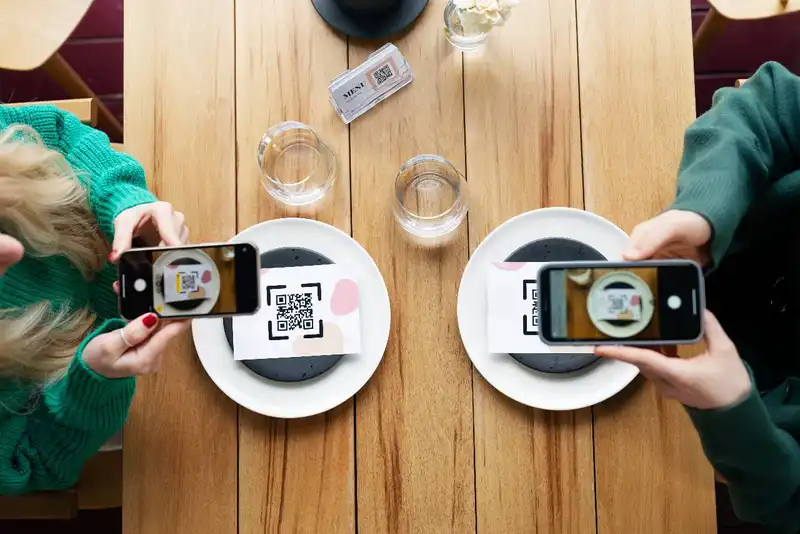
A QR menu can either make your restaurant feel modern and easy - or slow and annoying. The difference usually isn't the QR code itself. It's the menu experience on a phone. If guests have to pinch-zoom a PDF, scroll forever, or guess what items include, you didn't remove friction - you moved it onto their screen.
Start with a simple rule - build for scanning, not reading. Most guests are making decisions fast. They want to find the category they came for (burgers, bowls, lattes), compare 2-3 options, and move on. That means your QR menu should be structured with -
- Clean categories (no clever names that hide what's inside)
- Short item names with a one-line description
- Visible prices without extra taps
- Modifiers that make sense (add cheese, swap side, spice level) without dumping 30 options at once
- Search and filters if the menu is large (especially helpful for allergies or dietary needs)
Clarity matters just as much as speed. Guests get frustrated when details are missing and they have to flag down a server. Include the info that prevents "back-and-forth" -
- What comes with the item (side, sauce, toppings)
- Key allergens or common questions (nuts, dairy, gluten, spice)
- Portion cues when relevant (shareable vs. single)
- Photos only where they help decisions (signature items, desserts, combos) - too many photos can slow the page and clutter choices
Accessibility is part of guest experience too. Use readable font sizes, strong contrast, and an easy language toggle if you serve bilingual guests. Most importantly - always have a backup. Keep a small stack of printed menus or a one-page "menu highlights" sheet. Some guests won't use their phone, some phones will be dead, and sometimes the internet will be flaky. A backup prevents the QR menu from becoming a service bottleneck.
Finally, treat your QR code like a front door sign. Place it where guests naturally look (table tent, sticker, check presenter), print it at a scannable size, and add a short instruction like - "Scan to view menu + order" or "Scan for menu (printed menus available)". When the QR menu is fast, readable, and optional, guests feel in control - and that's a big part of a great dining experience.
Reducing Wait Time
QR ordering can take pressure off your team during rushes, but only if it's set up to feel like a service improvement, not a "we don't want to talk to you" sign. Guests still want to feel welcomed. The goal is to remove the slow parts of ordering - waiting for menus, waiting to place an order, waiting for a server to come back - while keeping the human touch where it matters.
QR ordering works best in a few common situations -
- Peak windows where staff coverage is tight and guests hate waiting
- Patios and high-spread seating where table touches take longer
- Fast-casual or counter service where guests are already used to self-serve steps
- Large parties where splitting orders and customizing takes time
To make it feel smooth, the guest flow needs to be obvious and short -
1) Scan 2) Browse 3) Customize 4) Submit 5) Confirm.
That's it. Every extra step (creating an account, entering too much info, unclear modifiers) increases drop-off. Keep customization clean- show the top 5-10 common modifiers first, group the rest, and use plain language. Guests shouldn't need staff just to understand the options.
Hospitality comes from how you introduce QR ordering. A simple line at greet changes everything -
- "Welcome in - feel free to scan to order anytime, and I'm here if you have questions."
- "You can order from your phone if you want, or I can take your order - whatever's easier."
That wording gives guests control without making them feel forced. It also helps your staff avoid confusion because expectations are clear from the start.
Operational guardrails matter too. If guests order via QR, they need confidence the order went through. Make sure they receive a clear confirmation screen, and ideally a text/email receipt if your system supports it. Internally, your kitchen and expo need clean tickets with table numbers, modifiers, and pacing notes so QR orders don't become accuracy problems.
The biggest mistake with QR ordering is treating it like a "set it and forget it" tool. You still need table touches- water refills, check-ins, and problem-solving. When QR ordering handles the transaction and your team focuses on the experience, guests get faster service and better hospitality - without requiring more labor.
QR Payments
Checkout is one of the easiest places to improve guest experience because it's where frustration builds fast. Guests are usually ready to leave, and the last thing they want is to wait for a server to notice them, bring the check, return with a card reader, run the card, and come back again. When payment drags, guests don't remember the great appetizer - they remember the last 10 minutes.
QR payments solve a simple problem - guests can pay when they're ready. That single change reduces the "I've been trying to get the check" moment that leads to lower satisfaction and weaker tips. It also reduces staff interruptions. Instead of being pulled into repeated payment runs during peak hours, servers can stay focused on greeting, upselling, and food quality checks.
There are a few common QR payment setups -
1. Scan-to-pay at the table - guests view their check, tip, and pay without waiting
2. Split checks easily - guests select their items or split evenly (depending on the system)
3. Pay-and-go for fast casual - guests order and pay in one flow, reducing counter lines
To make QR pay actually feel "easy," you need to prevent the most common failure points. First is connectivity. If your dining room has Wi-Fi dead zones or poor cell signal, QR pay becomes a headache. Make sure the table QR page loads quickly, even on weaker connections. Second is clarity. Guests should instantly know they're paying the correct table and check - use big, obvious table/seat identifiers, and show an itemized list before payment.
Third is handling declines, receipts, and questions. Guests need a clear message if payment fails, plus a simple next step - "Try again or ask your server." They also need an easy way to get a receipt (email/text/QR confirmation screen). If people can't confirm payment, they'll flag staff anyway - which defeats the purpose.
From a business standpoint, faster payment can support better table turns. Even a small reduction in end-of-meal waiting adds up across a shift, especially on weekends. It also improves the guest's feeling of control- they can pay when they're done, not when someone becomes available.
The key is balance. QR pay should be an option, not a rule. Keep a traditional checkout method available for guests who prefer it, and train staff to introduce it politely - "Whenever you're ready, you can scan to pay - or I can take care of it." That keeps the experience smooth, modern, and guest-friendly.
Allergens, Ingredients, and Transparency
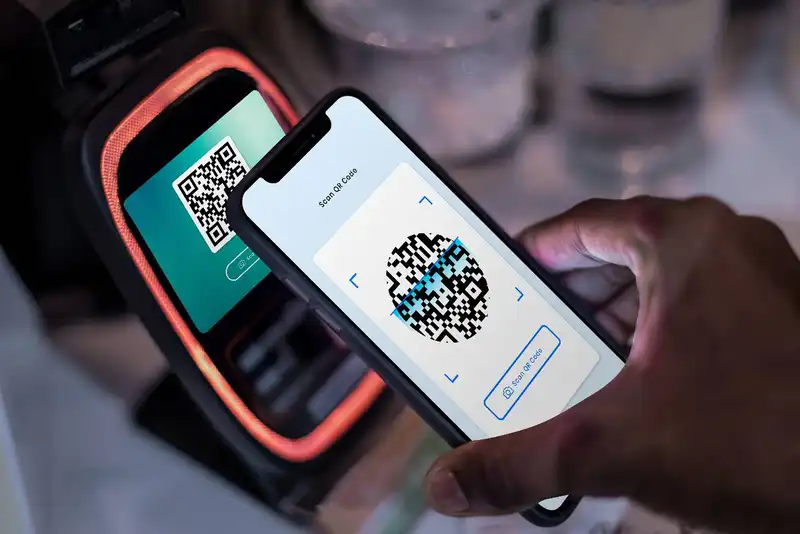
For many guests, "good service" starts before the first bite. It starts with confidence - Can I eat here safely? Do I know what I'm ordering? Am I going to be surprised? QR codes can build trust by making key information easy to access without forcing a guest to ask a busy employee in the middle of a rush.
Allergens are the most obvious win. When a guest has an allergy or dietary restriction, they're not being picky - they're trying to avoid a bad outcome. A QR menu can help by showing -
- Common allergens (milk, eggs, wheat/gluten, peanuts/tree nuts, soy, fish/shellfish, sesame)
- Cross-contact notes (if relevant) and clear ask our team language when needed
- Easy "no ---" modifiers where your kitchen can support it
- Dietary tags like vegetarian, vegan, gluten-free, dairy-free - only if you can keep them accurate
Ingredients and transparency matter even beyond allergies. Guests often ask the same questions - "What comes on it?", "Is it spicy?", "Is the sauce sweet?", "How big is it?", "Does it include sides?" If your QR menu answers these consistently, you reduce confusion and cut down on order mistakes. Fewer mistakes = fewer remakes and fewer negative experiences. It also makes guests feel you're organized and honest.
The "data-driven" part here is simple - every unclear menu item creates extra labor. It creates more questions, more back-and-forth, and more opportunities for miscommunication. If you can eliminate repetitive questions with clear digital details, your staff can spend time on higher-value hospitality - recommendations, check-ins, pacing, and problem-solving.
That said, transparency only helps if the information stays current. Outdated allergen notes or incorrect ingredients are worse than no information because they create false confidence. Keep the process simple - tie your QR menu updates to the same workflow you use for menu changes (new items, 86'd items, recipe updates, vendor substitutions). If you run specials, make sure they're clearly labeled and removed when done.
Finally, don't overpromise. Use straightforward wording like "contains," "may contain," or "prepared in a kitchen that also handles..." when appropriate. Your goal isn't to turn your QR menu into legal fine print - it's to communicate clearly so guests feel safe ordering. When guests trust your information, they order faster, complain less, and are more likely to return.
Simplify Multi-Channel Ordering
Get started with Altametrics to streamline your POS!
QR Codes for Convenience
Once you've improved menus, ordering, and payments, the next big guest experience upgrade is convenience. Convenience is what guests feel when they don't have to guess what to do next, and they don't have to wait for help with small requests. QR codes can support this by handling the "little moments" that add friction - especially when your team is stretched thin.
Waitlists and seating are a great example. Guests hate uncertainty at the door. A QR code at the host stand can let guests join the waitlist, confirm party size, and get status updates without repeatedly asking, How much longer? Even if you still manage seating manually, a digital waitlist view can reduce anxiety and keep the entry experience calmer. Clear messaging matters here - tell guests what to expect ("We'll text you when your table is ready) and what to do next (Please check in with the host when you arrive").
At the table, QR codes can help with reorders and small requests - but only if you're careful. For fast casual and counter-service, a reorder option for drinks, sides, or desserts can reduce lines and speed decisions. For full service, you may not want guests firing off unlimited requests that disrupt pacing. A smarter approach is to offer limited, high-value actions like -
- "Order another round" (with clear timing expectations)
- "Add dessert" (during late meal phase)
- "Request the check" or "Ready to pay" (without waving someone down)
QR codes also reduce friction with FAQs. Many guest questions are predictable - spice level, portion size, what's included, substitutions, kid options, parking, Wi-Fi, hours, or how your lunch combo works. A simple QR "help" card or footer link in your menu can answer these in seconds. That saves your staff from repeating the same explanations and reduces misunderstandings that lead to disappointment.
The operational benefit is real - fewer interruptions and fewer repeated questions means your team can stay focused on execution. The guest benefit is even bigger - they feel informed and in control. The key is keeping these QR convenience features simple and intentional. Don't add a dozen buttons just because you can. Add the few actions that remove the most friction - and keep a clear human backup for anything that needs real attention.
Loyalty, Feedback, and Review Capture
QR codes don't just improve the visit - they can help you grow repeat business if you earn it the right way. The mistake many restaurants make is turning QR codes into constant marketing prompts. Guests came to eat, not to be sold to. The goal is to make loyalty, feedback, and reviews feel like a natural extension of a good experience - optional, quick, and clearly valuable.
Start with loyalty. QR codes can remove the biggest barrier to signups- friction. If joining takes more than 30 seconds, most guests won't do it. A good QR loyalty flow is -
1) Scan 2) Enter phone/email 3) Confirm 4) Receive reward
Keep the form short. Explain the value in one sentence- Get points on every visit or Get a free item after X purchases. If you're asking for personal info, be transparent about what you'll send and how often. Guests trust simple promises.
Next is feedback, which is different from reviews. Feedback is private and actionable. Reviews are public and emotional. QR codes are great for capturing feedback because they let guests share issues quietly - before they turn into a negative review. A strong approach is a quick, two-step flow -
1. "How was your visit?" (1-5 rating)
2. If it's low, route to a short comment box and a manager alert; if it's high, then offer an optional review prompt.
This isn't about "hiding bad reviews." It's about fixing problems in real time. When guests feel heard, they're far less likely to vent publicly.
For review capture, timing matters more than wording. The best moment is when guests are satisfied but not rushed - often right after payment confirmation or when the check is closed. Keep the ask soft and respectful- "If you had a great visit, we'd appreciate a quick review." Avoid guilt-based language. And never block a guest from paying or accessing the menu unless they review - people hate that.
From a data-driven standpoint, this section is about building a measurable loop - more loyalty signups, more actionable feedback, and a steady flow of genuine reviews. Track scan-to-signup rate, feedback completion rate, and review volume over time. If the numbers drop, simplify the flow, reduce prompts, and focus on experience first. When QR codes support growth without being pushy, guests feel respected - and that's what brings them back.
Efficient Ordering at Your Fingertips
Experience Flawless Inventory Management with Altametrics

Employee scheduling
Human Resource Management for Restaurants
Employee scheduling
Common Payroll Challenges in Restaurants

Sales forecasting
How to Use Restaurant Analytics to Improve Profitability

Restaurant management
The Complete Guide to Restaurant Reputation Management
Accounting payroll
Restaurant Cash Handling Procedures

Accounting payroll
How to Manage Restaurant Finances

Employee scheduling
How to Motivate Restaurant Staff
Software integration
10 Ways Technology Can Help Control Food Cost in Restaurants
Frequently Asked Questions
Where should I place QR codes in the restaurant?
Put them where guests naturally look - table tents, stickers on tables, check presenters, host stand signage, and takeout pickup shelves. Make sure codes are large enough and scan easily.
How do QR codes help with loyalty and reviews?
They reduce signup friction and make it easy to request feedback and reviews at the right time (often after payment). Keep prompts optional and short to avoid annoying guests.
What's the best way to collect guest feedback using QR codes?
A short survey. 1-2 questions max, optional comment, and a manager follow-up option for issues.
How do QR codes improve ordering speed?
QR ordering can reduce the time guests wait to browse the menu and place orders - especially during rushes, on patios, or when staffing is tight - while staff focus on hospitality.

