


What is a kitchen display system (KDS)?
A kitchen display system (KDS) is a digital screen in the kitchen that replaces printed tickets. It shows orders in real time, routes items to stations, tracks timing, highlights modifiers, and helps teams prioritize tasks to improve speed and accuracy.
What Restaurant Technology Improves the Dining Experience?

Overview
The dining experience is everything a guest feels from the moment they decide to eat with you to the moment they leave (and whether they come back). It's not just food quality. It's confidence, comfort, and flow - how easy it is to choose you, how smooth the visit feels, and how consistently you deliver on expectations.
For most guests, a great dining experience comes down to a few simple outcomes -
1. Clarity - "I know what to order, what it costs, and what to expect."
2. Speed (without rushing) - "Things move smoothly and I'm not waiting forever."
3. Accuracy - "My order is correct, hot, and delivered the way I asked."
4. Hospitality - "I feel taken care of, not processed."
5. Consistency - "This location and this visit match what I remember (or what I saw online)."
That's where restaurant technology can help - not by replacing service, but by removing friction that guests shouldn't have to deal with. Good tech should make it easier for your team to be present, friendly, and fast. Bad tech does the opposite - it distracts staff, confuses guests, and creates new failure points.
Pre-Visit Tech
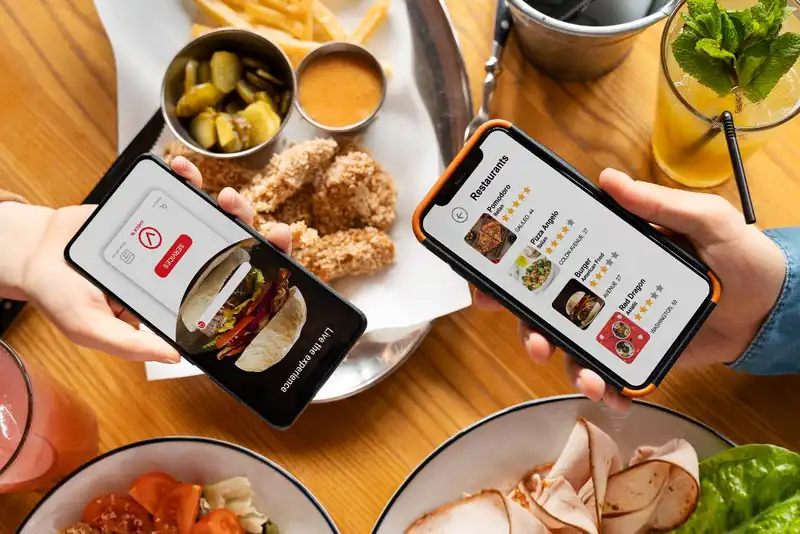
For many guests, the dining experience starts long before they step through the door. It begins on a phone screen- searching for your hours, scanning photos, checking the menu, or placing an order. If that experience is confusing or unreliable, guests arrive already frustrated - or they never arrive at all. The right technology improves the dining experience by making the pre-visit phase clear, accurate, and low-effort.
Start with the basics - your online presence. Your website and listings should answer the "decision questions" fast - hours, location, parking, dietary options, price range, and whether you offer dine-in, takeout, curbside, or delivery. Tools that help you keep information consistent across channels (website, Google, maps, and social profiles) reduce the most common guest friction- showing up to a closed restaurant or seeing an outdated menu.
Next, your digital menu experience matters more than most owners realize. A menu that's hard to read on mobile, missing modifier details, or unclear on pricing creates hesitation and slows ordering - both online and in person. Menu management tools can help you update items quickly, standardize descriptions, and highlight allergens or dietary notes in a consistent way.
If you offer online ordering, the ordering flow is a direct extension of your hospitality. Great ordering tech does a few specific things well - it makes modifiers easy, sets clear prep time expectations, confirms orders instantly, and provides status updates without guests needing to call. It should also prevent common mistakes - like allowing orders for items that are 86'd, or accepting orders beyond kitchen capacity.
Finally, simple communication tools can quietly upgrade the pre-visit experience. Automated confirmations, reservation reminders, and pickup instructions reduce anxiety and cut down on avoidable phone calls. The goal isn't to spam guests - it's to remove uncertainty. When guests know what to expect, they arrive more relaxed, staff start the interaction on a positive note, and the entire dining experience begins with confidence instead of confusion.
Arrival and Seating Tech
The moment a guest walks in, they start forming an opinion fast - Are we welcomed? Do they know we're here? How long is this going to take? Even if your food is excellent, a messy arrival - no greeting, unclear wait times, crowded entryway - can make the dining experience feel stressful before it even begins. The right technology improves this phase by making waiting more predictable, more transparent, and better paced.
For full-service restaurants, reservations and waitlist tools are often the biggest dining experience upgrade. A good system helps you control the flow of guests instead of letting it control you. Reservations reduce uncertainty for guests, while digital waitlists allow accurate quoting and updates via text. That text update matters more than you might think - guests don't mind waiting as much when they know the plan and don't feel forgotten. It also reduces "host stand pressure" because fewer guests are hovering and asking for updates every five minutes.
At the host stand, table management features can improve pacing and prevent the classic experience killers - double-seating a server, seating guests at dirty tables, or losing track of which tables are close to leaving. Tools that track table status (seated, ordered, entrees fired, checks dropped) help the team seat more strategically. Even a simple visual floor plan with server sections can reduce uneven coverage that leads to slow greetings and delayed drink orders.
Technology can also help with the special notes that guests care about - high chairs, accessibility needs, birthdays, preferred seating, or allergy concerns. When those notes are captured and visible, the experience feels personal - even though you're using software in the background.
The biggest caution - tech should support hospitality, not replace it. A tablet or screen doesn't make guests feel welcomed - your people do. But when tech handles the logistics (accurate wait times, pacing, table readiness), your team has more bandwidth to greet warmly, communicate clearly, and start the dining experience on the right foot.
Ordering Tech
Ordering is where the dining experience either starts to feel effortless - or starts to unravel. Guests care about two things here - being understood and getting what they asked for. The right technology improves ordering by reducing mistakes, speeding up communication with the kitchen, and giving staff more time to focus on hospitality instead of rework.
At the center of this is your POS ordering workflow. A well-designed POS helps staff take orders quickly and consistently by supporting common restaurant realities - modifiers, substitutions, allergy notes, and seat numbers. Even small tools - like forcing required choices (side selection, cooking temps) or clearly labeling upcharges - can prevent awkward surprises and reduce comped items later. For full-service, features like coursing (apps first, entrees later) and seat-based firing help the kitchen pace food so guests aren't waiting too long - or getting plates at the wrong time.
Many restaurants also benefit from tableside ordering using handhelds. Done right, handhelds shorten the time between guest decision and kitchen ticket, which reduces the "dead time" guests feel. They also help accuracy because staff can confirm modifiers in the moment instead of trying to remember them later. The key is implementation - handhelds should simplify service, not turn servers into screen-focused order takers. Training matters - eye contact first, device second.
QR ordering can work well in specific situations - high-volume counter-style concepts, fast casual, bars, patios, or places where guests prefer self-serve speed. But it can also feel impersonal if it's the only option. The best approach is often "guest choice" - QR ordering available for convenience, with staff still ready to guide, recommend, and answer questions.
Finally, ordering tech should connect to real-time menu reality. If your system supports 86'ing items, updating specials, or communicating prep time delays, guests get fewer disappointments. Nothing hurts the dining experience like ordering something confidently - then being told five minutes later it's unavailable.
Back-of-House Tech
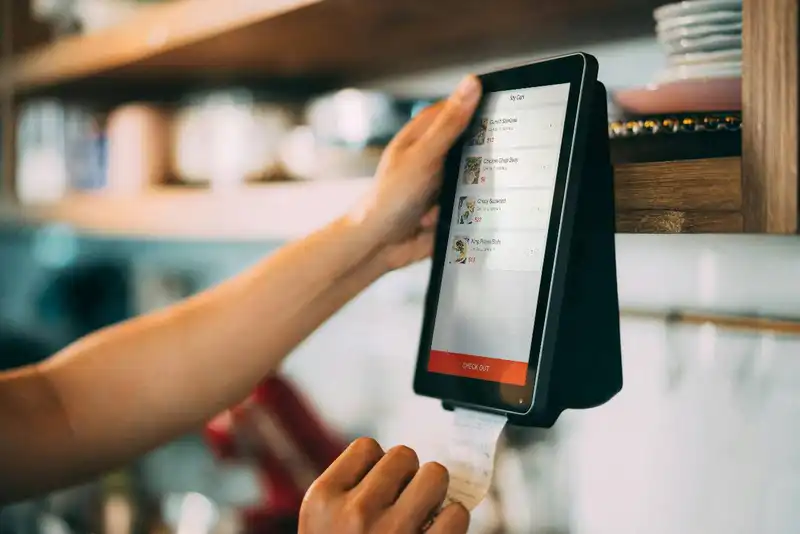
Guests may never see your kitchen, but they feel it in the dining experience through one thing - timing. Long waits, uneven coursing, missing items, and remakes create frustration and kill confidence. Back-of-house technology improves the dining experience by making production more visible, more coordinated, and easier to execute under pressure - especially during rush.
One of the biggest upgrades for many restaurants is a Kitchen Display System (KDS). Compared to printed tickets, KDS screens can improve speed and accuracy by organizing orders clearly, routing items to the correct station, and tracking prep time in real time. When the kitchen can see what's coming, what's late, and what's been bumped, it reduces the "Where is that ticket?" chaos that leads to mistakes. Many systems also allow modifiers and allergy notes to stand out so they're harder to miss.
KDS is even more powerful when paired with an expo view or a single point of control for firing and timing. This helps with pacing - you can avoid dropping salads and apps at the same time as entrees, and you can coordinate large parties so food lands together. From a guest standpoint, coordinated coursing feels like professionalism - even if they don't know why it feels better.
Back-of-house tech can also support prep and readiness. Digital prep lists, par-level guidance, and station checklists reduce the odds that you 86 items mid-service. Nothing breaks the dining experience like being told, "Sorry, we're out," especially for signature dishes. Inventory and prep tools won't eliminate shortages entirely, but they can reduce surprises by flagging low stock earlier and standardizing prep habits across shifts.
Finally, strong systems improve communication between front and back of house. Clean order notes, easy-to-read modifiers, and clear "hold/fire" timing reduces remakes and missing sides. Some kitchens also track reasons for remakes (wrong temp, missing modifier, late fire), which helps you identify the real root causes - training gaps, menu complexity, station overload, or unclear POS buttons.
Payment Tech
A lot of restaurants lose points in the last five minutes. The meal is great, service is solid - then the guest is stuck waiting for the check, waiting to run a card, or struggling through a split payment. That ending matters because it's the last thing the guest remembers. The right payment technology improves the dining experience by making checkout fast, flexible, and low-friction - without making guests feel rushed.
Significant dining experience upgrades often come from pay-at-table options. That can mean handheld card readers, tableside POS devices, or QR-based pay links tied to a table. The benefit is simple - it removes the back-and-forth of (1) Can I get the check? (2) I'll be right back (3) Let me run this (4) Here's the receipt. Guests who are ready to leave can leave when they want, which is especially valuable at lunch, during events, or for families. It also helps your staff during peak times because fewer minutes are spent on purely transactional steps.
Payment tech also improves the experience through better split-check handling. Splitting by seat, item, or percentage is a common source of stress for both guests and servers. Systems that support seat numbers from the start of the order make splitting easy at the end. That reduces awkward moments and delays, and it helps staff stay calm and friendly when the dining room is busy.
Another overlooked area is digital receipts and gift cards. Digital receipts reduce paper friction and can help guests expense meals quickly. Gift cards are also part of the guest experience - if redemption is clunky, slow, or confusing, it creates a negative final impression. Smooth gift card processing (and clear balance checks) prevents that.
One caution - speed should never feel like pressure. Payment tech is best when it offers choice. Some guests love QR pay - others prefer a traditional check presenter. The goal is to make the exit experience feel effortless and respectful.
When payment tech is working, guests don't think about it - they simply feel that the restaurant was organized, modern, and considerate of their time. And that smooth ending raises the odds they'll come back.
Post-Visit Tech
The dining experience doesn't end when a guest walks out the door. What happens after - whether they leave a review, tell a friend, return next week, or never come back - is heavily influenced by how you stay connected and how quickly you address issues. Post-visit technology improves the dining experience by helping you recover problems early, learn what guests actually feel, and give satisfied guests a reason to return.
Start with guest feedback tools. The most valuable feedback is often the feedback you didn't get - because unhappy guests frequently skip telling you and go straight to a public review. Simple post-visit surveys (sent via email or text when a guest opts in) can catch issues while they're still fixable. The key is routing - feedback should land with the right manager quickly, with enough context to act (date/time, location, order details if available). A strong workflow turns "We had a bad experience" into "Thanks for letting us fix this," which protects your reputation and increases return visits.
Next, review monitoring and response management matters. You don't need to respond to everything instantly, but you do need consistency. Tools that consolidate Google and other review platforms into one view make it easier to spot patterns - slow service on weekends, cold food during delivery, missing modifiers, or long waits at lunch. Trends are far more useful than one-off complaints because they point to operational fixes that improve the dining experience for everyone.
Then there's loyalty and CRM. The best loyalty programs don't feel like constant discounting - they feel like recognition. Technology can track visits, favorite items, and engagement so you can offer simple perks that fit your brand- a birthday treat, early access to specials, or points that build toward a free item. CRM tools also support smart messaging - reminders that bring guests back without spamming them. A small "We miss you" offer to lapsed guests can outperform broad promotions - and it protects margin.
Finally, post-visit tech helps you close the loop internally. If guests mention the same problem repeatedly, you can tie it back to training, staffing coverage, menu complexity, or kitchen pacing. That's where dining experience improvements become sustainable- not just fixing individual complaints, but preventing the complaint from happening again.
How to Choose the Right Tech Stack
The fastest way to waste money on restaurant technology is to buy tools because they're popular - rather than because they fix a specific dining experience problem in your operation. A "better tech stack" isn't the one with the most features. It's the one that removes the most friction for guests and staff, with the least complexity. The goal is simple - choose tech that improves the dining experience you're currently struggling to deliver consistently.
Step 1. Start with your dining experience bottleneck
Pick the top 1-2 issues guests feel most often -
- Long waits to be seated or inaccurate quoted times
- Slow greetings, slow drink delivery, or uneven service coverage
- Incorrect orders, missing modifiers, allergy confusion
- Long ticket times or poor pacing between courses
- Slow checkout, confusing splits, or payment delays
- Guests not returning (weak follow-up, no loyalty connection)
Match tools to the bottleneck. For example, long waits and chaos at the door usually points to reservations/waitlist + table management. Order accuracy points to POS workflow, handhelds, and clearer modifiers. Ticket time problems often point to KDS, routing, and expo controls.
Step 2. Use a simple "must-have" checklist
Before committing to anything, confirm the basics -
Ease of use - can a new hire learn the core flow quickly?
Reliability - what happens when Wi-Fi drops or hardware fails?
Support - response times, training resources, and escalation path
Reporting - can you measure improvement (ticket times, remakes, voids, reviews)?
Integrations - does it connect cleanly with POS, payments, online ordering, loyalty, KDS?
Guest impact - does it reduce steps for guests, or add them?
Step 3. Roll out in 30 days (without disrupting service)
A practical rollout plan keeps guest experience stable while you change workflows -
Week 1. Pilot - Enable the new tool in one area (one shift, one station, or one daypart).
Week 2. Train - Train in short sessions with real scenarios (mods, allergies, split checks, rush handling).
Week 3. Measure - Track 2-3 metrics tied to the problem (quoted vs. actual wait times, ticket times, remakes, checkout time).
Week 4. Adjust - Simplify screens, tighten workflows, and document the new standard.
Step 4. Measure what guests actually feel
Don't just track sales. Track experience signals -
- Wait time accuracy
- Order accuracy / remakes / comps
- Ticket time by daypart
- Payment time and split-check friction
- Guest feedback trends and review themes
- Repeat visits (especially from loyalty members)
When you choose tech this way - pain point first, rollout second - you avoid "tool overload" an
Sales forecasting
How to Use Restaurant Analytics to Improve Profitability
Restaurant management
The Complete Guide to Restaurant Reputation Management
Accounting payroll
Restaurant Cash Handling Procedures

Accounting payroll
How to Manage Restaurant Finances
Employee scheduling
How to Motivate Restaurant Staff
Software integration
10 Ways Technology Can Help Control Food Cost in Restaurants

Restaurant management
How Much Should a Restaurant Spend on Marketing?
Inventory management
The Complete Guide to Bar Inventory Management for Restaurants
Frequently Asked Questions
What payment technology improves the dining experience?
Tableside payment devices, contactless payments, and systems that handle split checks smoothly. The goal is letting guests pay when they're ready without repeated back-and-forth.
What's the difference between handheld ordering and QR ordering?
Handhelds keep service staff involved while speeding up order entry and improving accuracy. QR ordering shifts control to the guest for convenience. Handhelds are often better for full service - QR can be better for fast casual or limited-service situations.
How can technology reduce order mistakes?
Look for POS features like required modifier prompts, allergy flags, seat numbers, clear upcharge visibility, and clean kitchen ticket formatting. Pairing this with KDS and training reduces remakes.
What technology helps improve consistency across shifts and managers?
Standardized POS buttons/modifiers, KDS routing rules, digital prep checklists, and reporting dashboards. Consistency improves when the process is the same every shift.

