


What should restaurant owners check on an invoice?
Restaurant owners should check the vendor name, invoice number, invoice date, payment terms, item descriptions, quantities, unit prices, taxes, fees, discounts, and credits. They should also confirm that the invoice matches the original order and the delivery received.
The Ultimate Guide to Restaurant Invoice Management

Understand the Restaurant Invoice Process
Restaurant invoice management works best when owners understand the full path an invoice follows before it is paid. An invoice should not move from vendor to payment without review. It should pass through a clear process that confirms the restaurant received the right products, at the right price, in the right quantity, under the right payment terms.
A practical restaurant invoice process usually includes six steps -
1. Order is placed - The process starts when the restaurant orders food, beverages, supplies, services, or equipment. Ideally, the order should be documented through a purchase order, order guide, vendor portal, or internal purchasing system. This creates a record of what was expected before the delivery arrives.
2. Delivery is received - When the vendor delivers the order, the receiving employee should check the products against the delivery slip. This includes verifying item count, product quality, packaging condition, substitutions, missing items, and temperature-sensitive goods. If this step is skipped, the restaurant may later pay for items that were damaged, missing, or never received.
3. Invoice is collected - The invoice may arrive with the delivery, by email, through a vendor portal, or by mail. Restaurant owners should have one consistent place where all invoices are collected. When invoices are scattered across paper files, manager emails, and vendor websites, it becomes easier to lose documents or miss payment deadlines.
4. Invoice is reviewed - Before approval, the invoice should be checked against the order and delivery record. Managers should compare quantities, unit prices, taxes, delivery fees, credits, discounts, and payment terms. This is where many cost-control issues can be caught before payment.
5. Invoice is approved and recorded - Once verified, the invoice should be approved by the right person and entered into the accounting or invoice management system. Accurate coding matters because invoices affect food cost, operating expenses, vendor balances, and profit reporting.
6. Payment is scheduled - The final step is payment. Owners should avoid paying invoices too early without reason, but they also need to prevent late fees and strained vendor relationships. A clear payment schedule helps protect cash flow while keeping vendor accounts current.
When this process is consistent, invoice management becomes more than paperwork. It becomes a cost-control system. Restaurant owners can see what was ordered, what was received, what was charged, and when money will leave the business. That visibility makes it easier to control spending, identify errors, and make better financial decisions.
Set Clear Invoice Review Standards
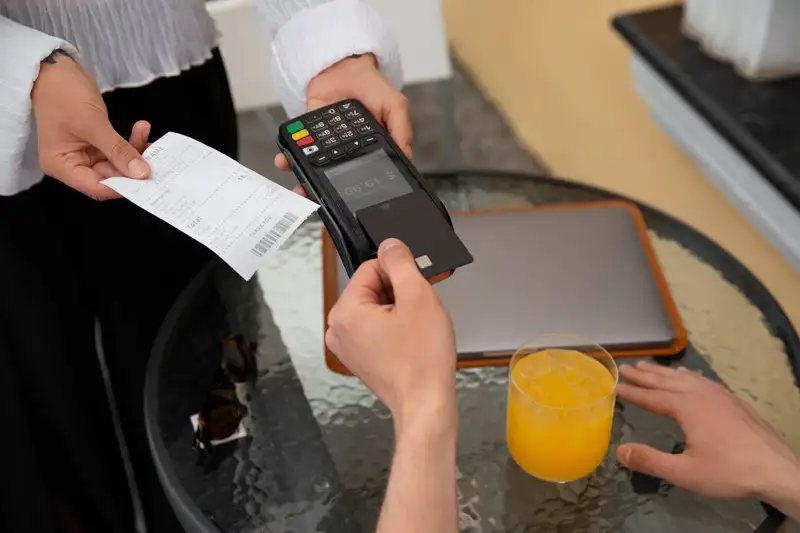
Restaurant invoice management becomes much stronger when every invoice is reviewed using the same standards. Without a clear review process, one manager may check prices carefully while another only looks at the total amount due. This creates inconsistency, and inconsistency creates cost risk. For restaurant owners, the goal is simple- no invoice should be approved until the key details have been checked.
A practical invoice review should focus on the numbers that directly affect cost control. Start with the vendor name, invoice date, invoice number, and payment terms. These details help prevent duplicate payments, missed deadlines, and confusion between multiple deliveries. Then review the item descriptions, quantities, unit prices, taxes, service fees, delivery fees, credits, and discounts. Even small differences matter because restaurants operate on tight margins. A few cents more per pound, case, or unit can become a larger cost issue when repeated across high-volume ingredients.
Owners should also require managers to flag any invoice that does not match the expected order. This includes price increases that were not communicated, missing credits for returned products, substituted items with different costs, or charges for products that were shorted at delivery. These issues should be documented before the invoice is approved, not discovered weeks later during accounting review.
A strong review standard should answer five questions -
1. Did we receive what we ordered?
2. Did we receive the correct quantity?
3. Were we charged the agreed price?
4. Were all credits, discounts, and adjustments applied?
5. Is the invoice approved by the right person before payment?
To make the process more data driven, restaurant owners should track invoice exceptions over time. For example, if one vendor regularly has price discrepancies, missing credits, or delivery shortages, that pattern should be visible in reporting. This gives owners better leverage during vendor conversations and helps protect profitability.
Clear invoice review standards also make training easier. Managers know exactly what to check, accounting teams receive cleaner records, and owners gain more confidence that payments are accurate. In a restaurant, invoice review is not just an administrative task. It is a financial control point that helps prevent overpayment, reduce waste, and protect margins.
Easy Invoicing and Vendor Payments!
Streamline Your Finances with Altametrics Accounting!
Match Invoices with Orders and Deliveries
Matching invoices with orders and deliveries is one of the most important steps in restaurant invoice management. An invoice should never be reviewed by itself. It should be compared against what was ordered and what was actually received. This helps restaurant owners catch errors before payment is made and before incorrect costs affect financial reports.
The process is often called matching, and it gives owners a clearer view of whether the vendor billed the restaurant correctly. In a restaurant, this matters because orders can change quickly. Items may be substituted, shorted, damaged, priced differently, or delivered in a different quantity than expected. If the invoice is approved without comparison, the restaurant may pay for products it did not receive or accept higher costs without noticing.
A practical invoice matching process should compare three records -
1. The original order - This shows what the restaurant expected to receive. It may include item names, pack sizes, quantities, agreed prices, and order dates.
2. The delivery receipt - This confirms what actually arrived. Managers should note missing items, rejected products, damaged goods, substitutions, and quantity changes at the time of delivery.
3. The vendor invoice - This shows what the restaurant is being charged. The invoice should match the order and delivery record before it is approved for payment.
For example, if a restaurant ordered 10 cases of chicken but only received 8, the invoice should not charge for 10. If the vendor substituted a higher-priced product, that price difference should be reviewed. If produce arrived damaged and was returned, the credit should appear on the invoice or be tracked until it is received.
This process also supports better inventory control. When invoices match deliveries accurately, food cost reports become more reliable. Owners can connect purchasing data to inventory counts, prep planning, menu pricing, and cost of goods sold. When invoices are wrong, the numbers behind those decisions become less dependable.
Track Vendor Pricing and Cost Changes
Restaurant invoices are one of the best tools owners have for tracking vendor pricing and cost changes. Every invoice shows what the restaurant paid for specific products, how prices changed over time, and whether the vendor charged the agreed amount. When owners review invoices only for payment, they miss an opportunity to use that data for smarter purchasing decisions.
Food and supply costs can change quickly. Meat, dairy, produce, paper goods, cleaning supplies, beverages, and packaging may all fluctuate based on seasonality, demand, fuel costs, labor costs, or vendor pricing updates. If these changes are not tracked, a restaurant may continue selling menu items at the same price while ingredient costs quietly increase. Over time, this can reduce profit margins without an obvious warning sign.
A practical way to manage this is to track invoice data by key products. Restaurant owners should monitor high-volume and high-cost items first, such as proteins, cooking oil, dairy, seafood, produce, takeout packaging, and beverages. These items have the biggest impact on food cost and gross profit.
Important pricing data to track includes -
1. Unit price changes - Compare the current invoice price to previous invoices to identify increases or unusual charges.
2. Price variance by vendor - Review whether one vendor is consistently more expensive than another for similar products.
3. Unexpected fees - Track delivery fees, fuel surcharges, service charges, and other add-ons that increase the true cost of each order.
4. Credit and discount accuracy - Make sure negotiated discounts, rebates, returned product credits, and promotional pricing appear correctly on invoices.
5. Cost impact on menu items - Connect ingredient cost changes to menu pricing, recipe costing, and portion control.
Tracking vendor pricing also improves accountability. If a vendor raises prices without notice, misses credits, or applies inconsistent charges, owners have invoice history to support the conversation. Instead of relying on memory, they can use real numbers to ask for corrections, renegotiate pricing, or compare alternative suppliers.
For restaurant owners, invoice data should not sit in a folder after payment. It should become part of the restaurant's cost-control system. When pricing trends are reviewed regularly, owners can catch margin pressure earlier, adjust purchasing decisions faster, and protect profitability before small increases become major financial problems.
Build an Organized Invoice Approval Workflow

Restaurant invoice management becomes much easier when there is a clear approval workflow. Without one, invoices may sit on a manager's desk, get buried in email, or move straight to payment without proper review. This creates risk for late payments, duplicate payments, missed credits, and inaccurate cost reporting. For restaurant owners, the approval process should be simple, consistent, and easy to verify.
A strong invoice approval workflow defines who receives the invoice, who checks it, who approves it, and who schedules payment. Each step should have a clear owner. For example, the receiving manager may confirm that the delivery was correct, the general manager may approve the invoice, and the accounting team may process payment. When responsibilities are not clearly assigned, mistakes become harder to trace.
The workflow should also include approval timelines. Invoices should be reviewed as close to the delivery date as possible. Waiting until the end of the month makes it harder to remember shortages, substitutions, damaged products, or missing credits. A daily or weekly review schedule keeps invoice issues fresh and easier to resolve with vendors.
Restaurant owners should also separate approval from payment whenever possible. The same person who receives goods should not always be the only person approving and paying invoices. This separation creates a basic financial control that helps reduce errors and unauthorized payments.
A practical invoice approval workflow should include -
1. Invoice collection - All invoices should go to one central location, whether that is an email inbox, accounting system, invoice software, or physical folder.
2. Delivery verification - The invoice should be checked against the delivery receipt and any notes about shortages, damaged products, or substitutions.
3. Price and quantity review - Managers should confirm that quantities, unit prices, fees, taxes, discounts, and credits are accurate.
4. Approval routing - The invoice should go to the correct person based on amount, vendor, department, or location.
5. Dispute tracking - Any issue should be documented before payment, including vendor follow-up and expected credits.
6. Payment scheduling - Approved invoices should be paid according to vendor terms while protecting restaurant cash flow.
For multi-location restaurants, this workflow becomes even more important. Each location may receive invoices from different vendors or managers, but owners still need consistent visibility. Standard approval rules make it easier to compare costs across locations, prevent duplicate payments, and hold each store accountable.
An organized invoice approval workflow gives restaurant owners stronger financial control. It reduces confusion, speeds up review, improves vendor communication, and helps ensure that only accurate invoices are paid.

Process Your Invoices and Make Payments to Vendors
Automate, Integrate, Dominate with Altametrics
Use Invoice Data to Improve Financial Control
Restaurant invoices should not only be used to pay vendors. They should also be used to understand where money is going, how costs are changing, and whether the restaurant is staying on budget. Every invoice contains data that can help owners make better financial decisions, especially when that information is reviewed regularly instead of only at month-end.
Invoice data helps restaurant owners track important cost categories such as food, beverages, packaging, cleaning supplies, equipment, repairs, linen service, and maintenance. When these expenses are organized correctly, owners can see which categories are rising, which vendors are driving the most spending, and where costs may be drifting away from expected levels.
A practical way to use invoice data is to connect it to key financial controls -
1. Budget tracking - Compare invoice totals against weekly or monthly budgets. If food purchases are higher than expected, owners can investigate before the problem affects profit margins.
2. Cash flow planning - Invoices show what payments are coming due and when. This helps owners plan cash needs, avoid late fees, and decide when to schedule payments.
3. Food cost analysis - Invoice prices help calculate the true cost of ingredients. When ingredient costs rise, owners can review menu pricing, portions, recipes, and vendor options.
4. Inventory control - Invoices show what was purchased, while inventory counts show what remains. Comparing the two can help identify waste, over-ordering, theft, spoilage, or inaccurate prep levels.
5. Vendor performance - Invoice history helps owners review price changes, missed credits, delivery fees, shortages, and billing errors. This gives owners stronger data when discussing terms with vendors.
6. Location-level reporting - For restaurants with multiple locations, invoice data makes it easier to compare spending by store. If one location spends more on the same products, owners can investigate purchasing habits, waste, vendor pricing, or manager behavior.
When invoice data is accurate and organized, financial reports become more reliable. Owners can make smarter decisions about purchasing, pricing, labor planning, menu profitability, and vendor negotiations. In a low-margin business, better invoice visibility can help protect cash flow and improve overall cost control.
Move Toward Digital Invoice Management
As restaurants grow, paper invoices, email attachments, and manual spreadsheets become harder to control. A single-location restaurant may be able to manage invoices manually for a while, but the process often becomes unreliable as vendor volume, purchase frequency, and approval responsibilities increase. When invoices are stored in different places, owners lose visibility into what has been received, what has been approved, what is being disputed, and what still needs to be paid.
Digital invoice management helps restaurant owners create a more organized and accurate process. Instead of relying on paper files or scattered inboxes, invoices can be captured, stored, reviewed, approved, and tracked in one system. This reduces the chance of lost invoices, duplicate payments, late fees, and missed vendor credits.
A digital invoice process can improve several areas of restaurant financial control -
1. Faster invoice capture - Invoices can be uploaded, scanned, emailed, or entered directly into a system. This makes it easier to collect records as soon as they arrive.
2. Better approval visibility - Owners can see which invoices are pending, approved, disputed, or ready for payment. This helps prevent invoices from sitting unnoticed.
3. Fewer manual errors - Manual data entry can lead to wrong invoice numbers, incorrect totals, missing due dates, or misclassified expenses. Digital tools help reduce these errors by standardizing how information is entered and reviewed.
4. Stronger cost tracking - When invoice data is organized digitally, owners can review spending by vendor, category, location, item, or time period. This makes it easier to spot rising costs and unusual spending patterns.
5. Cleaner records for accounting - Digital invoice records make month-end close, tax preparation, audits, and vendor disputes easier because documents are searchable and stored in one place.
6. Improved multi-location control - For owners with more than one restaurant, digital invoice management creates consistency across locations. Each store can follow the same approval process while ownership maintains central visibility.
Moving toward digital invoice management does not mean replacing good judgment. Managers still need to verify deliveries, review prices, question unexpected fees, and confirm credits. The difference is that digital systems make the process easier to track and harder to ignore.
Restaurant owners should start by identifying where invoice problems happen most often. Are invoices getting lost? Are managers approving them late? Are vendor credits missing? Are prices changing without review? Are accounting records delayed? Once those issues are clear, owners can choose tools and workflows that solve real operational problems instead of adding unnecessary complexity.
The best restaurant invoice management system is one that improves control, saves time, and gives owners better financial visibility. In a business where every dollar matters, moving from manual invoice handling to a more digital process can help protect cash flow, reduce mistakes, and support better decisions across purchasing, inventory, accounting, and vendor management.
Manage Your Accounts Payable with Ease
Start Optimizing Your AP process with Altametrics
Inventory management
How to Conduct a Food Waste Audit in Your Restaurant

Software integration
Smart Ways to Use AI in Your Restaurant

Employee scheduling
Employee Time Tracking Tips for Restaurants
Employee scheduling
7 Scheduling Mistakes Restaurant Owners Should Stop Making

Employee scheduling
Human Resource Management for Restaurants
Employee scheduling
Common Payroll Challenges in Restaurants

Sales forecasting
How to Use Restaurant Analytics to Improve Profitability

Restaurant management
The Complete Guide to Restaurant Reputation Management

Accounting payroll
Restaurant Cash Handling Procedures

Frequently Asked Questions
What are common restaurant invoice mistakes?
Common restaurant invoice mistakes include duplicate invoices, incorrect quantities, wrong unit prices, missing credits, unauthorized fees, incorrect taxes, unapproved price increases, and charges for products that were damaged, returned, or never delivered.
How can invoice data improve restaurant financial control?
Invoice data helps restaurant owners monitor budgets, plan cash flow, track vendor spending, calculate food costs, manage inventory, and compare expenses across locations. When invoice data is accurate, financial reports become more reliable and easier to act on.
What invoice categories should restaurants track?
Restaurants should track invoices by category, such as food, beverages, packaging, cleaning supplies, repairs, maintenance, equipment, uniforms, linen service, technology, and delivery-related fees. Clear categories make financial reporting and budget tracking more accurate.
What is the best way to organize restaurant invoices?
The best way to organize restaurant invoices is to store them by vendor, date, location, category, and payment status. Digital storage is often easier because invoices can be searched, reviewed, approved, and shared without relying on paper files or scattered emails.

